---
title: Change the Customer on a Conversation
description: This is probably not something you'll find yourself doing often, but from time to time you'll need to change a customer on a conversation, allowing you to direct your replies to someone other than the
---
[Skip to content](https://hsdemo.frodx.com/en/knowledge/change-the-customer-on-a-conversation#main-content)
English
Show submenu for translations
.png?width=550&height=171&name=frodx-logo-new%20(1).png)
- [Sample Contact Page](https://hsdemo.frodx.com/sample-contact)
- [Sample About Page](https://hsdemo.frodx.com/sample-about)
- [Default HubSpot Blog](https://hsdemo.frodx.com/biglytics-blog)
Open main navigation
Close main navigation
- [Sample Contact Page](https://hsdemo.frodx.com/sample-contact)
- [Sample About Page](https://hsdemo.frodx.com/sample-about)
- [Default HubSpot Blog](https://hsdemo.frodx.com/biglytics-blog)
- English
Show submenu for translations
- Contact us
Contact us
How can we help you?
- There are no suggestions because the search field is empty.
1. [Help Center](https://hsdemo.frodx.com/en/knowledge)
2. [Help Desk](https://hsdemo.frodx.com/en/knowledge/help-desk)
3. [Working with Conversations](https://hsdemo.frodx.com/en/knowledge/help-desk#working-with-conversations)
# Change the Customer on a Conversation
This is probably not something you'll find yourself doing often, but from time to time you'll need to change a customer on a conversation, allowing you to direct your replies to someone other than the original sender, or to resend a bounced email to a correct address.
This article is all about how to change a customer on a conversation.
#### In this article
- [When to Change a Customer](https://hsdemo.frodx.com/en/knowledge/change-the-customer-on-a-conversation#when)
- [Change Customer vs. Profile Update](https://hsdemo.frodx.com/en/knowledge/change-the-customer-on-a-conversation#vs)
- [Change the Customer](https://hsdemo.frodx.com/en/knowledge/change-the-customer-on-a-conversation#change)
### When to Change a Customer
- [Contact form submissions](https://5256150.hs-sites.com/knowledge/send-contact-form-submissions-to-a-mailbox) incorrectly set your *no-reply* email address as the primary customer address.
- Forwarded conversations sent from non-Help Scout Users need to be readdressed.
- Ownership of a large group conversation needs to be reassigned to another customer.
- Your email to a customer [bounced](https://5256150.hs-sites.com/knowledge/troubleshooting-conversations-in-needs-attention-and-bounces) because of a bad email address.
- Any situation where you believe the conversation should be directed to a different email address.
### Change Customer vs. Profile Updates
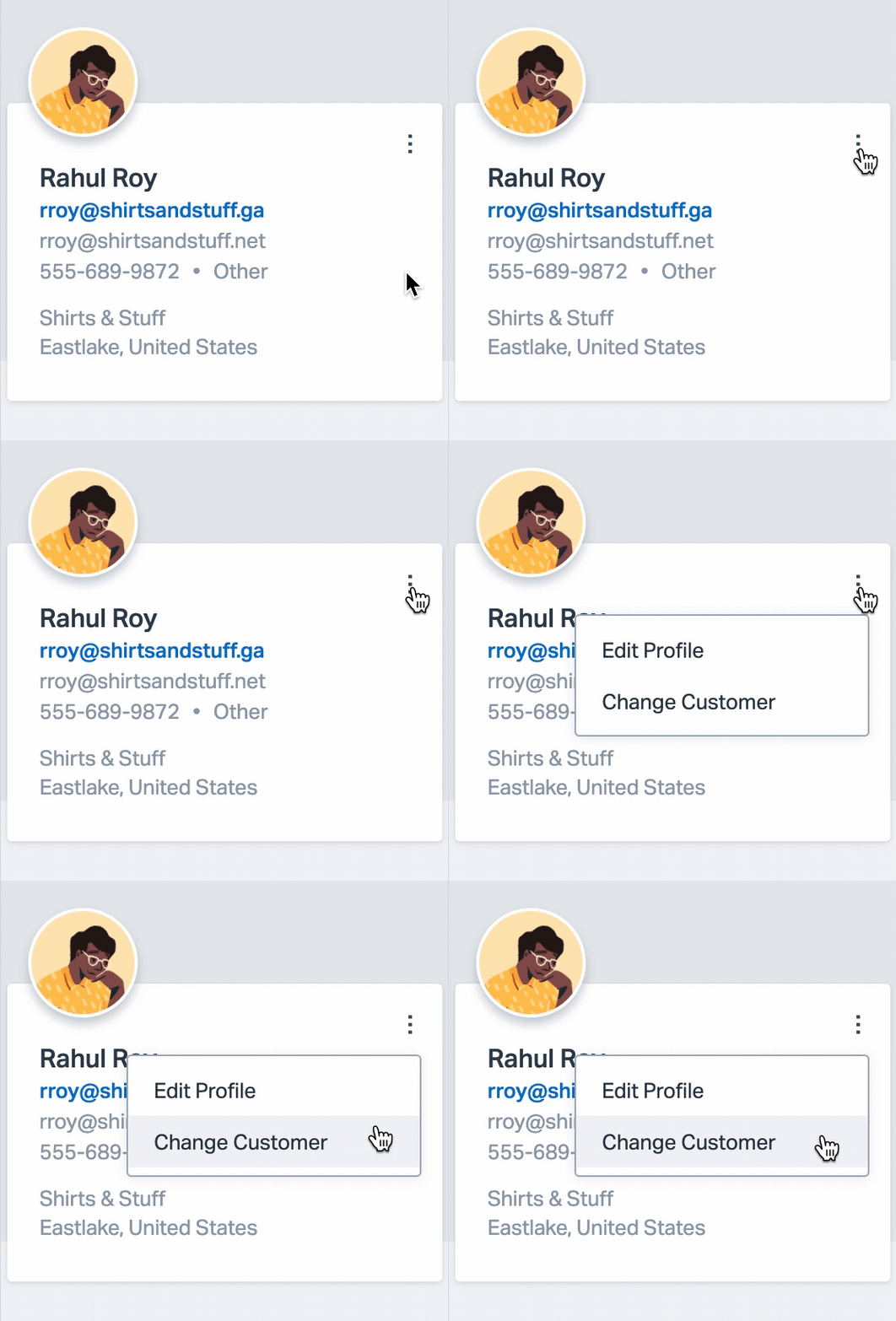
If you ever come across a conversation that you think should belong to someone else, or you simply need to direct your reply to a person who isn't involved with the original conversation, use **Change Customer** under 3 dot options menu in the right sidebar to actually change the conversation to belong to that other customer.
If you edit the customer profile that is already attached, rather than changing the customer to a different customer, it will re-associate all previous conversations from one customer to another which is not what you want!
### Change the Customer
Take a look at the customer profile section in the sidebar. Click the 3 dot options menu in the top right corner, then click **Change Customer**.
Search for the customer that you want to attach to the conversation. Select a customer profile and confirm the change.
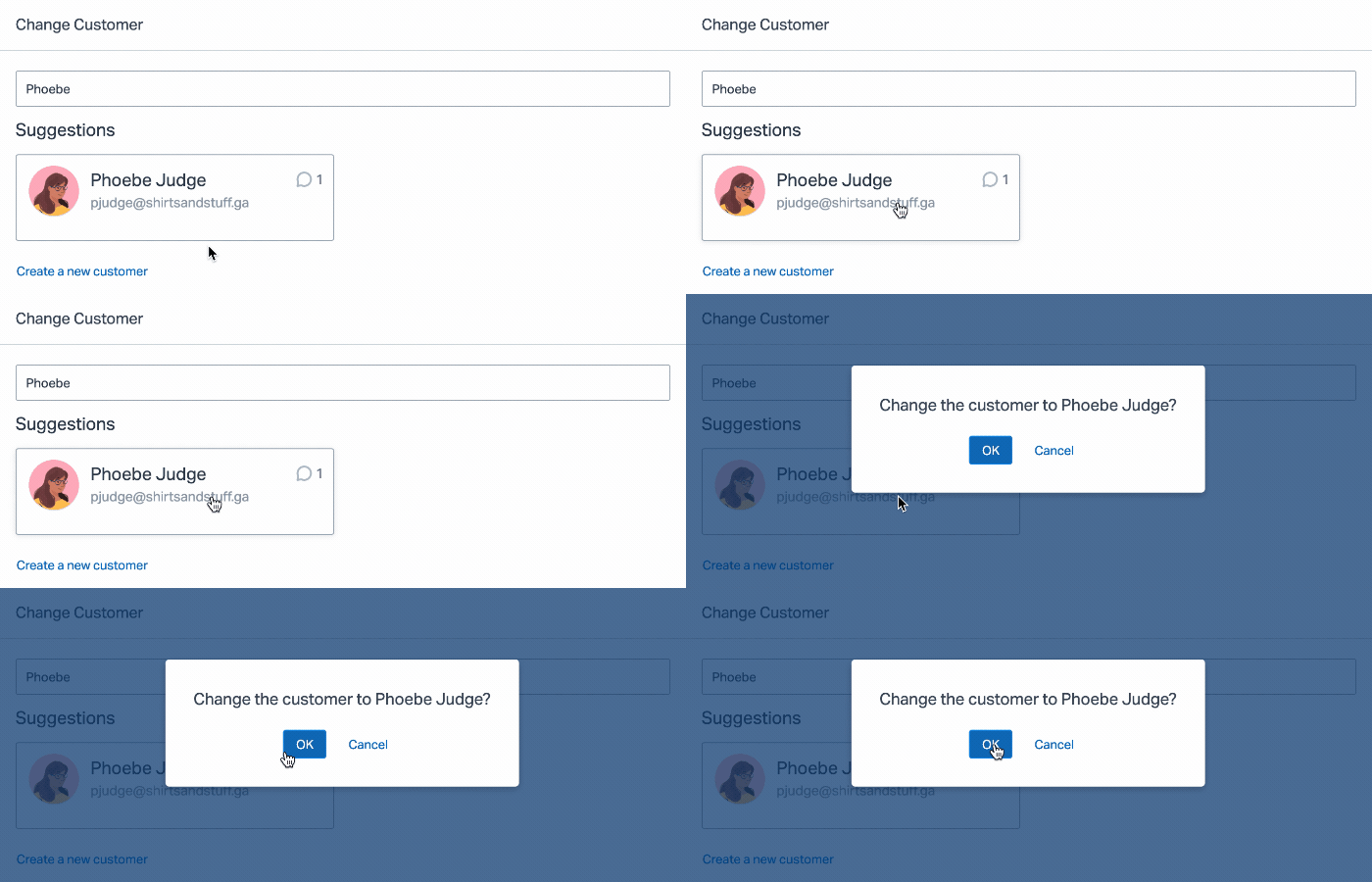If the customer does not already exist, you can choose to **Create a new customer** from this screen as well.
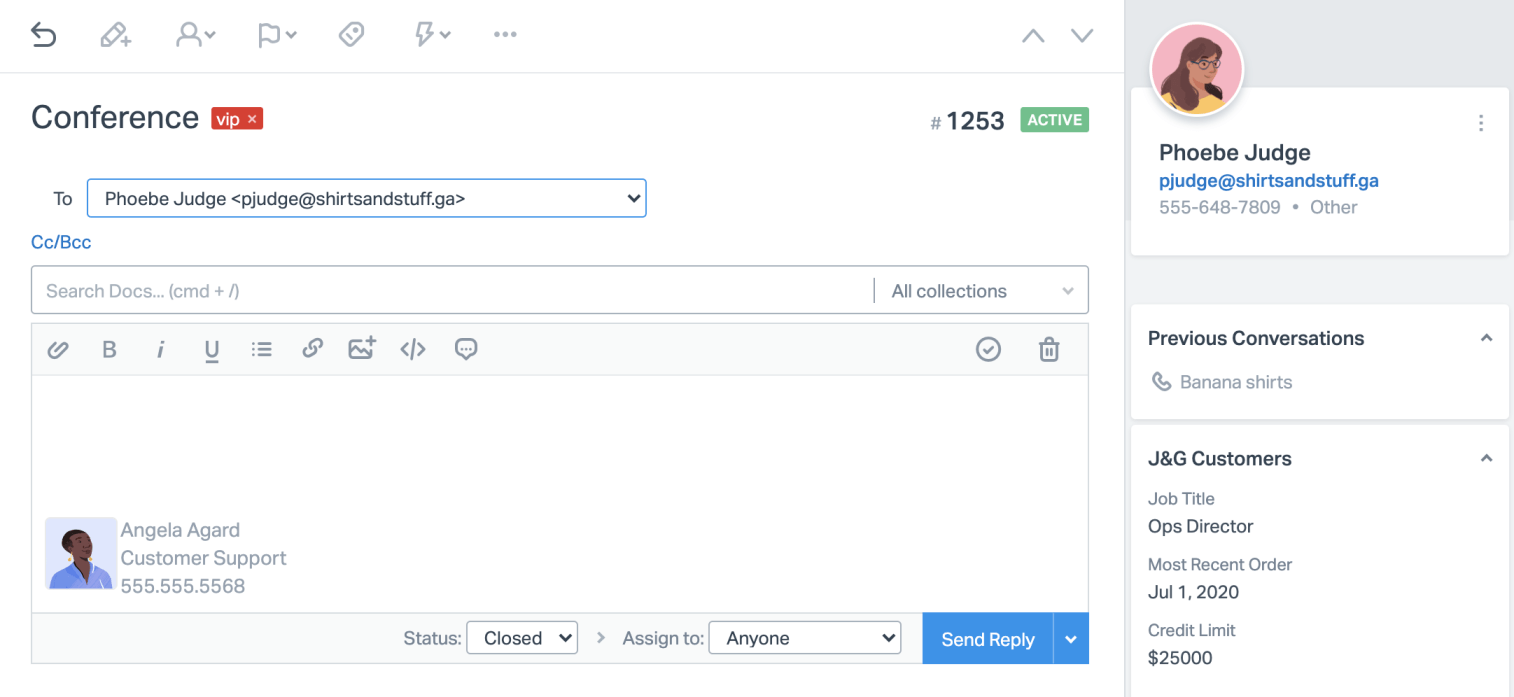
The sidebar will update with the customer profile for the customer you select. Replying will automatically reply to the new customer, unless otherwise specified via the **To:** dropdown menu visible when the reply editor is open.
 Did this answer your question? Thanks for the feedback There was a problem submitting your feedback. Please try again later.Yes No No results found
- [Docs](https://hsdemo.frodx.com/en/knowledge/docs#main-content)
- [Working with Docs](https://hsdemo.frodx.com/en/knowledge/docs#working-with-docs)
- [Formatting Content](https://hsdemo.frodx.com/en/knowledge/docs#formatting-content)
- [Managing Docs in Help Scout](https://hsdemo.frodx.com/en/knowledge/docs#managing-docs-in-help-scout)
- [Help Desk](https://hsdemo.frodx.com/en/knowledge/help-desk#main-content)
- [Mobile Apps](https://hsdemo.frodx.com/en/knowledge/help-desk#mobile-apps)
- [Getting Started](https://hsdemo.frodx.com/en/knowledge/help-desk#getting-started)
- [Productivity](https://hsdemo.frodx.com/en/knowledge/help-desk#productivity)
- [Mailbox and User Settings](https://hsdemo.frodx.com/en/knowledge/help-desk#mailbox-and-user-settings)
- [Working with Conversations](https://hsdemo.frodx.com/en/knowledge/help-desk#working-with-conversations)
- [Account Management](https://hsdemo.frodx.com/en/knowledge/help-desk#account-management)
- [Integrations](https://hsdemo.frodx.com/en/knowledge/help-desk#integrations)
- [Copying Email to Help Scout](https://hsdemo.frodx.com/en/knowledge/help-desk#copying-email-to-help-scout)
- [Reporting](https://hsdemo.frodx.com/en/knowledge/help-desk#reporting)
- [Sample Contact Page](https://hsdemo.frodx.com/sample-contact)
- [Sample About Page](https://hsdemo.frodx.com/sample-about)
- [Default HubSpot Blog](https://hsdemo.frodx.com/biglytics-blog)
[.png?width=550&height=171&name=frodx-logo-new%20(1).png "FrodX")](https://en.frodx.com/)
[mailto:email@email.com](mailto:email@email.com)
Copyright © 2026, GateHub Ltd