---
title: Connect ChannelReply With Help Scout for eBay, Amazon, Shopify, and Walmart Support
description: ChannelReply is a messaging platform that helps you support all of your e-commerce customers right from Help Scout. ChannelReply delivers your eBay, Walmart, Shopify, and Amazon buyer messages into co
---
[Skip to content](https://hsdemo.frodx.com/en/knowledge/connect-channelreply-with-help-scout-for-ebay-amazon-shopify-and-walmart-support#main-content)
English
Show submenu for translations
.png?width=550&height=171&name=frodx-logo-new%20(1).png)
- [Sample Contact Page](https://hsdemo.frodx.com/sample-contact)
- [Sample About Page](https://hsdemo.frodx.com/sample-about)
- [Default HubSpot Blog](https://hsdemo.frodx.com/biglytics-blog)
Open main navigation
Close main navigation
- [Sample Contact Page](https://hsdemo.frodx.com/sample-contact)
- [Sample About Page](https://hsdemo.frodx.com/sample-about)
- [Default HubSpot Blog](https://hsdemo.frodx.com/biglytics-blog)
- English
Show submenu for translations
- Contact us
Contact us
How can we help you?
- There are no suggestions because the search field is empty.
1. [Help Center](https://hsdemo.frodx.com/en/knowledge)
2. [Help Desk](https://hsdemo.frodx.com/en/knowledge/help-desk)
3. [Integrations](https://hsdemo.frodx.com/en/knowledge/help-desk#integrations)
# Connect ChannelReply With Help Scout for eBay, Amazon, Shopify, and Walmart Support
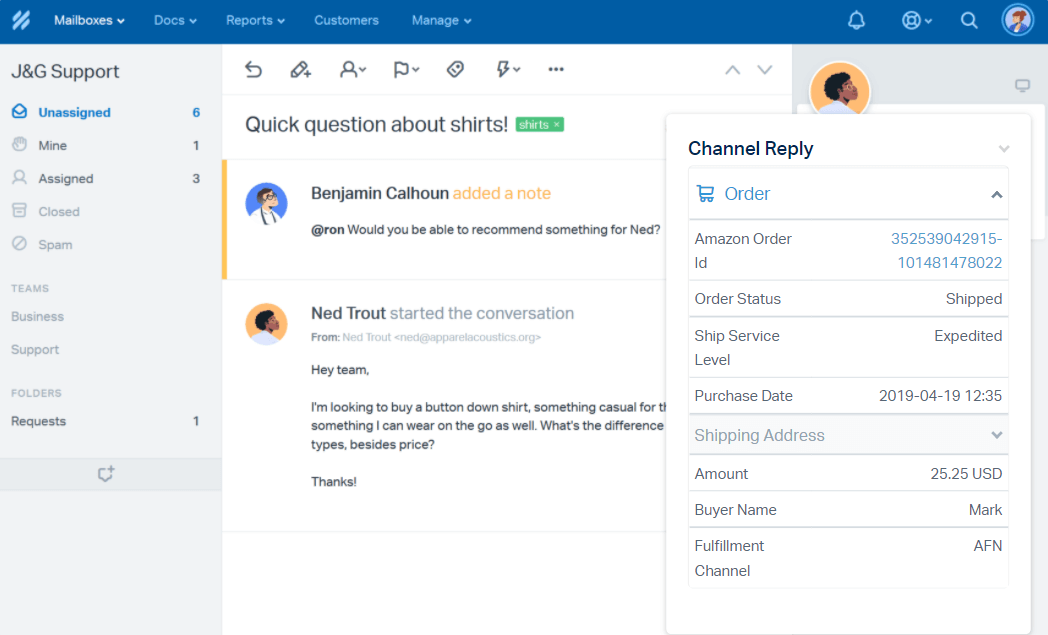
[ChannelReply](https://www.channelreply.com/) is a messaging platform that helps you support all of your e-commerce customers right from Help Scout. ChannelReply delivers your eBay, Walmart, Shopify, and Amazon buyer messages into conversations just like normal emails. Any replies sent from Help Scout are synchronized with each connected platform.
Install the ChannelReply app for Help Scout to have all of your customer's order details at your fingertips. Beyond simple messaging, the integration will also bring in customer order details from your sales channels and display the information right in the customer sidebar. You can also subscribe to resolution center updates (eBay) and mark conversations as no response needed (Amazon), all without leaving Help Scout.
### Activation Instructions
Connect Amazon, eBay, Shopify, and Walmart through ChannelReply.
Make sure that you've already created a mailbox in Help Scout as you'll need the address for that mailbox or your custom address for the rest of this set up. Head over to [How Mailboxes Work in Help Scout: Create a New Mailbox](https://docs.helpscout.com/article/231-how-mailboxes-work-in-help-scout#create) if you need help with that.
Head over to [Help Scout Integration Instructions](https://www.channelreply.com/help/view/help-scout-integration) at ChannelReply, where they'll walk you through the rest of the set up.
### Custom Fields
You can also sync your order details right into your [Custom Fields](https://5256150.hs-sites.com/knowledge/work-with-custom-fields), making your data actionable in search, workflows, and reports. Head over to ChannelReply's article [Help Scout Custom Fields Setup](https://www.channelreply.com/help/view/help-scout-custom-fields) for the details on getting that set up.
The Custom Fields feature is included with Help Scout's Plus plan. For more about Help Scout plans, check out the [Billing and Plans Guide](https://5256150.hs-sites.com/knowledge/billing-and-plans-guide).
**Need more help?** This integration is supported by ChannelReply — [reach out to ChannelReply's team](https://www.channelreply.com/contact-us) if you have questions or find that you need more help getting things connected.
Did this answer your question? Thanks for the feedback There was a problem submitting your feedback. Please try again later.Yes No No results found
- [Docs](https://hsdemo.frodx.com/en/knowledge/docs#main-content)
- [Working with Docs](https://hsdemo.frodx.com/en/knowledge/docs#working-with-docs)
- [Formatting Content](https://hsdemo.frodx.com/en/knowledge/docs#formatting-content)
- [Managing Docs in Help Scout](https://hsdemo.frodx.com/en/knowledge/docs#managing-docs-in-help-scout)
- [Help Desk](https://hsdemo.frodx.com/en/knowledge/help-desk#main-content)
- [Mobile Apps](https://hsdemo.frodx.com/en/knowledge/help-desk#mobile-apps)
- [Getting Started](https://hsdemo.frodx.com/en/knowledge/help-desk#getting-started)
- [Productivity](https://hsdemo.frodx.com/en/knowledge/help-desk#productivity)
- [Mailbox and User Settings](https://hsdemo.frodx.com/en/knowledge/help-desk#mailbox-and-user-settings)
- [Working with Conversations](https://hsdemo.frodx.com/en/knowledge/help-desk#working-with-conversations)
- [Account Management](https://hsdemo.frodx.com/en/knowledge/help-desk#account-management)
- [Integrations](https://hsdemo.frodx.com/en/knowledge/help-desk#integrations)
- [Copying Email to Help Scout](https://hsdemo.frodx.com/en/knowledge/help-desk#copying-email-to-help-scout)
- [Reporting](https://hsdemo.frodx.com/en/knowledge/help-desk#reporting)
- [Sample Contact Page](https://hsdemo.frodx.com/sample-contact)
- [Sample About Page](https://hsdemo.frodx.com/sample-about)
- [Default HubSpot Blog](https://hsdemo.frodx.com/biglytics-blog)
[.png?width=550&height=171&name=frodx-logo-new%20(1).png "FrodX")](https://en.frodx.com/)
[mailto:email@email.com](mailto:email@email.com)
Copyright © 2026, GateHub Ltd