---
title: Customize Your Mailbox Settings
description: Each Help Scout mailbox has its own distinct settings — customize your mailbox to make it your own! This article will guide you through each of the mailbox settings you find on the Edit Mailbox page.
---
[Skip to content](https://hsdemo.frodx.com/en/knowledge/customize-your-mailbox-settings#main-content)
English
Show submenu for translations
.png?width=550&height=171&name=frodx-logo-new%20(1).png)
- [Sample Contact Page](https://hsdemo.frodx.com/sample-contact)
- [Sample About Page](https://hsdemo.frodx.com/sample-about)
- [Default HubSpot Blog](https://hsdemo.frodx.com/biglytics-blog)
Open main navigation
Close main navigation
- [Sample Contact Page](https://hsdemo.frodx.com/sample-contact)
- [Sample About Page](https://hsdemo.frodx.com/sample-about)
- [Default HubSpot Blog](https://hsdemo.frodx.com/biglytics-blog)
- English
Show submenu for translations
- Contact us
Contact us
How can we help you?
- There are no suggestions because the search field is empty.
1. [Help Center](https://hsdemo.frodx.com/en/knowledge)
2. [Help Desk](https://hsdemo.frodx.com/en/knowledge/help-desk)
3. [Mailbox and User Settings](https://hsdemo.frodx.com/en/knowledge/help-desk#mailbox-and-user-settings)
# Customize Your Mailbox Settings
Each Help Scout mailbox has its own distinct settings — customize your mailbox to make it your own! This article will guide you through each of the mailbox settings you find on the Edit Mailbox page.
Head to **Manage \> Mailbox(es) \> \[Choose Your Mailbox\]**, or click on the gear icon in the left-hand sidebar under your folders from within your mailbox, and choose **Edit Mailbox**.
Mailbox settings are available to Help Scout Account Owners and Administrators only. See [User Roles and Permissions](https://5256150.hs-sites.com/knowledge/user-roles-and-permissions) for more on permissions.
### Mailbox
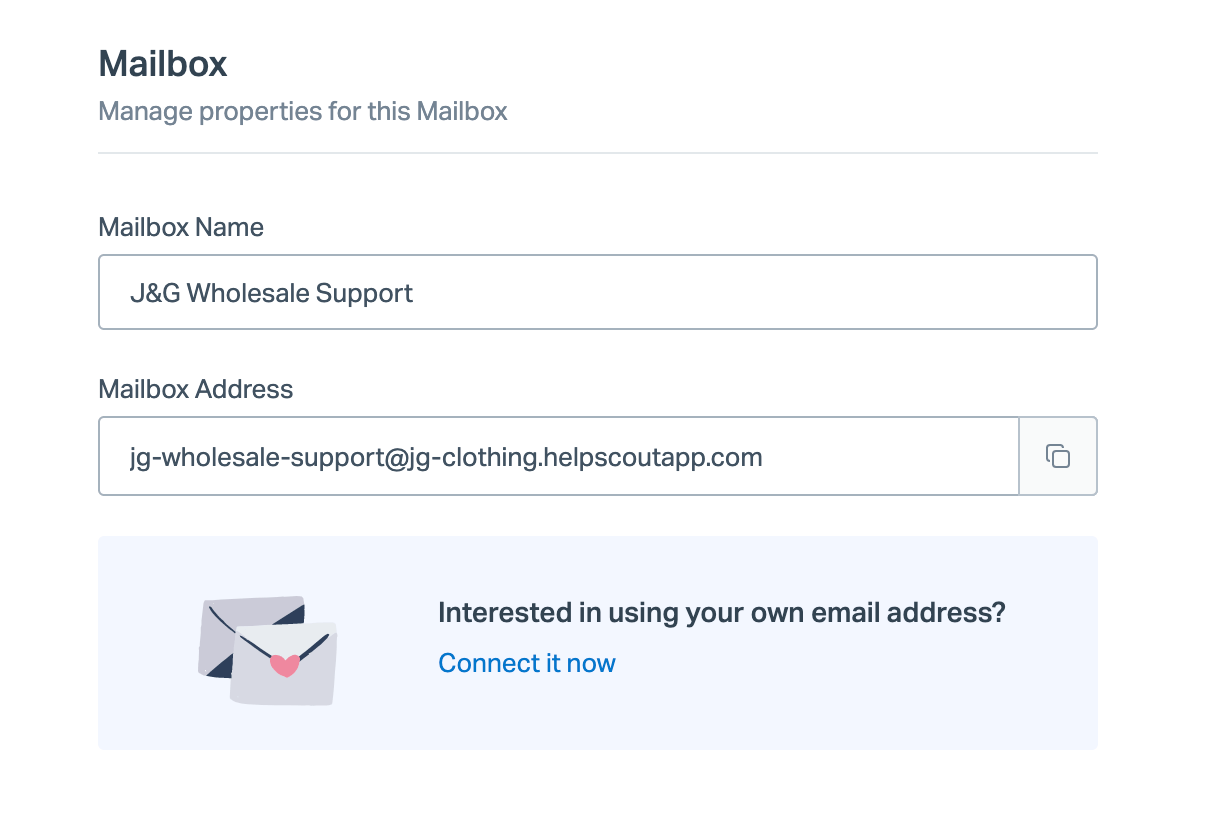
#### Mailbox Name
Use any Mailbox Name you'd like! If you've got more than one mailbox, it's helpful to use a descriptive name so that you can easily tell them apart. You may choose to use the Mailbox Name in the [From Name](https://hsdemo.frodx.com/en/knowledge/customize-your-mailbox-settings#fromname) for your mailbox, or in [variables](https://5256150.hs-sites.com/knowledge/work-with-variables) in several other settings that your customers might see.
#### Mailbox Address
The Mailbox Address is the main email address for your mailbox. You may choose to give this email address out to your customers, or connect a custom email address that uses your own domain name and set up your email to forward to this address. Take a look at [Add or Update a Custom Email Address](https://docs.helpscout.com/article/846-create-and-manage-mailboxes-in-help-scout#update) for the details on how to manage that.
#### Connected Email Address

This setting shows the custom email address that has been connected, if one exists. To change the address, click the blue **Change** link just above the box and head to [Add or Update a Custom Email Address](https://docs.helpscout.com/article/846-create-and-manage-mailboxes-in-help-scout#update) for the instructions to follow from there.
### Default settings
#### From Name
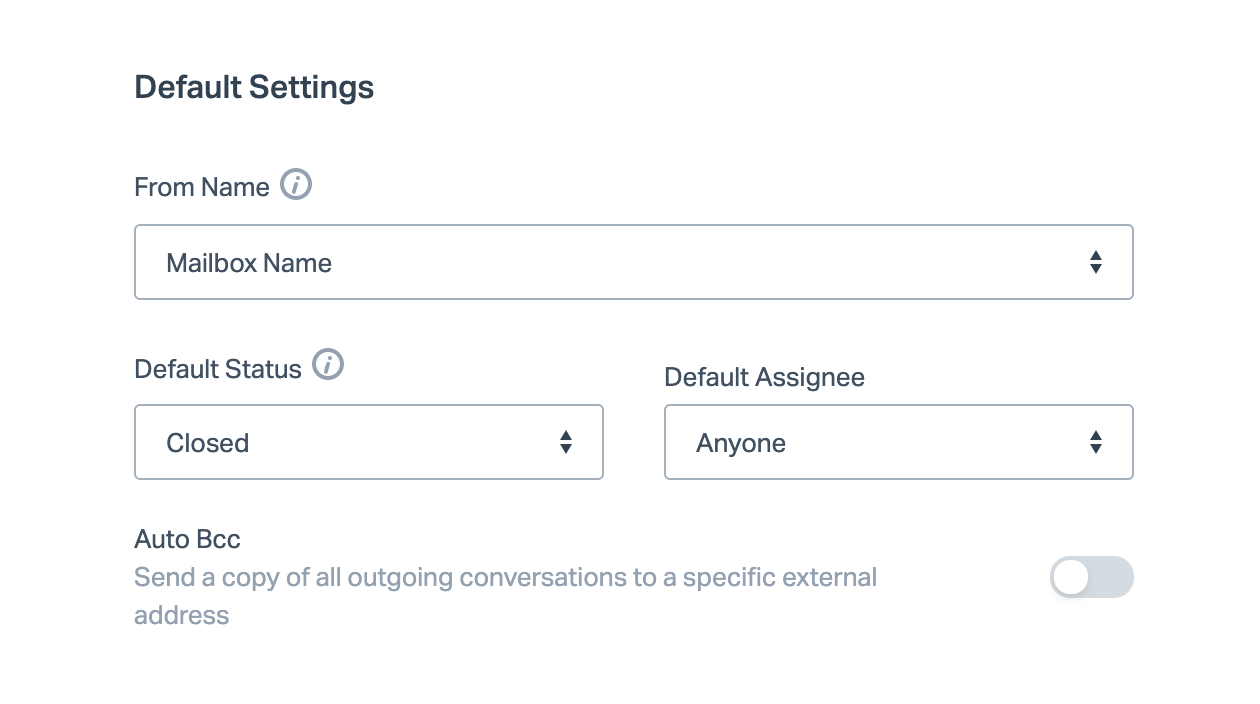
The From Name is what will show in your customers' email inboxes when you write to them. Choose **User's Name** for a more personal look and feel — each email will show as being from your mailbox or connected email *address*, but the From Name will show as the name of the User who sent that reply. Or choose **Mailbox Name** for a more formal approach — no matter which User replies, it always shows as your Mailbox Name.
You can also use the **Custom Name** to make it something all its own! This field supports a few of our [variables](https://5256150.hs-sites.com/knowledge/work-with-variables) that you can mix in as you like — though you don't see a dropdown list to select a variable, you can enter *{%mailbox.name%}*, *{%user.fullName%}*, *{%user.firstName%}*, and/or *{%user.lastName%}* here to use them.
#### Default Status
Default Status determines which status your conversations automatically go to after a reply has been sent. If you're just starting out, we recommend using **Closed** because conversations will automatically change to Active when customers reply. If using **Active** or **Pending** is a better fit for your team's method of working through your conversations, you can change that setting under that menu. More about Help Scout's statuses: [Understand Conversation Icons and Colors: Status Indicators](https://docs.helpscout.com/article/11-conversation-elements?#status).
#### Default Assignee
Default Assignee designates who has ownership of a conversation after a team member replies. Choose **Anyone** if you'd like to keep conversations Unassigned regardless of who replies, **Person Replying** if you want to make sure whomever sends the most recent reply retains ownership of the conversation, or **Person Replying if Unassigned** if you'd like the first person who replies to take ownership of the conversation.
#### Auto Bcc
Auto Bcc allows you to automatically send a copy of every outbound reply sent from your mailbox to a specific external address. This is useful if, for example, you need to loop in an external email address for archival or compliance.
Looking to add an Auto Bcc address for your replies only? Each user can set up for their own Auto Bcc from their [User Profile](https://docs.helpscout.com/article/499-manage-your-user-profile#tabs).
#### Signature
A signature in Help Scout belongs to the mailbox instead of the person. Check out [Create and Manage Mailbox Signatures](https://5256150.hs-sites.com/knowledge/create-and-manage-mailbox-signatures) for the full information on how to customize this setting.
### Aliases
Use the Alias field to forward multiple email inboxes to the same Help Scout mailbox. Adding the alias addresses to this field will tell Help Scout those emails are coming from your inboxes and will direct your replies to the customer.
For more detailed information about using alias emails with Help Scout, check out [Forward Email Aliases to a Mailbox](https://5256150.hs-sites.com/knowledge/forward-email-aliases-to-a-mailbox-1) and [When to Set Up a New Mailbox](https://5256150.hs-sites.com/knowledge/when-to-set-up-a-new-mailbox).
Did this answer your question? Thanks for the feedback There was a problem submitting your feedback. Please try again later.Yes No No results found
- [Docs](https://hsdemo.frodx.com/en/knowledge/docs#main-content)
- [Working with Docs](https://hsdemo.frodx.com/en/knowledge/docs#working-with-docs)
- [Formatting Content](https://hsdemo.frodx.com/en/knowledge/docs#formatting-content)
- [Managing Docs in Help Scout](https://hsdemo.frodx.com/en/knowledge/docs#managing-docs-in-help-scout)
- [Help Desk](https://hsdemo.frodx.com/en/knowledge/help-desk#main-content)
- [Mobile Apps](https://hsdemo.frodx.com/en/knowledge/help-desk#mobile-apps)
- [Getting Started](https://hsdemo.frodx.com/en/knowledge/help-desk#getting-started)
- [Productivity](https://hsdemo.frodx.com/en/knowledge/help-desk#productivity)
- [Mailbox and User Settings](https://hsdemo.frodx.com/en/knowledge/help-desk#mailbox-and-user-settings)
- [Working with Conversations](https://hsdemo.frodx.com/en/knowledge/help-desk#working-with-conversations)
- [Account Management](https://hsdemo.frodx.com/en/knowledge/help-desk#account-management)
- [Integrations](https://hsdemo.frodx.com/en/knowledge/help-desk#integrations)
- [Copying Email to Help Scout](https://hsdemo.frodx.com/en/knowledge/help-desk#copying-email-to-help-scout)
- [Reporting](https://hsdemo.frodx.com/en/knowledge/help-desk#reporting)
- [Sample Contact Page](https://hsdemo.frodx.com/sample-contact)
- [Sample About Page](https://hsdemo.frodx.com/sample-about)
- [Default HubSpot Blog](https://hsdemo.frodx.com/biglytics-blog)
[.png?width=550&height=171&name=frodx-logo-new%20(1).png "FrodX")](https://en.frodx.com/)
[mailto:email@email.com](mailto:email@email.com)
Copyright © 2026, GateHub Ltd