---
title: Docs Article Satisfaction Ratings
description: Article satisfaction ratings allow your Docs site visitors let you know how helpful your knowledge base content is with a single click. You can use this information to fine tune your Docs articles and
---
[Skip to content](https://hsdemo.frodx.com/en/knowledge/docs-article-satisfaction-ratings#main-content)
English
Show submenu for translations
.png?width=550&height=171&name=frodx-logo-new%20(1).png)
- [Sample Contact Page](https://hsdemo.frodx.com/sample-contact)
- [Sample About Page](https://hsdemo.frodx.com/sample-about)
- [Default HubSpot Blog](https://hsdemo.frodx.com/biglytics-blog)
Open main navigation
Close main navigation
- [Sample Contact Page](https://hsdemo.frodx.com/sample-contact)
- [Sample About Page](https://hsdemo.frodx.com/sample-about)
- [Default HubSpot Blog](https://hsdemo.frodx.com/biglytics-blog)
- English
Show submenu for translations
- Contact us
Contact us
How can we help you?
- There are no suggestions because the search field is empty.
1. [Help Center](https://hsdemo.frodx.com/en/knowledge)
2. [Docs](https://hsdemo.frodx.com/en/knowledge/docs)
3. [Managing Docs in Help Scout](https://hsdemo.frodx.com/en/knowledge/docs#managing-docs-in-help-scout)
# Docs Article Satisfaction Ratings
Article satisfaction ratings allow your Docs site visitors let you know how helpful your knowledge base content is with a single click. You can use this information to fine tune your Docs articles and maximize your self-service support, which can make a big difference in your team's overall support efficiency and value.
If you are using [Beacon](https://5256150.hs-sites.com/knowledge/beacon-jumpstart-guide), your customers will see ratings appear on articles within Beacon as well.
#### In this article
- [Enable Docs Article Ratings](https://hsdemo.frodx.com/en/knowledge/docs-article-satisfaction-ratings#enable)
- [How Customers Rate Articles](https://hsdemo.frodx.com/en/knowledge/docs-article-satisfaction-ratings#how)
- [Reporting on Ratings](https://hsdemo.frodx.com/en/knowledge/docs-article-satisfaction-ratings#report)
### Enable Docs Article Ratings
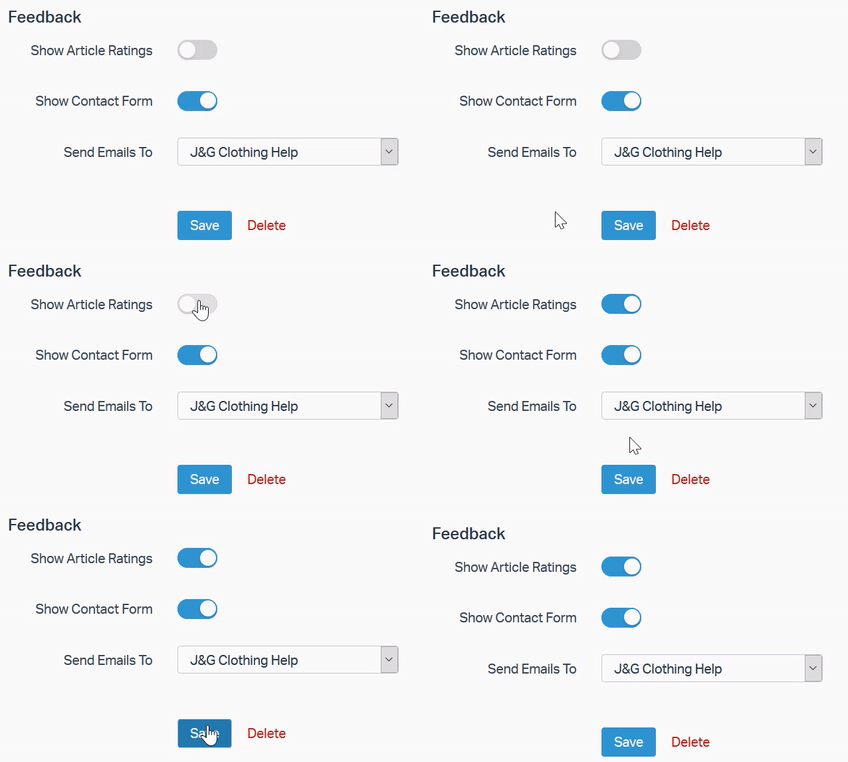
Docs Article Ratings are specific for each Docs site and are turned on for new sites by default. To enable article ratings on your site, head over to **Manage → Docs** to select a site and openyour**Site** **Settings.** Under **Feedback,** you can toggle Article Ratings on or off.
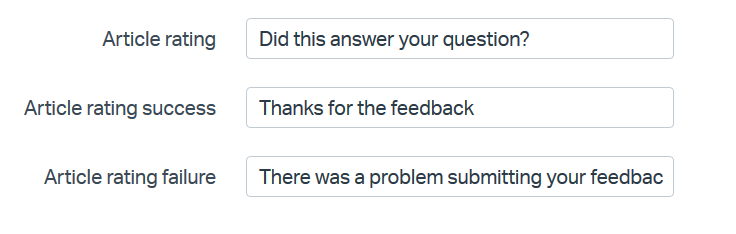
To translate the rating question, head over to the **Translate** tab of your Docs site settings and enter your preferred wording for the Article rating options.
### How Customers Rate Articles
When article ratings are enabled, a question will appear at the bottom of each article with a happy face and a sad face for the visitor to choose from. Any visitor to your Docs site can rate an article, though articles can only be rated one time per visitor.
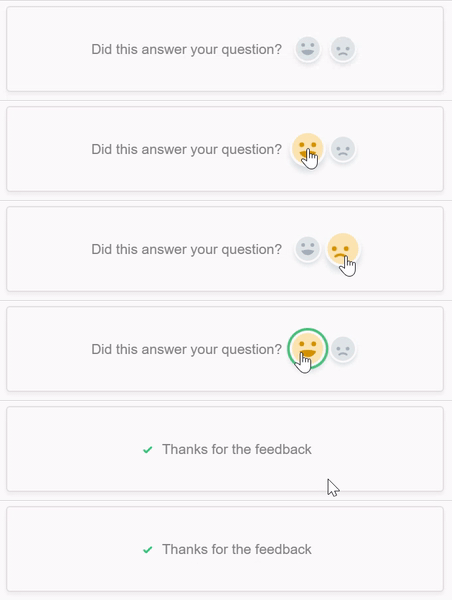
Give it a try on us! Rate this article down below and let us know what you think.
### Reporting on Ratings
Head right into your [Docs Report](https://secure.helpscout.net/reports/docs/) to see how your customers have rated your articles. Check out [Reports: Docs](https://5256150.hs-sites.com/knowledge/reports-docs) for a bit more information on what you see there!
Did this answer your question? Thanks for the feedback There was a problem submitting your feedback. Please try again later.Yes No No results found
- [Docs](https://hsdemo.frodx.com/en/knowledge/docs#main-content)
- [Working with Docs](https://hsdemo.frodx.com/en/knowledge/docs#working-with-docs)
- [Formatting Content](https://hsdemo.frodx.com/en/knowledge/docs#formatting-content)
- [Managing Docs in Help Scout](https://hsdemo.frodx.com/en/knowledge/docs#managing-docs-in-help-scout)
- [Help Desk](https://hsdemo.frodx.com/en/knowledge/help-desk#main-content)
- [Mobile Apps](https://hsdemo.frodx.com/en/knowledge/help-desk#mobile-apps)
- [Getting Started](https://hsdemo.frodx.com/en/knowledge/help-desk#getting-started)
- [Productivity](https://hsdemo.frodx.com/en/knowledge/help-desk#productivity)
- [Mailbox and User Settings](https://hsdemo.frodx.com/en/knowledge/help-desk#mailbox-and-user-settings)
- [Working with Conversations](https://hsdemo.frodx.com/en/knowledge/help-desk#working-with-conversations)
- [Account Management](https://hsdemo.frodx.com/en/knowledge/help-desk#account-management)
- [Integrations](https://hsdemo.frodx.com/en/knowledge/help-desk#integrations)
- [Copying Email to Help Scout](https://hsdemo.frodx.com/en/knowledge/help-desk#copying-email-to-help-scout)
- [Reporting](https://hsdemo.frodx.com/en/knowledge/help-desk#reporting)
- [Sample Contact Page](https://hsdemo.frodx.com/sample-contact)
- [Sample About Page](https://hsdemo.frodx.com/sample-about)
- [Default HubSpot Blog](https://hsdemo.frodx.com/biglytics-blog)
[.png?width=550&height=171&name=frodx-logo-new%20(1).png "FrodX")](https://en.frodx.com/)
[mailto:email@email.com](mailto:email@email.com)
Copyright © 2026, GateHub Ltd