---
title: Infusionsoft
description: Infusionsoft is a popular small business CRM tool that allows users to organize contacts, automate marketing and manage eCommerce inventories all in one place. Help Scout's app for Infusionsoft brings
---
[Skip to content](https://hsdemo.frodx.com/en/knowledge/infusionsoft#main-content)
English
Show submenu for translations
.png?width=550&height=171&name=frodx-logo-new%20(1).png)
- [Sample Contact Page](https://hsdemo.frodx.com/sample-contact)
- [Sample About Page](https://hsdemo.frodx.com/sample-about)
- [Default HubSpot Blog](https://hsdemo.frodx.com/biglytics-blog)
Open main navigation
Close main navigation
- [Sample Contact Page](https://hsdemo.frodx.com/sample-contact)
- [Sample About Page](https://hsdemo.frodx.com/sample-about)
- [Default HubSpot Blog](https://hsdemo.frodx.com/biglytics-blog)
- English
Show submenu for translations
- Contact us
Contact us
How can we help you?
- There are no suggestions because the search field is empty.
1. [Help Center](https://hsdemo.frodx.com/en/knowledge)
2. [Help Desk](https://hsdemo.frodx.com/en/knowledge/help-desk)
3. [Integrations](https://hsdemo.frodx.com/en/knowledge/help-desk#integrations)
# Infusionsoft
[Infusionsoft](http://www.infusionsoft.com/) is a popular small business CRM tool that allows users to organize contacts, automate marketing and manage eCommerce inventories all in one place.
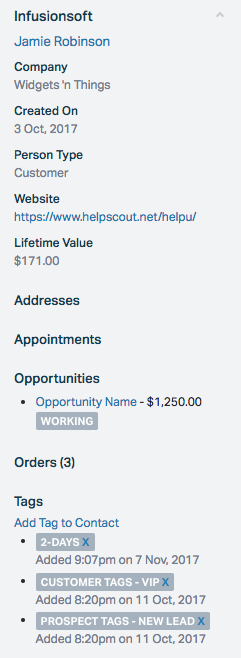
Help Scout's app for Infusionsoft brings the customer data you need directly into the customer sidebar. When you receive an email from a customer, this app allows you to:
- Automatically import customer contact information.
- Pull in key metrics, such as lifetime value, and display up to 10 recent orders.
- Add new conversations to completed customer tasks.
- Add satisfaction ratings to completed customer tasks.
- Display a wide range of fields from Infusionsoft, including addresses, appointments, opportunities, orders, and tags.
- Create contacts in Infusionsoft if they don't already exist.
### Activation instructions
The Infusionsoft app uses oAuth 2.0, which makes installation quick and easy.
**Install App**
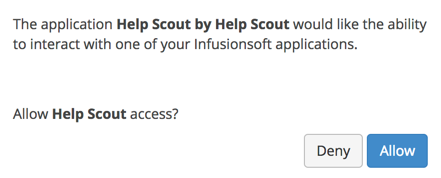
Grant Help Scout access to your Infusionsoft account. Click the **Allow** button.
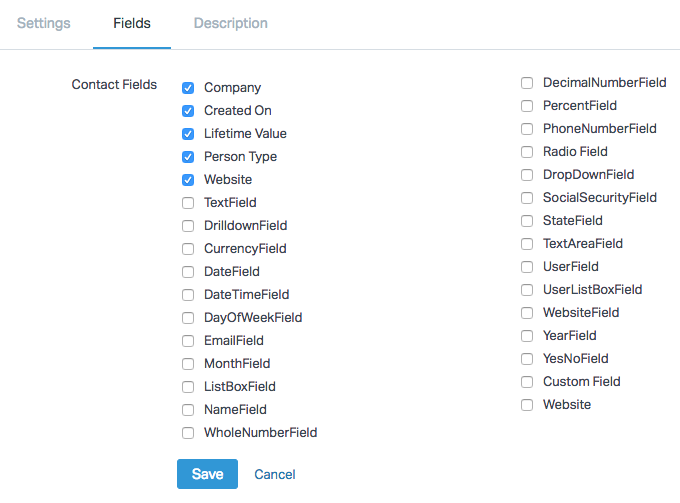
After granting access, you'll be redirected back to Help Scout. Take a moment to review the options on the **Settings** and **Fields** tab. Select which mailboxes you want to enable the integration for, then hit the **Save** button.

 **Note***one* Did this answer your question? Thanks for the feedback There was a problem submitting your feedback. Please try again later.Yes No No results found
- [Docs](https://hsdemo.frodx.com/en/knowledge/docs#main-content)
- [Working with Docs](https://hsdemo.frodx.com/en/knowledge/docs#working-with-docs)
- [Formatting Content](https://hsdemo.frodx.com/en/knowledge/docs#formatting-content)
- [Managing Docs in Help Scout](https://hsdemo.frodx.com/en/knowledge/docs#managing-docs-in-help-scout)
- [Help Desk](https://hsdemo.frodx.com/en/knowledge/help-desk#main-content)
- [Mobile Apps](https://hsdemo.frodx.com/en/knowledge/help-desk#mobile-apps)
- [Getting Started](https://hsdemo.frodx.com/en/knowledge/help-desk#getting-started)
- [Productivity](https://hsdemo.frodx.com/en/knowledge/help-desk#productivity)
- [Mailbox and User Settings](https://hsdemo.frodx.com/en/knowledge/help-desk#mailbox-and-user-settings)
- [Working with Conversations](https://hsdemo.frodx.com/en/knowledge/help-desk#working-with-conversations)
- [Account Management](https://hsdemo.frodx.com/en/knowledge/help-desk#account-management)
- [Integrations](https://hsdemo.frodx.com/en/knowledge/help-desk#integrations)
- [Copying Email to Help Scout](https://hsdemo.frodx.com/en/knowledge/help-desk#copying-email-to-help-scout)
- [Reporting](https://hsdemo.frodx.com/en/knowledge/help-desk#reporting)
- [Sample Contact Page](https://hsdemo.frodx.com/sample-contact)
- [Sample About Page](https://hsdemo.frodx.com/sample-about)
- [Default HubSpot Blog](https://hsdemo.frodx.com/biglytics-blog)
[.png?width=550&height=171&name=frodx-logo-new%20(1).png "FrodX")](https://en.frodx.com/)
[mailto:email@email.com](mailto:email@email.com)
Copyright © 2026, GateHub Ltd