---
title: Keyboard Shortcuts
description: Keyboard shortcuts provide a quick and easy way to move around Help Scout. They are built into Help Scout so no need to enable anything on your end. Keyboard shortcuts can be disabled under the Your
---
[Skip to content](https://hsdemo.frodx.com/en/knowledge/keyboard-shortcuts#main-content)
English
Show submenu for translations
.png?width=550&height=171&name=frodx-logo-new%20(1).png)
- [Sample Contact Page](https://hsdemo.frodx.com/sample-contact)
- [Sample About Page](https://hsdemo.frodx.com/sample-about)
- [Default HubSpot Blog](https://hsdemo.frodx.com/biglytics-blog)
Open main navigation
Close main navigation
- [Sample Contact Page](https://hsdemo.frodx.com/sample-contact)
- [Sample About Page](https://hsdemo.frodx.com/sample-about)
- [Default HubSpot Blog](https://hsdemo.frodx.com/biglytics-blog)
- English
Show submenu for translations
- Contact us
Contact us
How can we help you?
- There are no suggestions because the search field is empty.
1. [Help Center](https://hsdemo.frodx.com/en/knowledge)
2. [Help Desk](https://hsdemo.frodx.com/en/knowledge/help-desk)
3. [Working with Conversations](https://hsdemo.frodx.com/en/knowledge/help-desk#working-with-conversations)
# Keyboard Shortcuts
Keyboard shortcuts provide a quick and easy way to move around Help Scout. They are built into Help Scout so no need to enable anything on your end.
#### In this article
- [Turning Off Keyboard Shortcuts](https://hsdemo.frodx.com/en/knowledge/keyboard-shortcuts#off)
- [Keyboard Shortcuts - Image List](https://hsdemo.frodx.com/en/knowledge/keyboard-shortcuts#image)
- [Keyboard Shortcuts - Text List](https://hsdemo.frodx.com/en/knowledge/keyboard-shortcuts#text)
### Turning Off Keyboard Shortcuts
Keyboard shortcuts can be disabled under the [Your Profile](https://docs.helpscout.com/article/499-update-your-user-profile) section of your account by toggling off the Keyboard Shortcuts option.
### Keyboard Shortcuts - Image List
#### Conversation Actions
#### Conversation List
#### Folders
#### Text Editor
Windows: Use the *Control* key in place of the *Command* key for these shortcuts.

#### Tags Management
#### All Pages
#### Docs Search

### Keyboard Shortcuts - Text List
Below is a searchable text list of these shortcuts.
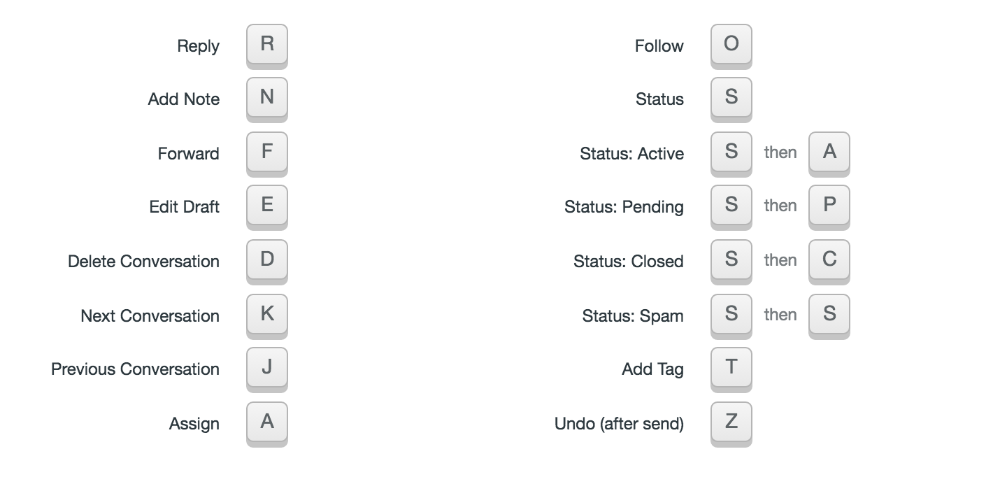
#### Conversation Actions
Reply - **R**
Add Note - **N**
Forward - **F**
Edit Draft - **E**
Delete Conversation - **D**
Next Conversation - **K**
Previous Conversation - **J**
Assign - **A**
Follow - **O**
Status - **S**
Status: Active - **S** then **A**
Status: Pending - **S** then **P**
Status: Closed - **S** then **C**
Status: Spam - **S** then **S**
Add Tag - **T**
Undo (after send) - **Z**
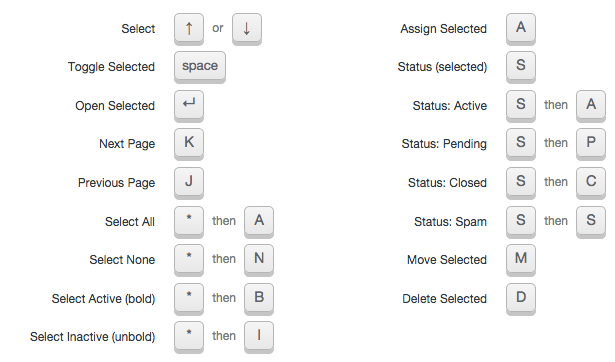
#### Conversation List
Select - **Arrow Up** or **Arrow Down**
Toggle Selected - **Spacebar**
Open Selected - **Return/Enter**
Next Page - **K**
Prevous Page - **J**
Select All - **\*** then **A**
Select None - **\*** then **N**
Select Active (bold) - **\*** then **B**
Select Inactive (unbold) - **\*** then **I**
Assigned Selected - **A**
Status (selected) - **S**
Status (selected): Active - **S** then **A**
Status (selected): Pending - **S** then **P**
Status (selected): Closed - **S** then **C**
Status (selected): Spam - **S** then **S**
Move Selected - **M**
Delete Selected - **D**
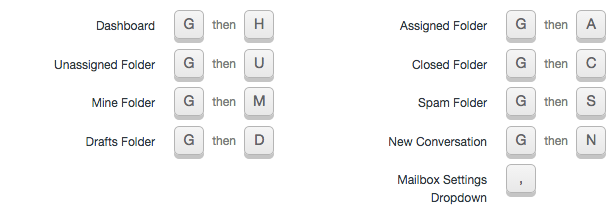
#### Folders
Dashboard - **G** then **H**
Unassigned Folder - **G** then **U**
Mine Folder - **G** then **M**
Drafts Folder - **G** then **D**
Assigned Folder - **G** then **A**
Closed Folder - **G** then **C**
Spam Folder - **G** then **S**
New Conversation - **G** then **N**
Mailbox Settings Dropdown - **,** (comma)
#### Text Editor
Windows: Use Ctrl in place of Cmd for these shortcuts
Bold - **Cmd + B**
Italic - **Cmd + I**
Underline - **Cmd + U**
Bullet List - **Cmd + \*** or **Cmd + Shift + 8**
Numbered List - **Cmd + &** or **Cmd + Shift + 7**
Undo - **Cmd + Z**
Save Draft - **Cmd + Shift + D**
Attach File - **Cmd + Shift + A**
Toggle Saved Replies - **Cmd + Shift + S**
Create a Link - **Cmd + K**
Send Reply/Save Note - **Cmd + Return/Enter**
Discard Reply/Note - **Esc**
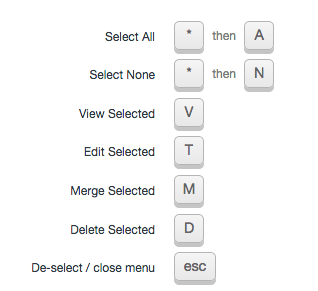
#### Tags Management
Select All - **\*** then **A**
Select None - **\*** then **N**
View Selected - **V**
Edit Selected - **T**
Merge Selected - **M**
Delete Selected - **D**
De-select / close menu - **Esc**
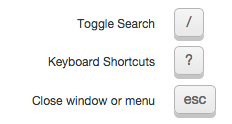
#### All Pages
Toggle Search - **/**
Keyboard Shortcuts - **?**
Close window or menu - **Esc**
#### Docs Search
Toggle Search - **Cmd + /**
Select - **Arrow Up** or **Arrow Down**
Preview Article - **Return/Enter**
Insert Link w/ reply or note open - **Spacebar**
Did this answer your question? Thanks for the feedback There was a problem submitting your feedback. Please try again later.Yes No No results found
- [Docs](https://hsdemo.frodx.com/en/knowledge/docs#main-content)
- [Working with Docs](https://hsdemo.frodx.com/en/knowledge/docs#working-with-docs)
- [Formatting Content](https://hsdemo.frodx.com/en/knowledge/docs#formatting-content)
- [Managing Docs in Help Scout](https://hsdemo.frodx.com/en/knowledge/docs#managing-docs-in-help-scout)
- [Help Desk](https://hsdemo.frodx.com/en/knowledge/help-desk#main-content)
- [Mobile Apps](https://hsdemo.frodx.com/en/knowledge/help-desk#mobile-apps)
- [Getting Started](https://hsdemo.frodx.com/en/knowledge/help-desk#getting-started)
- [Productivity](https://hsdemo.frodx.com/en/knowledge/help-desk#productivity)
- [Mailbox and User Settings](https://hsdemo.frodx.com/en/knowledge/help-desk#mailbox-and-user-settings)
- [Working with Conversations](https://hsdemo.frodx.com/en/knowledge/help-desk#working-with-conversations)
- [Account Management](https://hsdemo.frodx.com/en/knowledge/help-desk#account-management)
- [Integrations](https://hsdemo.frodx.com/en/knowledge/help-desk#integrations)
- [Copying Email to Help Scout](https://hsdemo.frodx.com/en/knowledge/help-desk#copying-email-to-help-scout)
- [Reporting](https://hsdemo.frodx.com/en/knowledge/help-desk#reporting)
- [Sample Contact Page](https://hsdemo.frodx.com/sample-contact)
- [Sample About Page](https://hsdemo.frodx.com/sample-about)
- [Default HubSpot Blog](https://hsdemo.frodx.com/biglytics-blog)
[.png?width=550&height=171&name=frodx-logo-new%20(1).png "FrodX")](https://en.frodx.com/)
[mailto:email@email.com](mailto:email@email.com)
Copyright © 2026, GateHub Ltd