---
title: Log in to Help Scout
description: Head to the login page to sign in to Help Scout. How you sign in from there might be different depending on your settings, and we'll cover all of the options here. If your company or organization ha
---
[Skip to content](https://hsdemo.frodx.com/en/knowledge/log-in-to-help-scout#main-content)
English
Show submenu for translations
.png?width=550&height=171&name=frodx-logo-new%20(1).png)
- [Sample Contact Page](https://hsdemo.frodx.com/sample-contact)
- [Sample About Page](https://hsdemo.frodx.com/sample-about)
- [Default HubSpot Blog](https://hsdemo.frodx.com/biglytics-blog)
Open main navigation
Close main navigation
- [Sample Contact Page](https://hsdemo.frodx.com/sample-contact)
- [Sample About Page](https://hsdemo.frodx.com/sample-about)
- [Default HubSpot Blog](https://hsdemo.frodx.com/biglytics-blog)
- English
Show submenu for translations
- Contact us
Contact us
How can we help you?
- There are no suggestions because the search field is empty.
1. [Help Center](https://hsdemo.frodx.com/en/knowledge)
2. [Help Desk](https://hsdemo.frodx.com/en/knowledge/help-desk)
3. [Account Management](https://hsdemo.frodx.com/en/knowledge/help-desk#account-management)
# Log in to Help Scout
Head to [the login page to sign in to Help Scout](https://secure.helpscout.net/members/login/). How you sign in from there might be different depending on your settings, and we'll cover all of the options here.
#### In this article
- [Help Scout Account](https://hsdemo.frodx.com/en/knowledge/log-in-to-help-scout#helpscout)
- [Google Workspace (formerly known as G Suite)](https://hsdemo.frodx.com/en/knowledge/log-in-to-help-scout#google)
- [Single Sign-On](https://hsdemo.frodx.com/en/knowledge/log-in-to-help-scout#sso)
### Help Scout Account
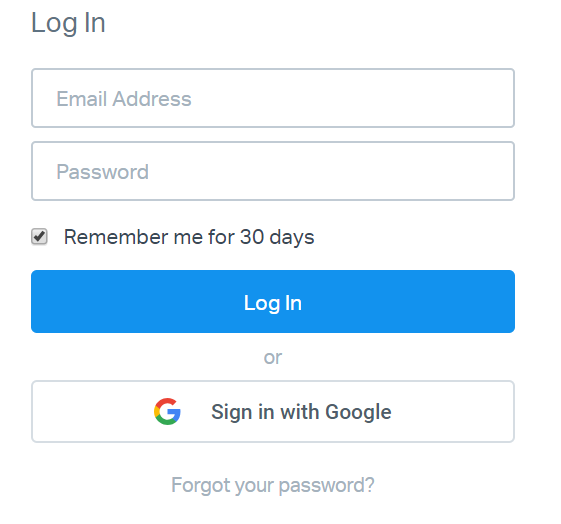
If your company or organization has not set up any other method of logging in, just enter your email address and password, and you're all set. The email address you enter here is your User account email, not your mailbox address. If you have forgotten your password, click the [Forgot your password?](https://secure.helpscout.net/members/forgot-password/) link there on the page.
### Google Workspace (formerly known as G Suite)
If your Help Scout account is set up to use the [Google Workspace integration](https://docs.helpscout.com/article/365-google-workspace-integration), you can log in using your Google account. Your Help Scout administrators may have chosen to only allow you to log in using the Sign in with Google button.
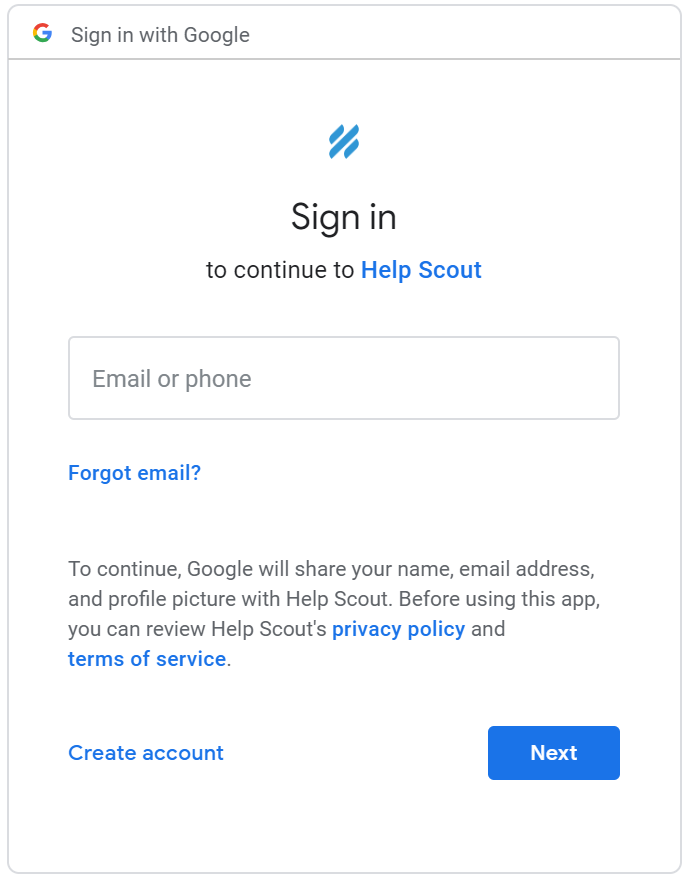
Click the **Sign in with Google** button below the blue *Log In* button. A new window will popup that will ask you to Sign in to Google, or choose which Google account you'd like to authenticate with if you were already logged in to any Google accounts. Make sure you are using the Google account that is tied to your company or organization.
### Single Sign-On (SSO)
Single sign-on via a custom SAML solution is also available on the **Pro** plan or as an add-on for Plus plans.
If your account has SSO enabled, enter your login email address for Help Scout and a blue **Log in with Single Sign-On** button will appear.
Check out [Enabling SSO in Your Account](https://docs.helpscout.com/article/877-enabling-sso-in-your-account) for more on how to set up SSO for your account.
Did this answer your question? Thanks for the feedback There was a problem submitting your feedback. Please try again later.Yes No No results found
- [Docs](https://hsdemo.frodx.com/en/knowledge/docs#main-content)
- [Working with Docs](https://hsdemo.frodx.com/en/knowledge/docs#working-with-docs)
- [Formatting Content](https://hsdemo.frodx.com/en/knowledge/docs#formatting-content)
- [Managing Docs in Help Scout](https://hsdemo.frodx.com/en/knowledge/docs#managing-docs-in-help-scout)
- [Help Desk](https://hsdemo.frodx.com/en/knowledge/help-desk#main-content)
- [Mobile Apps](https://hsdemo.frodx.com/en/knowledge/help-desk#mobile-apps)
- [Getting Started](https://hsdemo.frodx.com/en/knowledge/help-desk#getting-started)
- [Productivity](https://hsdemo.frodx.com/en/knowledge/help-desk#productivity)
- [Mailbox and User Settings](https://hsdemo.frodx.com/en/knowledge/help-desk#mailbox-and-user-settings)
- [Working with Conversations](https://hsdemo.frodx.com/en/knowledge/help-desk#working-with-conversations)
- [Account Management](https://hsdemo.frodx.com/en/knowledge/help-desk#account-management)
- [Integrations](https://hsdemo.frodx.com/en/knowledge/help-desk#integrations)
- [Copying Email to Help Scout](https://hsdemo.frodx.com/en/knowledge/help-desk#copying-email-to-help-scout)
- [Reporting](https://hsdemo.frodx.com/en/knowledge/help-desk#reporting)
- [Sample Contact Page](https://hsdemo.frodx.com/sample-contact)
- [Sample About Page](https://hsdemo.frodx.com/sample-about)
- [Default HubSpot Blog](https://hsdemo.frodx.com/biglytics-blog)
[.png?width=550&height=171&name=frodx-logo-new%20(1).png "FrodX")](https://en.frodx.com/)
[mailto:email@email.com](mailto:email@email.com)
Copyright © 2026, GateHub Ltd