---
title: Manage collections and categories
description: This article will help you understand the basic organizational structure within Docs. You'll also learn how to manage collections and categories. If your site is a bookcase, Collections would be the s
---
[Skip to content](https://hsdemo.frodx.com/en/knowledge/manage-collections-and-categories#main-content)
English
Show submenu for translations
.png?width=550&height=171&name=frodx-logo-new%20(1).png)
- [Sample Contact Page](https://hsdemo.frodx.com/sample-contact)
- [Sample About Page](https://hsdemo.frodx.com/sample-about)
- [Default HubSpot Blog](https://hsdemo.frodx.com/biglytics-blog)
Open main navigation
Close main navigation
- [Sample Contact Page](https://hsdemo.frodx.com/sample-contact)
- [Sample About Page](https://hsdemo.frodx.com/sample-about)
- [Default HubSpot Blog](https://hsdemo.frodx.com/biglytics-blog)
- English
Show submenu for translations
- Contact us
Contact us
How can we help you?
- There are no suggestions because the search field is empty.
1. [Help Center](https://hsdemo.frodx.com/en/knowledge)
2. [Docs](https://hsdemo.frodx.com/en/knowledge/docs)
3. [Working with Docs](https://hsdemo.frodx.com/en/knowledge/docs#working-with-docs)
# Manage collections and categories
This article will help you understand the basic organizational structure within Docs. You'll also learn how to manage collections and categories.
#### In this article
- [What are Collections and Categories?](https://hsdemo.frodx.com/en/knowledge/manage-collections-and-categories#what)
- [Creating and managing collections](https://hsdemo.frodx.com/en/knowledge/manage-collections-and-categories#create)
- [Creating categories](https://hsdemo.frodx.com/en/knowledge/manage-collections-and-categories#create-category)
- [Editing or deleting existing categories](https://hsdemo.frodx.com/en/knowledge/manage-collections-and-categories#edit)
### What are Collections and Categories?
#### Collections
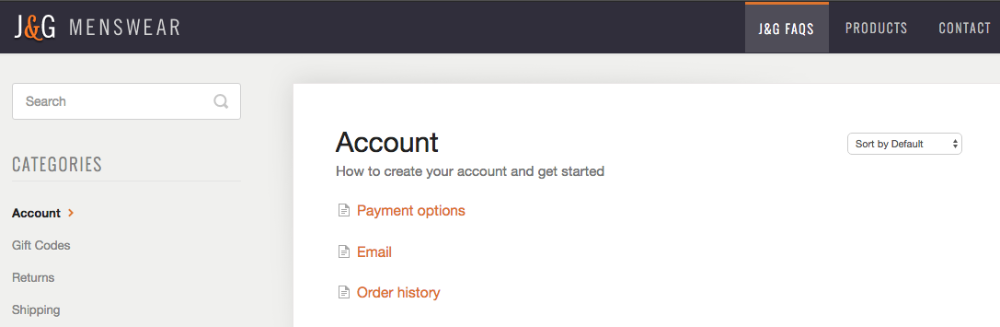
If your site is a bookcase, *Collections* would be the shelves, and *Categories* would be the books. Each collection should cover a completely different topic, product, or department. Depending on how you structure your documentation, you might need one collection or a couple of collections. In our example below, we use 3 collections: **For Customers**, **Wholesale** and **For the Team**.
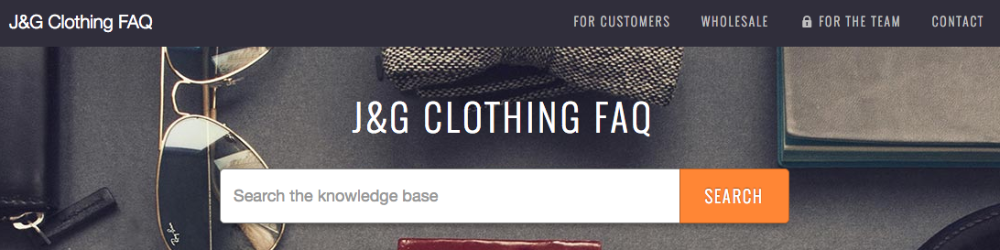
Because information for customers and wholesale will be completely different, it makes sense for content to be separated in to different shelves, or collections. *For the Team* is a private collection, so it's not visible on the public website.
*For the Team*
You'll see collections appear on the top navigation bar of your public Docs website. Everybody loves a neat, organized bookcase, so don't get too wild with multiple collections.
#### Categories
*Categories* are books on your shelves. Each collection can have multiple categories. Articles are like the chapters within each book. Articles can belong to multiple categories, so your customers can find what they need in multiple locations.
Here's one point we want to drive home: articles *cannot* belong to more than one collection. If you find yourself needing the same article in two collections, you might want to turn those collections in to categories instead.
### Creating and managing collections
We recommend having *some* structure set up before you start relentlessly pecking away at your keyboard to write articles. Let's walk through creating and managing collections.
To get started, head over to **Manage** → **Docs,** then click the Docs site you'd like to create or manage collections for.

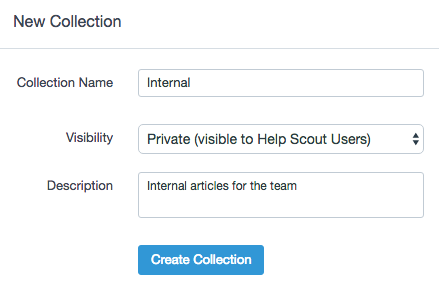
To create a new collection, just click the *New Collection* button at the top of the page. Name your collection and select a visibility option.
If you need to rearrange how your collections (bookshelves) appear in the navigation bar, place your mouse cursor over the bar icons and drag and drop as you see fit.

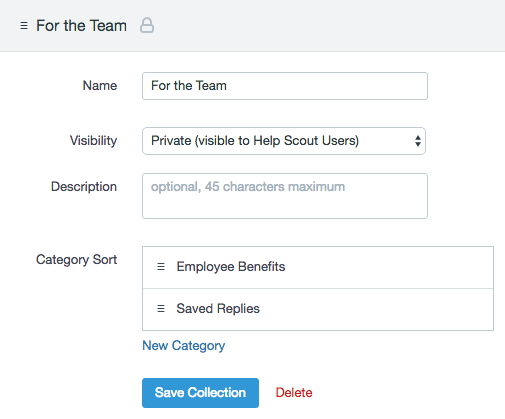
Clicking on a collection lets you customize the name, visibility, and category sorting order. You can modify collection settings whenever you'd like. If you don't have any categories just yet, create one (or a few) before moving on. You can reorder categories by dragging them up or down on the page. Don't forget to save your changes. If you delete a collection, any existing articles or categories that belong to that collection will also be deleted.
### Creating categories
You can create categories from a few different locations in Docs:
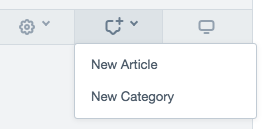
1. From the *New* dropdown menu on the sidebar.
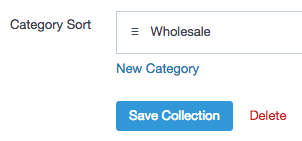
2. From the *Collections* page, when you create or modify a collection.
3. While working on an article, from the categories sidebar.

### Editing or deleting an existing category
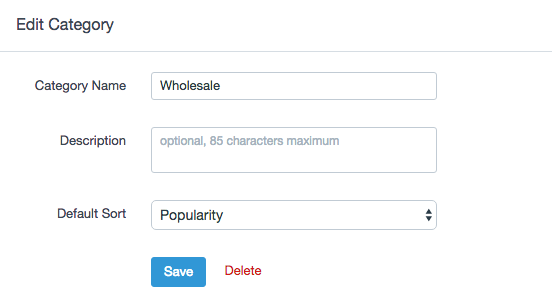
To update or edit a category, just click on the category name from the left-hand sidebar, then click the same category name at the top of the page. If you delete a category, any existing articles that belonged to that category will be marked as *uncategorized*.
Did this answer your question? Thanks for the feedback There was a problem submitting your feedback. Please try again later.Yes No No results found
- [Docs](https://hsdemo.frodx.com/en/knowledge/docs#main-content)
- [Working with Docs](https://hsdemo.frodx.com/en/knowledge/docs#working-with-docs)
- [Formatting Content](https://hsdemo.frodx.com/en/knowledge/docs#formatting-content)
- [Managing Docs in Help Scout](https://hsdemo.frodx.com/en/knowledge/docs#managing-docs-in-help-scout)
- [Help Desk](https://hsdemo.frodx.com/en/knowledge/help-desk#main-content)
- [Mobile Apps](https://hsdemo.frodx.com/en/knowledge/help-desk#mobile-apps)
- [Getting Started](https://hsdemo.frodx.com/en/knowledge/help-desk#getting-started)
- [Productivity](https://hsdemo.frodx.com/en/knowledge/help-desk#productivity)
- [Mailbox and User Settings](https://hsdemo.frodx.com/en/knowledge/help-desk#mailbox-and-user-settings)
- [Working with Conversations](https://hsdemo.frodx.com/en/knowledge/help-desk#working-with-conversations)
- [Account Management](https://hsdemo.frodx.com/en/knowledge/help-desk#account-management)
- [Integrations](https://hsdemo.frodx.com/en/knowledge/help-desk#integrations)
- [Copying Email to Help Scout](https://hsdemo.frodx.com/en/knowledge/help-desk#copying-email-to-help-scout)
- [Reporting](https://hsdemo.frodx.com/en/knowledge/help-desk#reporting)
- [Sample Contact Page](https://hsdemo.frodx.com/sample-contact)
- [Sample About Page](https://hsdemo.frodx.com/sample-about)
- [Default HubSpot Blog](https://hsdemo.frodx.com/biglytics-blog)
[.png?width=550&height=171&name=frodx-logo-new%20(1).png "FrodX")](https://en.frodx.com/)
[mailto:email@email.com](mailto:email@email.com)
Copyright © 2026, GateHub Ltd