---
title: Manage Voice Messages
description: Help Scout's Voicemail app works automatically — no installation required. This article is about the voicemail integration, and how to manage voice messages in Help Scout. Just configure your voice or
---
[Skip to content](https://hsdemo.frodx.com/en/knowledge/manage-voice-messages-1#main-content)
English
Show submenu for translations
.png?width=550&height=171&name=frodx-logo-new%20(1).png)
- [Sample Contact Page](https://hsdemo.frodx.com/sample-contact)
- [Sample About Page](https://hsdemo.frodx.com/sample-about)
- [Default HubSpot Blog](https://hsdemo.frodx.com/biglytics-blog)
Open main navigation
Close main navigation
- [Sample Contact Page](https://hsdemo.frodx.com/sample-contact)
- [Sample About Page](https://hsdemo.frodx.com/sample-about)
- [Default HubSpot Blog](https://hsdemo.frodx.com/biglytics-blog)
- English
Show submenu for translations
- Contact us
Contact us
How can we help you?
- There are no suggestions because the search field is empty.
1. [Help Center](https://hsdemo.frodx.com/en/knowledge)
2. [Help Desk](https://hsdemo.frodx.com/en/knowledge/help-desk)
3. [Working with Conversations](https://hsdemo.frodx.com/en/knowledge/help-desk#working-with-conversations)
# Manage Voice Messages
Help Scout's Voicemail app works automatically — no installation required. This article is about the voicemail integration, and how to manage voice messages in Help Scout.
#### In this article
- [How the Integration Works](https://hsdemo.frodx.com/en/knowledge/manage-voice-messages-1#how)
- [Phone Notes](https://hsdemo.frodx.com/en/knowledge/manage-voice-messages-1#note)
- [Link Voicemail to a Customer](https://hsdemo.frodx.com/en/knowledge/manage-voice-messages-1#link)
- [Supported Voicemail Providers](https://hsdemo.frodx.com/en/knowledge/manage-voice-messages-1#providers)
### How the Integration Works
Just configure your voice or phone provider to send voicemail notifications to an email address that lands in to your Help Scout mailbox. You can send those messages to your custom email address or to your Help Scout mailbox address (the helpscout.net or helpscoutapp.com address).
Voicemails from any provider are supported when the voicemail notification matches both of these criteria:
1. **Voice Message** or **Voicemail from** is in the subject line of the email from your provider
2. An MP3 or WAV file attachment
Note: The subject match is case sensitive and must be exactly as you see here.
Notifications that match those conditions, or ones from the providers below, are classified as phone notes in Help Scout. This allows you to work with this notification like other conversations, including the ability to attach the call to a customer profile to make that voicemail a part of their conversation history.
### Phone Notes
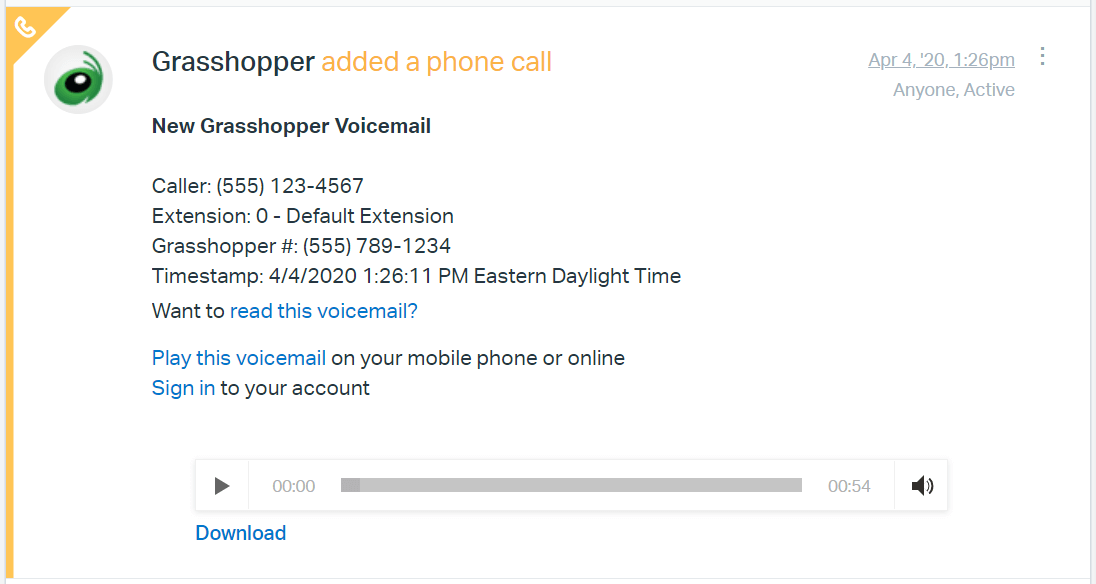
You'll see voice messages in your Unassigned folder like a regular conversation. Call details included in the email from your provider (which will vary by provider) are added as a note. You can play back the message in Help Scout or download the audio file.
### Link Voicemail to a Customer
Voicemails will be set as the voicemail provider's email address for the customer, as there's no method to link each voicemail call to a customer automatically. Use the [Change Customer](https://5256150.hs-sites.com/knowledge/change-the-customer-on-a-conversation) feature to change your phone call over to the correct customer.
You can reply to the customer via email in the same thread *after* you've changed to the customer. Remember, because those voicemail details are added as a note, the customer will *not* see call information when you reply.
### Supported Voicemail Providers
The providers listed below have additional logic behind the scenes to process their voicemail notifications, and are supported separately from the two criteria above. Providers not listed here also work successfully if their notifications are in the format above.
- [3CX](https://www.3cx.com/)
- [8x8](https://www.8x8.com/)
- [AltiGen](https://www.altigen.com/)
- [Answer](https://answer.co.uk/)
- [Asterisk](https://www.asterisk.org/)
- [CallRail](https://www.callrail.com/)
- [Call Ruby](https://www.callruby.com/)
- [Cisco](https://www.cisco.com/)
- [dmClub](https://www.dmclub.net/)
- [eReceptionist](https://www.ereceptionist.co.uk/)
- [eVoice](https://www.evoice.com/)
- [FluentStream](https://www.fluentstream.com/)
- [Fonality](https://www.fonality.com/)
- [FortiVoice](https://www.fortinet.com/products/business-phone-systems/fortivoice-fortifone)
- [FreedomVoice](https://www.freedomvoice.com/)
- [Google Voice](https://www.google.com/voice/)
- [Gradwell](https://www.gradwell.com/)
- [Grasshopper](https://www.grasshopper.com/)
- [Halloo](https://www.halloo.com/)
- [Intermedia](https://www.intermedia.net/)
- [jConnect](https://www.j2.com/jconnect/twa/page/homePage?CMP=j2)
- [Kall8](https://kall8.com/)
- [Line2](https://www.line2.com/)
- [Mitel](https://www.mitel.com/)
- [mVoice](https://www.mvoice.com.au/)
- [Nextiva](https://www.nextiva.com/)
- [Onebox](https://www.onebox.com/signup/)
- [Onsip](https://www.onsip.com/)
- [Ooma](https://www.ooma.com/)
- [Optimum Voice](https://www.optimum.com/home-phone-service/)
- [OVH](https://www.ovh.com/)
- [Phone.com](https://www.phone.com/)
- [Phonebooth](https://www.phonebooth.com/)
- [PhoneTag](https://lp.youmail.com/phonetag/)
- [Placetel](https://www.placetel.de/)
- [PureJam](https://www.purejam.co.uk/)
- [RingbyName](https://www.ringbyname.com/)
- [RingCentral](https://www.ringcentral.com/)
- [Ringio](https://www.ringio.com/)
- [SendHub](https://sendhub.com/)
- [Sipgate](https://www.sipgate.de/basic)
- [Soho66](https://soho66.co.uk/)
- [Sonetel](https://www.sonetel.com/)
- [SwitchboardFREE](https://www.switchboardfree.co.uk/)
- [SpeakUp](https://www.speakup.nl/)
- [Twilio](https://www.twilio.com/)
- [YouMail](https://www.youmail.com/)
- [Virtual PBX](https://www.virtualpbx.com/)
- [VoiceCloud](https://www.voicecloud.com/)
- [VoiceNation](https://www.voicenation.com/)
- [Voip.ms](https://www.voip.ms/)
- [Voipfone](https://www.voipfone.co.uk/)
- [Vonage](https://www.vonage.com/)
- [Windsor](https://www.windsor-telecom.co.uk/)
Did this answer your question? Thanks for the feedback There was a problem submitting your feedback. Please try again later.Yes No No results found
- [Docs](https://hsdemo.frodx.com/en/knowledge/docs#main-content)
- [Working with Docs](https://hsdemo.frodx.com/en/knowledge/docs#working-with-docs)
- [Formatting Content](https://hsdemo.frodx.com/en/knowledge/docs#formatting-content)
- [Managing Docs in Help Scout](https://hsdemo.frodx.com/en/knowledge/docs#managing-docs-in-help-scout)
- [Help Desk](https://hsdemo.frodx.com/en/knowledge/help-desk#main-content)
- [Mobile Apps](https://hsdemo.frodx.com/en/knowledge/help-desk#mobile-apps)
- [Getting Started](https://hsdemo.frodx.com/en/knowledge/help-desk#getting-started)
- [Productivity](https://hsdemo.frodx.com/en/knowledge/help-desk#productivity)
- [Mailbox and User Settings](https://hsdemo.frodx.com/en/knowledge/help-desk#mailbox-and-user-settings)
- [Working with Conversations](https://hsdemo.frodx.com/en/knowledge/help-desk#working-with-conversations)
- [Account Management](https://hsdemo.frodx.com/en/knowledge/help-desk#account-management)
- [Integrations](https://hsdemo.frodx.com/en/knowledge/help-desk#integrations)
- [Copying Email to Help Scout](https://hsdemo.frodx.com/en/knowledge/help-desk#copying-email-to-help-scout)
- [Reporting](https://hsdemo.frodx.com/en/knowledge/help-desk#reporting)
- [Sample Contact Page](https://hsdemo.frodx.com/sample-contact)
- [Sample About Page](https://hsdemo.frodx.com/sample-about)
- [Default HubSpot Blog](https://hsdemo.frodx.com/biglytics-blog)
[.png?width=550&height=171&name=frodx-logo-new%20(1).png "FrodX")](https://en.frodx.com/)
[mailto:email@email.com](mailto:email@email.com)
Copyright © 2026, GateHub Ltd