---
title: Merge Duplicate Customer Profiles
description: It's not uncommon for customers to send messages from different email addresses. This can cause a bit of confusion for your team — instead of having one profile for that customer, you might have two o
---
[Skip to content](https://hsdemo.frodx.com/en/knowledge/merge-duplicate-customer-profiles#main-content)
English
Show submenu for translations
.png?width=550&height=171&name=frodx-logo-new%20(1).png)
- [Sample Contact Page](https://hsdemo.frodx.com/sample-contact)
- [Sample About Page](https://hsdemo.frodx.com/sample-about)
- [Default HubSpot Blog](https://hsdemo.frodx.com/biglytics-blog)
Open main navigation
Close main navigation
- [Sample Contact Page](https://hsdemo.frodx.com/sample-contact)
- [Sample About Page](https://hsdemo.frodx.com/sample-about)
- [Default HubSpot Blog](https://hsdemo.frodx.com/biglytics-blog)
- English
Show submenu for translations
- Contact us
Contact us
How can we help you?
- There are no suggestions because the search field is empty.
1. [Help Center](https://hsdemo.frodx.com/en/knowledge)
2. [Help Desk](https://hsdemo.frodx.com/en/knowledge/help-desk)
3. [Productivity](https://hsdemo.frodx.com/en/knowledge/help-desk#productivity)
# Merge Duplicate Customer Profiles
It's not uncommon for customers to send messages from different email addresses. This can cause a bit of confusion for your team — instead of having one profile for that customer, you might have two or three profiles for the same person. It's helpful to keep conversation history in one place, and to do that you can merge profiles together to stay organized.
### How to Merge Customer Profiles
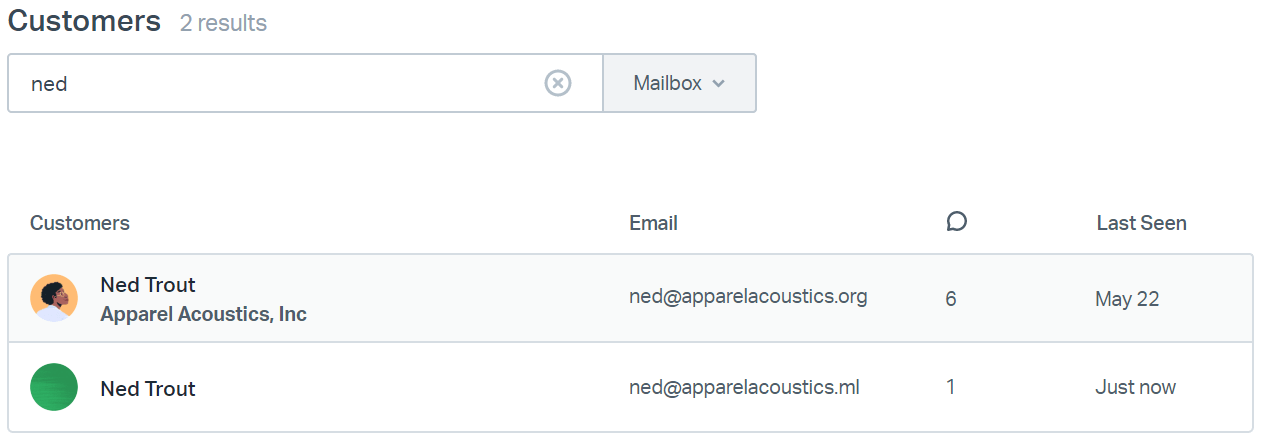
Locate both the duplicate profile and the profile you want to keep. The easiest way to do this is to head to the [Customers List](https://docs.helpscout.com/article/1328-customers-list) and find the customer profiles that you want to merge. In our example below we are searching by name to find both of the profiles.
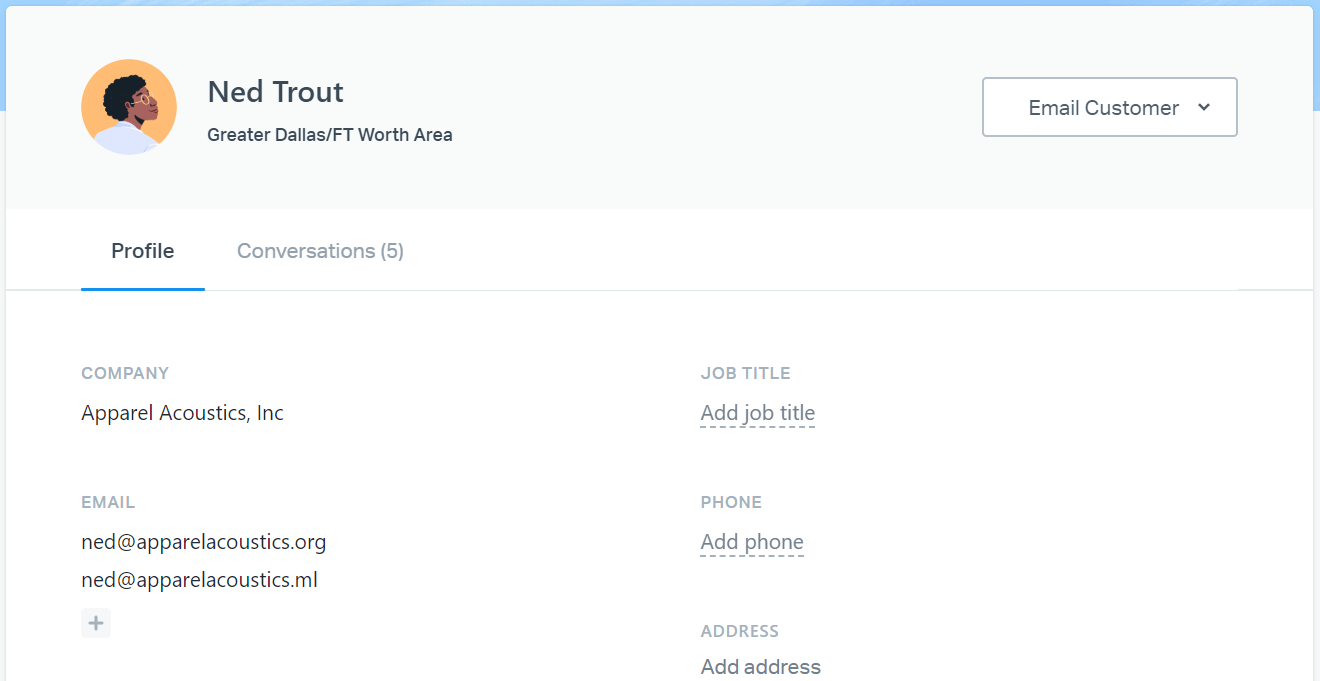
Copy the email address of the profile you *don't* want to keep. In this example, we're not keeping *ned@apparelacoustics.ml.* Next, click on the profile tile for the one you *do* want to keep *(ned@apparelacoustics.org)*. The profile editor modal will pop-up. You can complete Step 3 in the modal window or click **Edit Full Profile** to open the full profile.
Click the **+** under EMAIL. Paste the address you copied previously. Remember, the address you're pasting in is from the profile you *don't* want to keep — you're adding it to the main profile to merge things together.
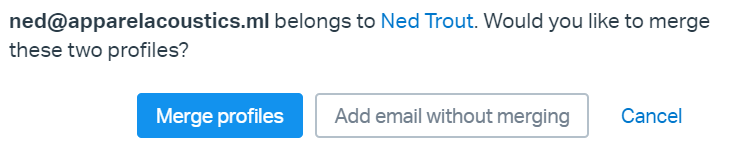
Hit enter or click elsewhere on the page after adding that email address. Click the **Merge profiles** button in the pop-up to confirm the changes. Now, go outside, walk the dog, or just keep working if you have to. You've merged!
Note: There is a 10 minute delay after merging customer profiles before you will see the Conversations list or the Previous Conversations updated with the conversations from the merged profile. After a 10 minute wait, you will see those conversations appear.
Did this answer your question? Thanks for the feedback There was a problem submitting your feedback. Please try again later.Yes No No results found
- [Docs](https://hsdemo.frodx.com/en/knowledge/docs#main-content)
- [Working with Docs](https://hsdemo.frodx.com/en/knowledge/docs#working-with-docs)
- [Formatting Content](https://hsdemo.frodx.com/en/knowledge/docs#formatting-content)
- [Managing Docs in Help Scout](https://hsdemo.frodx.com/en/knowledge/docs#managing-docs-in-help-scout)
- [Help Desk](https://hsdemo.frodx.com/en/knowledge/help-desk#main-content)
- [Mobile Apps](https://hsdemo.frodx.com/en/knowledge/help-desk#mobile-apps)
- [Getting Started](https://hsdemo.frodx.com/en/knowledge/help-desk#getting-started)
- [Productivity](https://hsdemo.frodx.com/en/knowledge/help-desk#productivity)
- [Mailbox and User Settings](https://hsdemo.frodx.com/en/knowledge/help-desk#mailbox-and-user-settings)
- [Working with Conversations](https://hsdemo.frodx.com/en/knowledge/help-desk#working-with-conversations)
- [Account Management](https://hsdemo.frodx.com/en/knowledge/help-desk#account-management)
- [Integrations](https://hsdemo.frodx.com/en/knowledge/help-desk#integrations)
- [Copying Email to Help Scout](https://hsdemo.frodx.com/en/knowledge/help-desk#copying-email-to-help-scout)
- [Reporting](https://hsdemo.frodx.com/en/knowledge/help-desk#reporting)
- [Sample Contact Page](https://hsdemo.frodx.com/sample-contact)
- [Sample About Page](https://hsdemo.frodx.com/sample-about)
- [Default HubSpot Blog](https://hsdemo.frodx.com/biglytics-blog)
[.png?width=550&height=171&name=frodx-logo-new%20(1).png "FrodX")](https://en.frodx.com/)
[mailto:email@email.com](mailto:email@email.com)
Copyright © 2026, GateHub Ltd