---
title: Move Between Conversations With Redirect Options
description: Redirect options in Help Scout refer to deciding where you land next after you have taken action on a conversation. Each Help Scout user can choose a different redirect option manually each time they
---
[Skip to content](https://hsdemo.frodx.com/en/knowledge/move-between-conversations-with-redirect-options#main-content)
English
Show submenu for translations
.png?width=550&height=171&name=frodx-logo-new%20(1).png)
- [Sample Contact Page](https://hsdemo.frodx.com/sample-contact)
- [Sample About Page](https://hsdemo.frodx.com/sample-about)
- [Default HubSpot Blog](https://hsdemo.frodx.com/biglytics-blog)
Open main navigation
Close main navigation
- [Sample Contact Page](https://hsdemo.frodx.com/sample-contact)
- [Sample About Page](https://hsdemo.frodx.com/sample-about)
- [Default HubSpot Blog](https://hsdemo.frodx.com/biglytics-blog)
- English
Show submenu for translations
- Contact us
Contact us
How can we help you?
- There are no suggestions because the search field is empty.
1. [Help Center](https://hsdemo.frodx.com/en/knowledge)
2. [Help Desk](https://hsdemo.frodx.com/en/knowledge/help-desk)
3. [Working with Conversations](https://hsdemo.frodx.com/en/knowledge/help-desk#working-with-conversations)
# Move Between Conversations With Redirect Options
Redirect options in Help Scout refer to deciding where you land next after you have taken action on a conversation. Each Help Scout user can choose a different redirect option manually each time they complete an action, and can customize the default redirect action to suit their personal preference.
This article will explain what the options are, how to select them manually, and how to set the default action.
#### In this article
- [Redirect Options Explained](https://hsdemo.frodx.com/en/knowledge/move-between-conversations-with-redirect-options#options)
- [How to Change Your Default Redirect](https://hsdemo.frodx.com/en/knowledge/move-between-conversations-with-redirect-options#change)
### Redirect Options Explained
By default in Help Scout, when you take action on a conversation, you will land on the next Active status conversation in the mailbox.
You can manually choose to follow a different redirect option each time you complete some actions, and you can set your default redirection to one of the other 2 options, as works best for you.
Each Help Scout user sets their own default action, and there is no option to disable, set a default for all users, or lock down this preference.
- **Send and stay on page** will send your reply and reload the same conversation.
- **Send and back to folder** will take you back to the previous folder.
- **Send and next active** will take you to the next active conversation in the queue, following your sort options.
#### Actions That Follow Your Redirect Default
Your redirect default preference will apply to several different actions that you take from within the conversation itself:
- Sending a reply to an existing conversation
- Adding a note to the conversation
- Forwarding the conversation
- Changing the status of the conversation
- Assigning the conversation
- Running a Manual Workflow
- Deleting the conversation you're in
- Moving the conversation to another mailbox
Some actions offer the ability to choose a different action than your default on a one-by-one basis at the time you take that action. These actions will have a dropdown arrow next to the button that allows you to override the default.
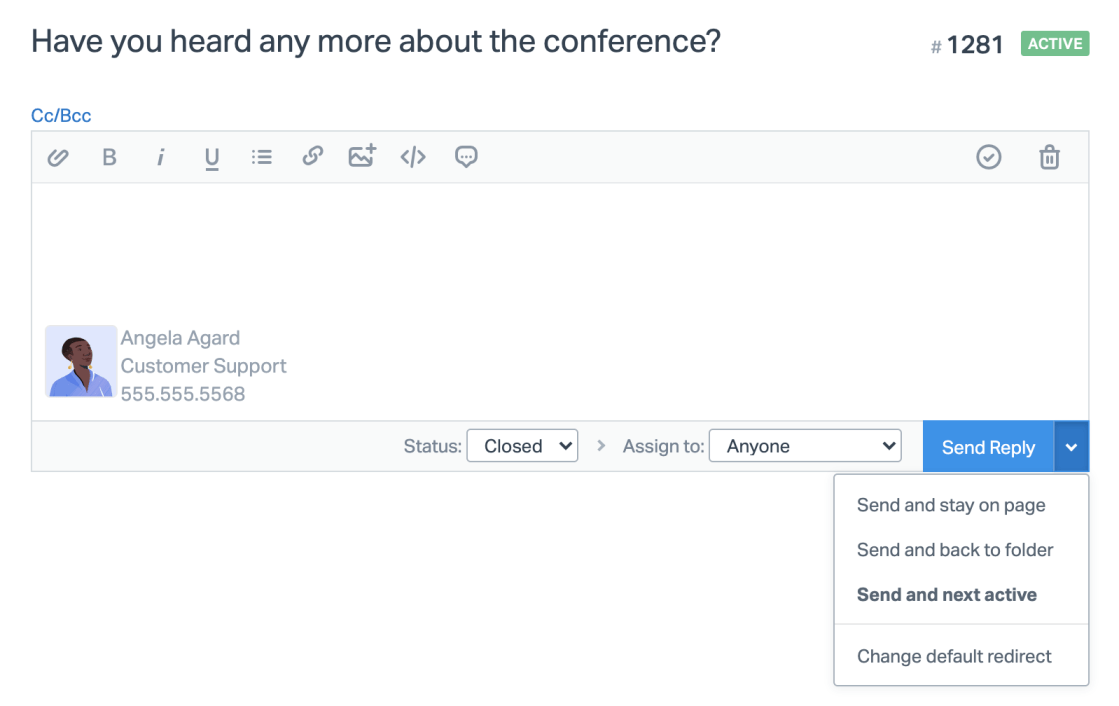
This dropdown is available:
- Next to the **Send Reply** button when replying to an existing conversation.
- Next to the **Add Note** button when adding a note to a conversation.
- Next the **Forward** button when forwarding a conversation.
When creating a new conversation, the options are slightly different.
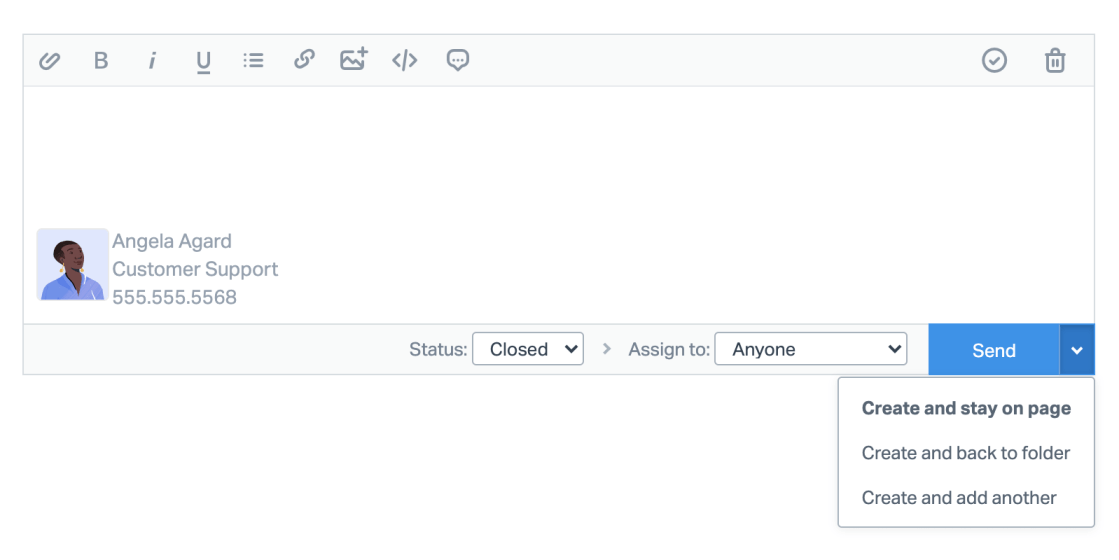
- **Create and stay on page** will create the new conversation and stay there.
- **Create and back to folder** will create the conversation and redirect you back to the folder you were in.
- **Create and add another** will create the conversation you're currently working on then take you to a new conversation page so you can create *another* conversation.
### How to Change Your Default Redirect
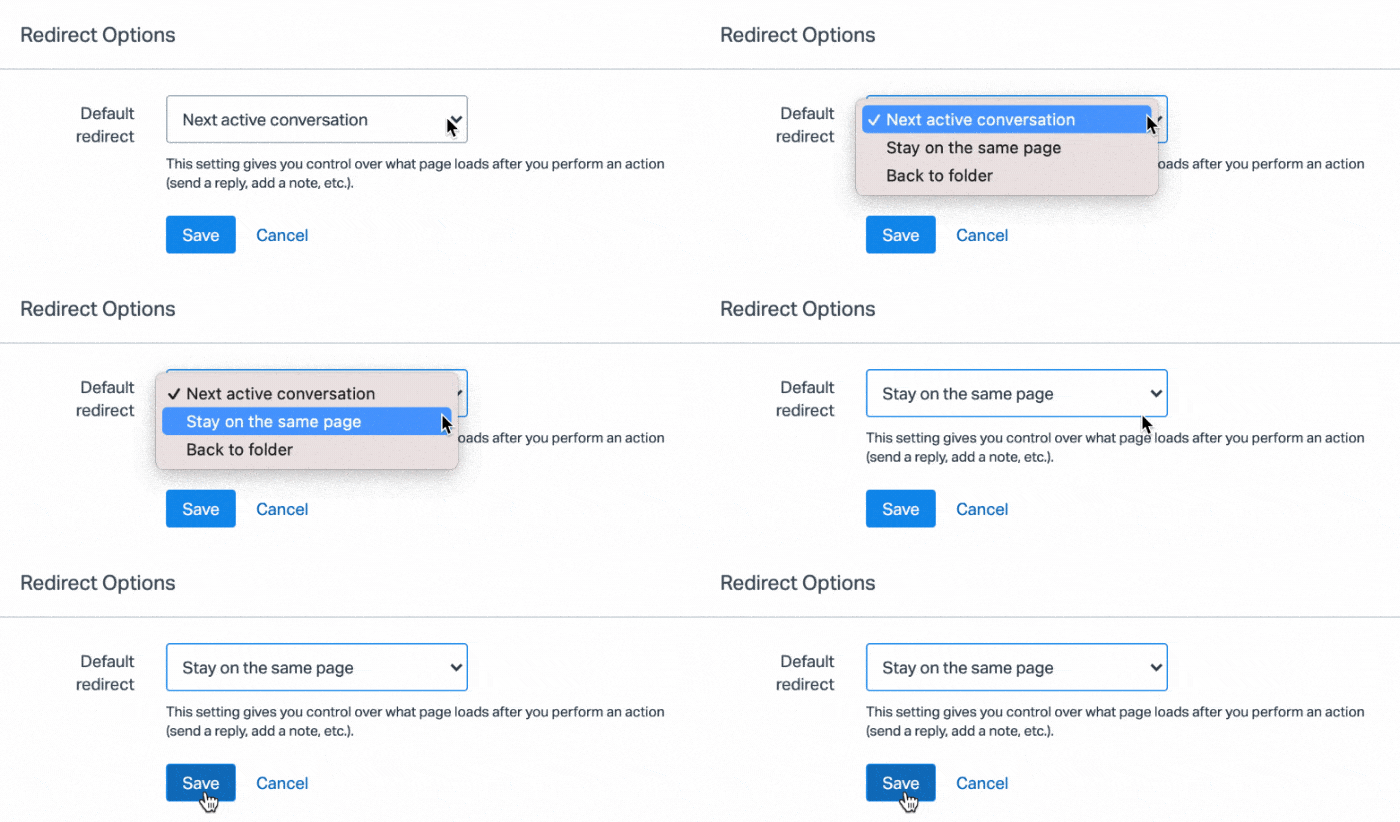
You may want to change your default redirect option if you always want to do something different than head to the next active conversation. You can find the option to **Change default redirect** in the dropdown menu:
- Next to the **Send Reply** button when replying to an existing conversation.
- Next to the **Add Note** button when adding a note to a conversation.
- Next the **Forward** button when forwarding a conversation.

Choose the redirect action you'd like to be your default. You will still be able to override that on a one-by-one basis on some actions as noted above.
Did this answer your question? Thanks for the feedback There was a problem submitting your feedback. Please try again later.Yes No No results found
- [Docs](https://hsdemo.frodx.com/en/knowledge/docs#main-content)
- [Working with Docs](https://hsdemo.frodx.com/en/knowledge/docs#working-with-docs)
- [Formatting Content](https://hsdemo.frodx.com/en/knowledge/docs#formatting-content)
- [Managing Docs in Help Scout](https://hsdemo.frodx.com/en/knowledge/docs#managing-docs-in-help-scout)
- [Help Desk](https://hsdemo.frodx.com/en/knowledge/help-desk#main-content)
- [Mobile Apps](https://hsdemo.frodx.com/en/knowledge/help-desk#mobile-apps)
- [Getting Started](https://hsdemo.frodx.com/en/knowledge/help-desk#getting-started)
- [Productivity](https://hsdemo.frodx.com/en/knowledge/help-desk#productivity)
- [Mailbox and User Settings](https://hsdemo.frodx.com/en/knowledge/help-desk#mailbox-and-user-settings)
- [Working with Conversations](https://hsdemo.frodx.com/en/knowledge/help-desk#working-with-conversations)
- [Account Management](https://hsdemo.frodx.com/en/knowledge/help-desk#account-management)
- [Integrations](https://hsdemo.frodx.com/en/knowledge/help-desk#integrations)
- [Copying Email to Help Scout](https://hsdemo.frodx.com/en/knowledge/help-desk#copying-email-to-help-scout)
- [Reporting](https://hsdemo.frodx.com/en/knowledge/help-desk#reporting)
- [Sample Contact Page](https://hsdemo.frodx.com/sample-contact)
- [Sample About Page](https://hsdemo.frodx.com/sample-about)
- [Default HubSpot Blog](https://hsdemo.frodx.com/biglytics-blog)
[.png?width=550&height=171&name=frodx-logo-new%20(1).png "FrodX")](https://en.frodx.com/)
[mailto:email@email.com](mailto:email@email.com)
Copyright © 2026, GateHub Ltd