---
title: Move From UserVoice to Help Scout
description: The UserVoice import tool allows you to import your entire ticket history (including customer profiles) as well as your knowledge base articles from UserVoice to Help Scout. Your UserVoice data will r
---
[Skip to content](https://hsdemo.frodx.com/en/knowledge/move-from-uservoice-to-help-scout#main-content)
English
Show submenu for translations
.png?width=550&height=171&name=frodx-logo-new%20(1).png)
- [Sample Contact Page](https://hsdemo.frodx.com/sample-contact)
- [Sample About Page](https://hsdemo.frodx.com/sample-about)
- [Default HubSpot Blog](https://hsdemo.frodx.com/biglytics-blog)
Open main navigation
Close main navigation
- [Sample Contact Page](https://hsdemo.frodx.com/sample-contact)
- [Sample About Page](https://hsdemo.frodx.com/sample-about)
- [Default HubSpot Blog](https://hsdemo.frodx.com/biglytics-blog)
- English
Show submenu for translations
- Contact us
Contact us
How can we help you?
- There are no suggestions because the search field is empty.
1. [Help Center](https://hsdemo.frodx.com/en/knowledge)
2. [Help Desk](https://hsdemo.frodx.com/en/knowledge/help-desk)
3. [Copying Email to Help Scout](https://hsdemo.frodx.com/en/knowledge/help-desk#copying-email-to-help-scout)
# Move From UserVoice to Help Scout
The UserVoice import tool allows you to import your entire ticket history (including customer profiles) as well as your knowledge base articles from UserVoice to Help Scout. Your UserVoice data will remain *untouched!* Help Scout will only import a *copy* of each ticket and customer profile.
#### In this article
- [Things You Should Know](https://hsdemo.frodx.com/en/knowledge/move-from-uservoice-to-help-scout#things)
- [Pre-import Check List](https://hsdemo.frodx.com/en/knowledge/move-from-uservoice-to-help-scout#pre-import)
- [Starting the Import](https://hsdemo.frodx.com/en/knowledge/move-from-uservoice-to-help-scout#starting)
- [Common Questions](https://hsdemo.frodx.com/en/knowledge/move-from-uservoice-to-help-scout#common)
### Things You Should Know
Here are a couple of key points to remember before flipping the switch on the import tool:
**You'll likely use the same support email address as you do in UserVoice.**
For example, messages sent to *support@domain.com* will no longer be forwarded to *support@yourdomain.uservoice.com*, but rather to your unique Help Scout mailbox alias that looks something like this: *support@jg-clothing.helpscoutapp.com*.
**Help Scout does not have a ticketing web portal.**
This is more of a transition for your customers, but be prepared to direct them to your dedicated support address. Since Help Scout is entirely email based, you'll be providing top-notch email support going forward. You can always connect a custom [contact form](https://5256150.hs-sites.com/knowledge/send-contact-form-submissions-to-a-mailbox) if another ticket channel is needed.
**All tickets import in as Closed conversations in Help Scout, regardless of Status** The UserVoice CSV import does not take current ticket Status in account, so all of your conversations will come in as Closed in Help Scout.
For reference, here's the .CSV template of what's imported from UserVoice: [UserVoiceTemplate-wdata.csv](https://s3.amazonaws.com/helpscout.net/docs/assets/524448053e3e9bd67a3dc68a/attachments/57e18fe59033606c1955ae7d/UserVoiceTemplate-wdata.csv)
**UserVoice tags will be imported to Help Scout.**
You'll see the same tags on the same tickets, of course. You can [clean up or merge tags](https://docs.helpscout.com/article/13-create-and-manage-tags) after the import if needed.
**Help Scout does not support the "type" field or other custom ticket fields.**
Tickets with custom fields will be imported, but field values will not be applied or referenced anywhere in Help Scout.
**Your old ticket numbers will not follow you to Help Scout**
When we import a ticket, we create a ticket line item that reads something like this: *Conversation imported from UserVoice ticket #542983*. In this message, the number referenced is the ticket id (column 3 on the CSV) and not the ticket number (column 4).
**The import process may take time to finish.**
You're looking at roughly one hour per 1,000 tickets, so large accounts can take a few days or more. Your tickets are imported newest to oldest, so within a couple of hours you'll have the most recent data.
### Pre-import Check List
#### Help Scout
1. Create a new [mailbox](https://docs.helpscout.com/article/231-an-introduction-to-mailboxes) using your catch-all support email address.
2. Setup your mailbox signature or change mailbox settings.
3. Create new [User accounts](https://5256150.hs-sites.com/knowledge/create-and-manage-user-accounts-1) for your team.
#### UserVoice
1. Disable ticket channels as you see fit. For example, turn off the Flowdock and Facebook integrations so that new requests are no longer funneled into UserVoice, and that updates are no longer sent out to those services.
2. Sort through your *Canned Responses* and *Ticket Rules.* Canned responses will need to be manually copied to Help Scout as *[Saved Replies](https://docs.helpscout.com/article/18-saved-replies)*. Ticket Rules will need to be re-created as [*Workflows*](https://docs.helpscout.com/article/22-using-workflows).
#### External
1. Make sure you're able to log in to your email provider's control panel. You should know where your mail forwarding options are located, and how to create or change forwarding rules. For provider specific instructions, check out [these](https://docs.helpscout.com/category/74-copying-email-to-help-scout) helpful articles.
2. If you're using third-party integrations with UserVoice, such as Olark or SnapEngage, be prepared to change external integration settings after you've made the move to Help Scout. You can always install Help Scout [integrations](https://secure.helpscout.net/apps/) at a later time.
3. Make coffee.
### Starting the Import
**Settings \>** **General.** *Export data* **All time** **Export**  **ticket\_history** **knowledgebase\_articles**  **Manage** **Company \>** **Import data** *Begin Import* 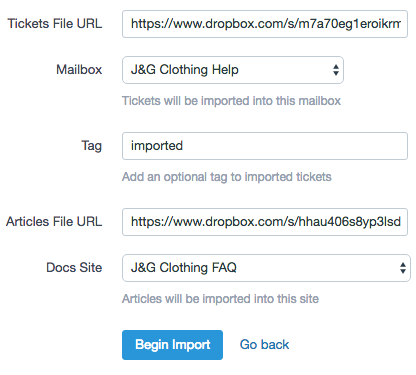 
### Common Questions
**When should I update my forwarding rule to send mail to Help Scout?**
We'd recommend changing your forwarding rule *after* the import has finished. If you're feeling adventurous, you can change it before starting the import tool, and then work out of Help Scout going forward.
**How do I know which tickets were imported?**
Imported tickets contain a tiny bit of text that looks something like this: *Conversation imported from UserVoice ticket #723.*
Did this answer your question? Thanks for the feedback There was a problem submitting your feedback. Please try again later.Yes No No results found
- [Docs](https://hsdemo.frodx.com/en/knowledge/docs#main-content)
- [Working with Docs](https://hsdemo.frodx.com/en/knowledge/docs#working-with-docs)
- [Formatting Content](https://hsdemo.frodx.com/en/knowledge/docs#formatting-content)
- [Managing Docs in Help Scout](https://hsdemo.frodx.com/en/knowledge/docs#managing-docs-in-help-scout)
- [Help Desk](https://hsdemo.frodx.com/en/knowledge/help-desk#main-content)
- [Mobile Apps](https://hsdemo.frodx.com/en/knowledge/help-desk#mobile-apps)
- [Getting Started](https://hsdemo.frodx.com/en/knowledge/help-desk#getting-started)
- [Productivity](https://hsdemo.frodx.com/en/knowledge/help-desk#productivity)
- [Mailbox and User Settings](https://hsdemo.frodx.com/en/knowledge/help-desk#mailbox-and-user-settings)
- [Working with Conversations](https://hsdemo.frodx.com/en/knowledge/help-desk#working-with-conversations)
- [Account Management](https://hsdemo.frodx.com/en/knowledge/help-desk#account-management)
- [Integrations](https://hsdemo.frodx.com/en/knowledge/help-desk#integrations)
- [Copying Email to Help Scout](https://hsdemo.frodx.com/en/knowledge/help-desk#copying-email-to-help-scout)
- [Reporting](https://hsdemo.frodx.com/en/knowledge/help-desk#reporting)
- [Sample Contact Page](https://hsdemo.frodx.com/sample-contact)
- [Sample About Page](https://hsdemo.frodx.com/sample-about)
- [Default HubSpot Blog](https://hsdemo.frodx.com/biglytics-blog)
[.png?width=550&height=171&name=frodx-logo-new%20(1).png "FrodX")](https://en.frodx.com/)
[mailto:email@email.com](mailto:email@email.com)
Copyright © 2026, GateHub Ltd