---
title: Olark
description: Olark Live Chat is an easy-to-use live chat platform for your website. Simply copy-and-paste the embed code they provide, and within minutes you can be talking to customers who are browsing your site.
---
[Skip to content](https://hsdemo.frodx.com/en/knowledge/olark#main-content)
English
Show submenu for translations
.png?width=550&height=171&name=frodx-logo-new%20(1).png)
- [Sample Contact Page](https://hsdemo.frodx.com/sample-contact)
- [Sample About Page](https://hsdemo.frodx.com/sample-about)
- [Default HubSpot Blog](https://hsdemo.frodx.com/biglytics-blog)
Open main navigation
Close main navigation
- [Sample Contact Page](https://hsdemo.frodx.com/sample-contact)
- [Sample About Page](https://hsdemo.frodx.com/sample-about)
- [Default HubSpot Blog](https://hsdemo.frodx.com/biglytics-blog)
- English
Show submenu for translations
- Contact us
Contact us
How can we help you?
- There are no suggestions because the search field is empty.
1. [Help Center](https://hsdemo.frodx.com/en/knowledge)
2. [Help Desk](https://hsdemo.frodx.com/en/knowledge/help-desk)
3. [Integrations](https://hsdemo.frodx.com/en/knowledge/help-desk#integrations)
# Olark
Olark Live Chat is an easy-to-use live chat platform for your website. Simply copy-and-paste the embed code they provide, and within minutes you can be talking to customers who are browsing your site. With plenty of customization options, you can tailor Olark to match your site's aesthetics and use it to start sales conversations or help customers in need.
Perhaps its most powerful feature are the transcripts of customer conversations Olark provides. With the Olark and Help Scout integration, chat operators can attach a complete customer conversation to a customer record in Help Scout. Operators can manually send conversations one at a time, or they can select 'auto send' all conversations. Support team members can then flag these conversations for future reference and follow-up.
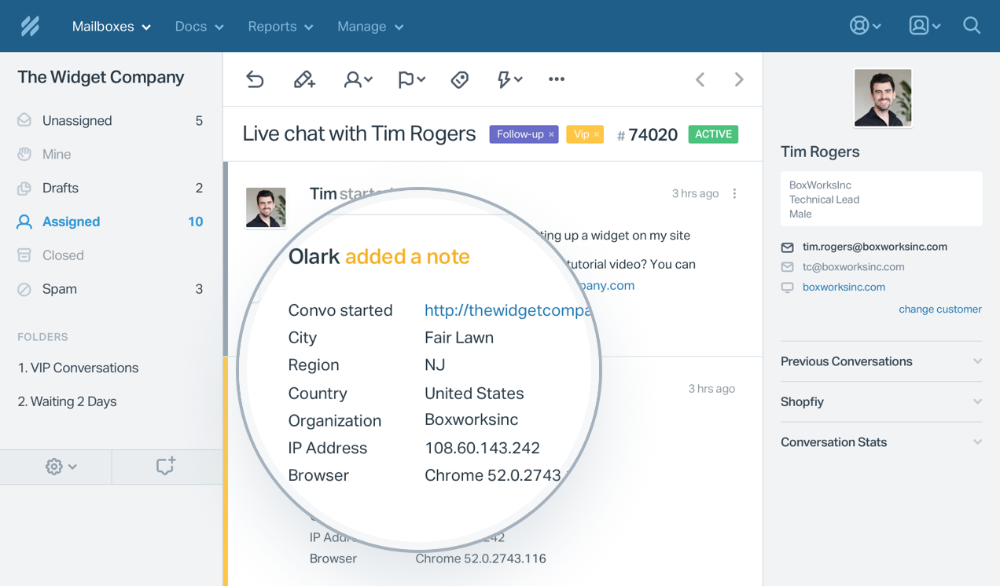
In each transcript, Olark captures customer information such as IP address, visitor location and browser/OS. This is contained as a separate note within the Help Scout mailbox.
Here's a quick snapshot of how it will appear in your Help Scout account:
### Activation instructions
First things first! [Log in](https://www.olark.com/login) to Olark, then click on the **Settings** link from the top menu bar.

Click on the *Integrations* link located under the **Preferences** section of the sidebar, and select *Help Scout* from the list. 
Head over to the [Olark app](https://secure.helpscout.net/apps/olark/) page in Help Scout, hit *Install App*, and under the *Settings* section, copy the Webhook Url.

Head back to the [webhook setup page](https://www.olark.com/settings/integrations/helpscout) in Olark, and paste the Webhook url from Help Scout into the Webhook url field. Check the box to *Send chat transcripts automatically.* Click on the green *Save* button when you're finished. 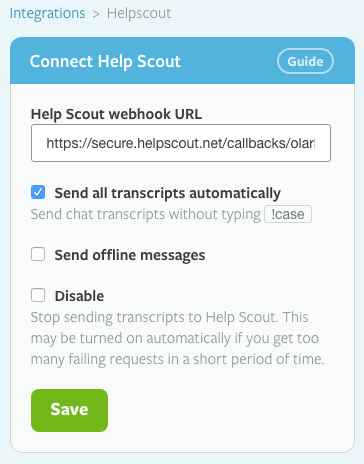
Click on the **Transcripts** tab from the top menu bar. Make sure that you're *not* emailing transcripts to your Help Scout mailbox address, or you'll receive duplicate conversations. 
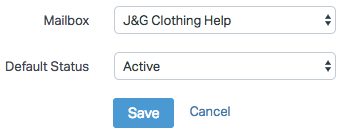
Bounce back over to Help Scout and [install the Olark app](https://secure.helpscout.net/apps/olark/). To finish up, just select which mailbox you want transcripts sent to, then select the default status for those conversations. Don't forget to hit the blue *Save* button!
 Did this answer your question? Thanks for the feedback There was a problem submitting your feedback. Please try again later.Yes No No results found
- [Docs](https://hsdemo.frodx.com/en/knowledge/docs#main-content)
- [Working with Docs](https://hsdemo.frodx.com/en/knowledge/docs#working-with-docs)
- [Formatting Content](https://hsdemo.frodx.com/en/knowledge/docs#formatting-content)
- [Managing Docs in Help Scout](https://hsdemo.frodx.com/en/knowledge/docs#managing-docs-in-help-scout)
- [Help Desk](https://hsdemo.frodx.com/en/knowledge/help-desk#main-content)
- [Mobile Apps](https://hsdemo.frodx.com/en/knowledge/help-desk#mobile-apps)
- [Getting Started](https://hsdemo.frodx.com/en/knowledge/help-desk#getting-started)
- [Productivity](https://hsdemo.frodx.com/en/knowledge/help-desk#productivity)
- [Mailbox and User Settings](https://hsdemo.frodx.com/en/knowledge/help-desk#mailbox-and-user-settings)
- [Working with Conversations](https://hsdemo.frodx.com/en/knowledge/help-desk#working-with-conversations)
- [Account Management](https://hsdemo.frodx.com/en/knowledge/help-desk#account-management)
- [Integrations](https://hsdemo.frodx.com/en/knowledge/help-desk#integrations)
- [Copying Email to Help Scout](https://hsdemo.frodx.com/en/knowledge/help-desk#copying-email-to-help-scout)
- [Reporting](https://hsdemo.frodx.com/en/knowledge/help-desk#reporting)
- [Sample Contact Page](https://hsdemo.frodx.com/sample-contact)
- [Sample About Page](https://hsdemo.frodx.com/sample-about)
- [Default HubSpot Blog](https://hsdemo.frodx.com/biglytics-blog)
[.png?width=550&height=171&name=frodx-logo-new%20(1).png "FrodX")](https://en.frodx.com/)
[mailto:email@email.com](mailto:email@email.com)
Copyright © 2026, GateHub Ltd