---
title: Private Collections and Articles for Internal Users
description: Sometimes you just want to have some Docs stashed away for your teammates' eyes only. This article is all about Private Collections and how helpful they can be for your team internally. In order to
---
[Skip to content](https://hsdemo.frodx.com/en/knowledge/private-collections-and-articles-for-internal-users#main-content)
English
Show submenu for translations
.png?width=550&height=171&name=frodx-logo-new%20(1).png)
- [Sample Contact Page](https://hsdemo.frodx.com/sample-contact)
- [Sample About Page](https://hsdemo.frodx.com/sample-about)
- [Default HubSpot Blog](https://hsdemo.frodx.com/biglytics-blog)
Open main navigation
Close main navigation
- [Sample Contact Page](https://hsdemo.frodx.com/sample-contact)
- [Sample About Page](https://hsdemo.frodx.com/sample-about)
- [Default HubSpot Blog](https://hsdemo.frodx.com/biglytics-blog)
- English
Show submenu for translations
- Contact us
Contact us
How can we help you?
- There are no suggestions because the search field is empty.
1. [Help Center](https://hsdemo.frodx.com/en/knowledge)
2. [Docs](https://hsdemo.frodx.com/en/knowledge/docs)
3. [Working with Docs](https://hsdemo.frodx.com/en/knowledge/docs#working-with-docs)
# Private Collections and Articles for Internal Users
Sometimes you just want to have some Docs stashed away for your teammates' eyes only. This article is all about Private Collections and how helpful they can be for your team internally.
#### In this article
- [Public vs. Private](https://hsdemo.frodx.com/en/knowledge/private-collections-and-articles-for-internal-users#difference)
- [Accessing a Private Collection](https://hsdemo.frodx.com/en/knowledge/private-collections-and-articles-for-internal-users#access)
- [Private Articles in Search Results](https://hsdemo.frodx.com/en/knowledge/private-collections-and-articles-for-internal-users#search)
- [Common Questions](https://hsdemo.frodx.com/en/knowledge/private-collections-and-articles-for-internal-users#common)
### Public vs. Private
- **Public collections** are viewable by everyone who visits your knowledge base site. In other words, all categories and articles contained within a public collection can be viewed by anyone with access to your Docs site or Beacon.
- **Private collections** are viewable *only* by authenticated Help Scout Users on your team. Content contained within a private collection is *never* shown to your customers in Docs or Beacon. Note that all Help Scout users *are* able to view & edit private collections.
### Accessing a Private Collection
In order to access a private collection, you must be logged in to Help Scout *and* have a link to either the collection itself, or an article within the collection. Head over to the **Docs** tab and select a private collection from the dropdown menu. From there, just open an article and click the *View Article* link, located on the right-hand sidebar.
Private collections will now be viewable in the navigation bar on the Docs front end. You'll see a small lock icon next to private collections, just so you know what's what. We'd recommend adding links for private collections on your bookmarks bar for easy access.

### Private Articles in Search Results
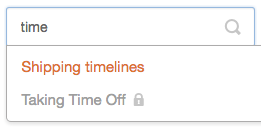
Now that you're logged in and able to view private content, you'll notice that articles within a private collection look a little different in search results. The article title will be grey, and you'll see a tiny lock icon to the right of the title. Your customers will *not* see private articles in search results.
### Common Questions
**Can I password protect a collection or site?**
Beacon offers the ability for you to control access to a Docs site with your own security. Take a look at [Restrict Docs Site Access with Beacon](https://5256150.hs-sites.com/knowledge/restrict-docs-site-access-with-beacon) to learn how to set that up. We do not currently offer the ability to password protect a collection or site within Docs itself.
**Can I store sensitive customer data in a private Collection?**
We don't recommend it. Private Collections are designed for people on your team to access internal company information, but please don't store any private customer data in Docs. Since Docs is not designed for storing customer data, it is not subject to the same GDPR or HIPAA compliance regulations that other aspects of Help Scout are.
Did this answer your question? Thanks for the feedback There was a problem submitting your feedback. Please try again later.Yes No No results found
- [Docs](https://hsdemo.frodx.com/en/knowledge/docs#main-content)
- [Working with Docs](https://hsdemo.frodx.com/en/knowledge/docs#working-with-docs)
- [Formatting Content](https://hsdemo.frodx.com/en/knowledge/docs#formatting-content)
- [Managing Docs in Help Scout](https://hsdemo.frodx.com/en/knowledge/docs#managing-docs-in-help-scout)
- [Help Desk](https://hsdemo.frodx.com/en/knowledge/help-desk#main-content)
- [Mobile Apps](https://hsdemo.frodx.com/en/knowledge/help-desk#mobile-apps)
- [Getting Started](https://hsdemo.frodx.com/en/knowledge/help-desk#getting-started)
- [Productivity](https://hsdemo.frodx.com/en/knowledge/help-desk#productivity)
- [Mailbox and User Settings](https://hsdemo.frodx.com/en/knowledge/help-desk#mailbox-and-user-settings)
- [Working with Conversations](https://hsdemo.frodx.com/en/knowledge/help-desk#working-with-conversations)
- [Account Management](https://hsdemo.frodx.com/en/knowledge/help-desk#account-management)
- [Integrations](https://hsdemo.frodx.com/en/knowledge/help-desk#integrations)
- [Copying Email to Help Scout](https://hsdemo.frodx.com/en/knowledge/help-desk#copying-email-to-help-scout)
- [Reporting](https://hsdemo.frodx.com/en/knowledge/help-desk#reporting)
- [Sample Contact Page](https://hsdemo.frodx.com/sample-contact)
- [Sample About Page](https://hsdemo.frodx.com/sample-about)
- [Default HubSpot Blog](https://hsdemo.frodx.com/biglytics-blog)
[.png?width=550&height=171&name=frodx-logo-new%20(1).png "FrodX")](https://en.frodx.com/)
[mailto:email@email.com](mailto:email@email.com)
Copyright © 2026, GateHub Ltd