---
title: Set Company Office Hours
description: If you occasionally close up shop, then you might want to set your company's Office Hours in Help Scout. That way you can review data and automatically respond to customers based on the times you're o
---
[Skip to content](https://hsdemo.frodx.com/en/knowledge/set-company-office-hours#main-content)
English
Show submenu for translations
.png?width=550&height=171&name=frodx-logo-new%20(1).png)
- [Sample Contact Page](https://hsdemo.frodx.com/sample-contact)
- [Sample About Page](https://hsdemo.frodx.com/sample-about)
- [Default HubSpot Blog](https://hsdemo.frodx.com/biglytics-blog)
Open main navigation
Close main navigation
- [Sample Contact Page](https://hsdemo.frodx.com/sample-contact)
- [Sample About Page](https://hsdemo.frodx.com/sample-about)
- [Default HubSpot Blog](https://hsdemo.frodx.com/biglytics-blog)
- English
Show submenu for translations
- Contact us
Contact us
How can we help you?
- There are no suggestions because the search field is empty.
1. [Help Center](https://hsdemo.frodx.com/en/knowledge)
2. [Help Desk](https://hsdemo.frodx.com/en/knowledge/help-desk)
3. [Account Management](https://hsdemo.frodx.com/en/knowledge/help-desk#account-management)
# Set Company Office Hours
If you occasionally close up shop, then you might want to set your company's Office Hours in Help Scout. That way you can review data and automatically respond to customers based on the times you're open. This article is all about the Office Hours setting and its benefits.
Help Scout Account Owners and Administrators have permission to manage the Office Hours setting. See [User Roles and Permissions](https://5256150.hs-sites.com/knowledge/user-roles-and-permissions) for more information on that.
#### In this article
- [Set Your Office Hours](https://hsdemo.frodx.com/en/knowledge/set-company-office-hours#set)
- [Office Hours and Reports](https://hsdemo.frodx.com/en/knowledge/set-company-office-hours#reports)
- [Office Hours and Auto-Replies](https://hsdemo.frodx.com/en/knowledge/set-company-office-hours#Reply)
### Set Your Office Hours
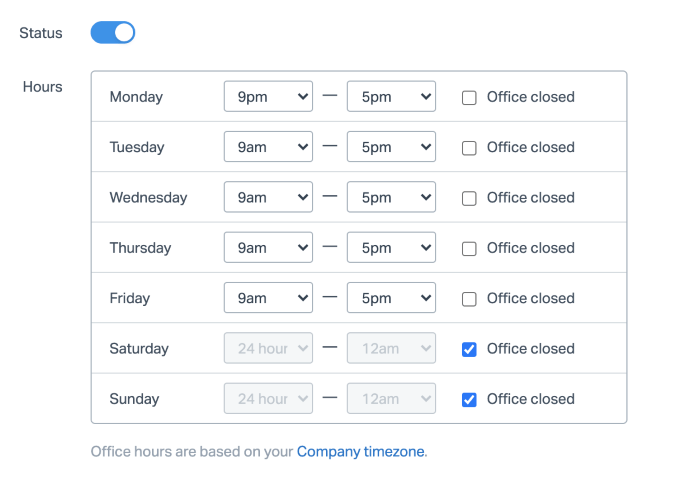
Head to **Manage \> Company**, then choose **[Office Hours](https://secure.helpscout.net/settings/office-hours/)** in the left sidebar.
Toggle **Status** on, and enter your hours of operation for each day of the week your business is open. Check the **Office closed** checkbox for any days that your business is closed.
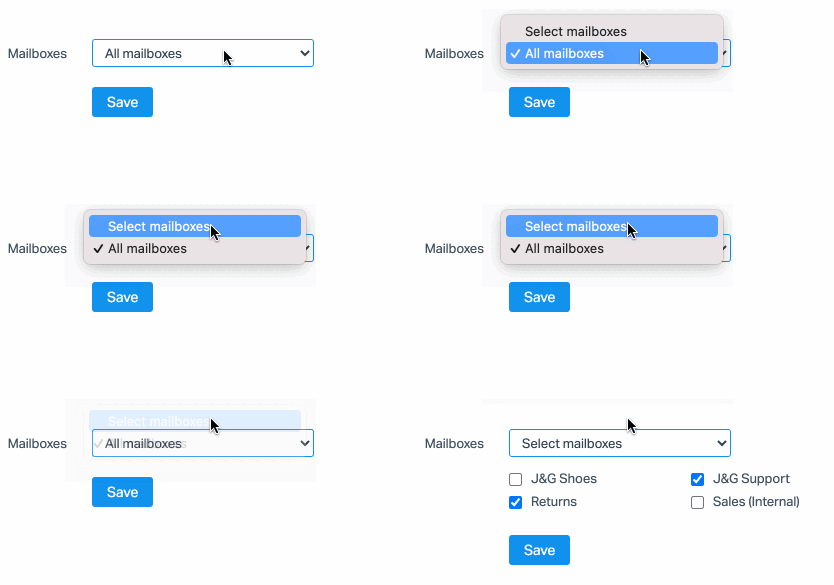
Choose whether you want the Office Hours to apply to All Mailboxes, or only certain ones.
### Office Hours and Reports
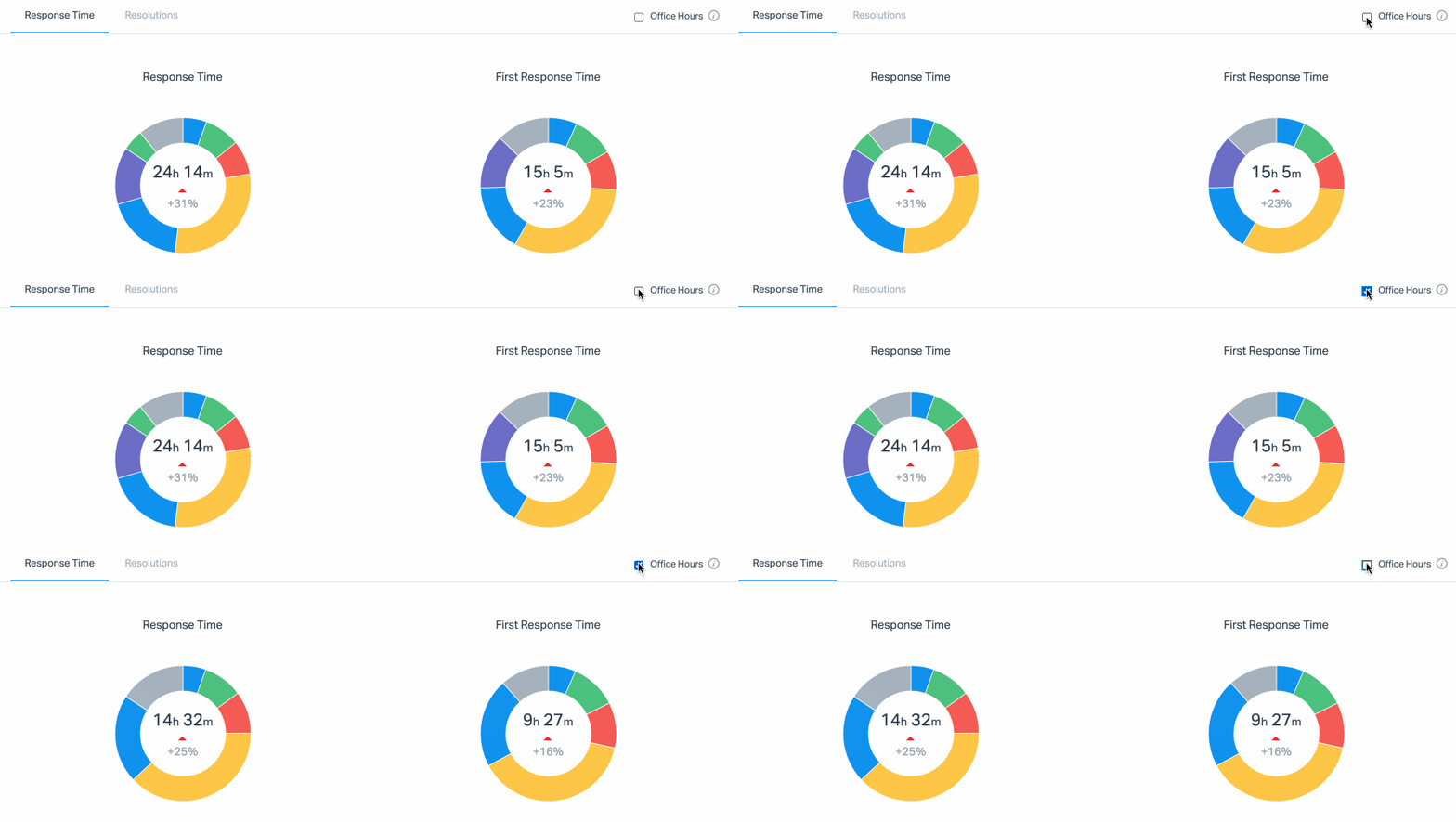
Use Office Hours to filter the Email Report and the User Report to help you gain more accurate insights into how quickly your team responds to your customers' email requests while business is in session. Read more about Help Scout Reports in general here: [Reporting](https://docs.helpscout.com/category/465-reporting)
**Office Hours in the Email Report**
Check the Office Hours checkbox at the top right corner of the Response Time metrics, right below the main productivity chart. The Response Time metrics update instantly.
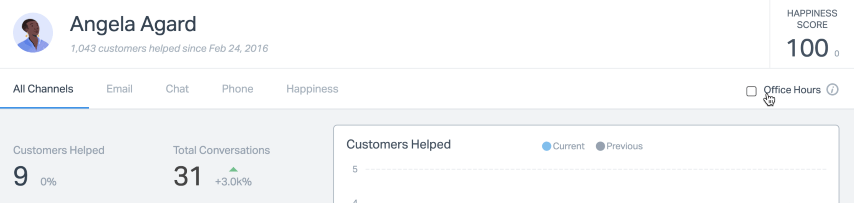
**Office Hours in the User Report**
Check the Office Hours box in the top right just above the graph. This will recalculate the Resolution and Response Time metrics for the user based on your Office Hours settings.
### Office Hours and Auto Replies
Let your customers know that while you may be closed for now, you’ll be be back and ready to respond once your business day starts.
**Manage \> Mailbox(es) \> \[Choose your mailbox\] \> Auto Reply** **Only send outside of office hours** Did this answer your question? Thanks for the feedback There was a problem submitting your feedback. Please try again later.Yes No No results found
- [Docs](https://hsdemo.frodx.com/en/knowledge/docs#main-content)
- [Working with Docs](https://hsdemo.frodx.com/en/knowledge/docs#working-with-docs)
- [Formatting Content](https://hsdemo.frodx.com/en/knowledge/docs#formatting-content)
- [Managing Docs in Help Scout](https://hsdemo.frodx.com/en/knowledge/docs#managing-docs-in-help-scout)
- [Help Desk](https://hsdemo.frodx.com/en/knowledge/help-desk#main-content)
- [Mobile Apps](https://hsdemo.frodx.com/en/knowledge/help-desk#mobile-apps)
- [Getting Started](https://hsdemo.frodx.com/en/knowledge/help-desk#getting-started)
- [Productivity](https://hsdemo.frodx.com/en/knowledge/help-desk#productivity)
- [Mailbox and User Settings](https://hsdemo.frodx.com/en/knowledge/help-desk#mailbox-and-user-settings)
- [Working with Conversations](https://hsdemo.frodx.com/en/knowledge/help-desk#working-with-conversations)
- [Account Management](https://hsdemo.frodx.com/en/knowledge/help-desk#account-management)
- [Integrations](https://hsdemo.frodx.com/en/knowledge/help-desk#integrations)
- [Copying Email to Help Scout](https://hsdemo.frodx.com/en/knowledge/help-desk#copying-email-to-help-scout)
- [Reporting](https://hsdemo.frodx.com/en/knowledge/help-desk#reporting)
- [Sample Contact Page](https://hsdemo.frodx.com/sample-contact)
- [Sample About Page](https://hsdemo.frodx.com/sample-about)
- [Default HubSpot Blog](https://hsdemo.frodx.com/biglytics-blog)
[.png?width=550&height=171&name=frodx-logo-new%20(1).png "FrodX")](https://en.frodx.com/)
[mailto:email@email.com](mailto:email@email.com)
Copyright © 2026, GateHub Ltd