---
title: Sort and organize Docs content
description: This article is all about sorting collections, categories, and articles on your Docs site. Click on the Collections tab located in the left-hand sidebar.and hold on a collection bar to drag and drop
---
[Skip to content](https://hsdemo.frodx.com/en/knowledge/sort-and-organize-docs-content#main-content)
English
Show submenu for translations
.png?width=550&height=171&name=frodx-logo-new%20(1).png)
- [Sample Contact Page](https://hsdemo.frodx.com/sample-contact)
- [Sample About Page](https://hsdemo.frodx.com/sample-about)
- [Default HubSpot Blog](https://hsdemo.frodx.com/biglytics-blog)
Open main navigation
Close main navigation
- [Sample Contact Page](https://hsdemo.frodx.com/sample-contact)
- [Sample About Page](https://hsdemo.frodx.com/sample-about)
- [Default HubSpot Blog](https://hsdemo.frodx.com/biglytics-blog)
- English
Show submenu for translations
- Contact us
Contact us
How can we help you?
- There are no suggestions because the search field is empty.
1. [Help Center](https://hsdemo.frodx.com/en/knowledge)
2. [Docs](https://hsdemo.frodx.com/en/knowledge/docs)
3. [Working with Docs](https://hsdemo.frodx.com/en/knowledge/docs#working-with-docs)
# Sort and organize Docs content
This article is all about sorting collections, categories, and articles on your Docs site.
#### In this article
- [Sorting Collections](https://hsdemo.frodx.com/en/knowledge/sort-and-organize-docs-content#collections)
- [Sorting Categories](https://hsdemo.frodx.com/en/knowledge/sort-and-organize-docs-content#categories)
- [Sorting Articles](https://hsdemo.frodx.com/en/knowledge/sort-and-organize-docs-content#articles)
### Sorting Collections
**ManageDocs**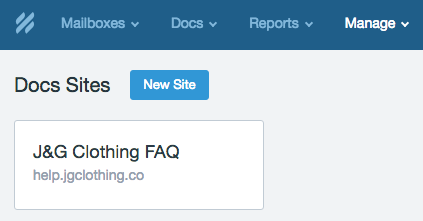
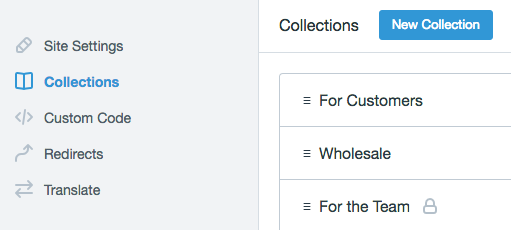
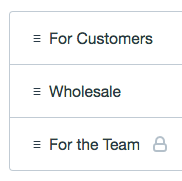
Click on the *Collections* tab located in the left-hand sidebar.and hold on a collection bar to drag and drop the collection above or below your other collections.
### Sorting Categories
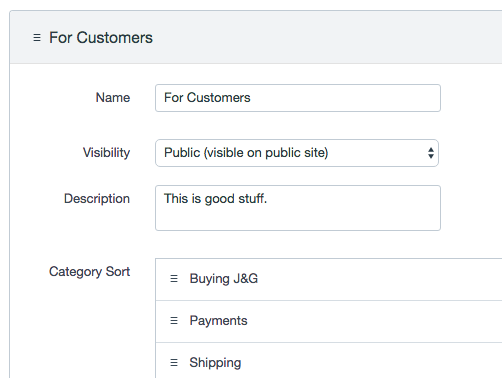
Click on the collection that contains the categories you want to sort. The collection will expand to show more options.
Check out the *Category Sort* section. Just mouseover a category or two, and drag and drop up or down as desired.
### Sorting Articles
Articles can be sorted a couple of different ways:
- By popularity
- From A-Z
- By last updated
- Custom
**Collections** 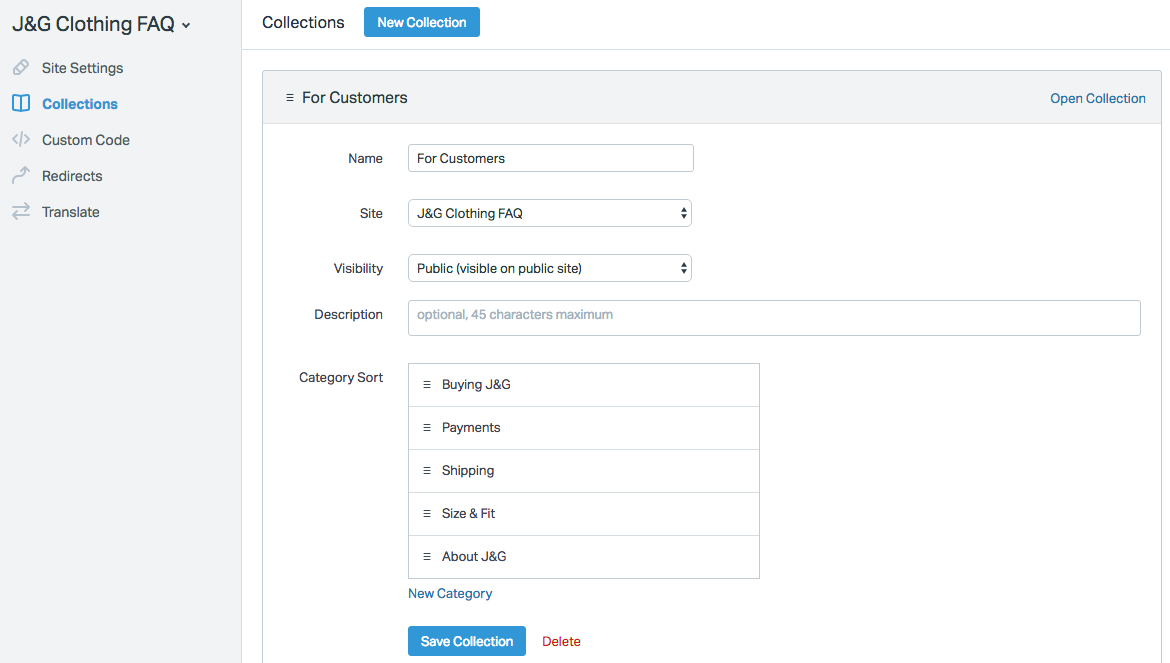 **Custom***Default Sort* **Save** 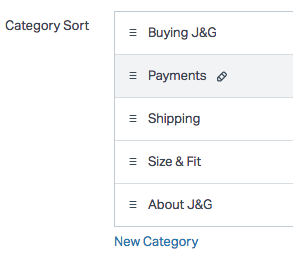 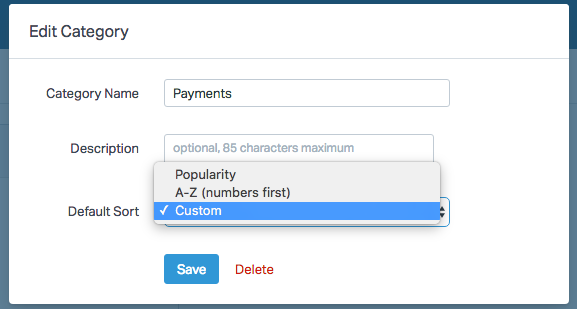 *Payments*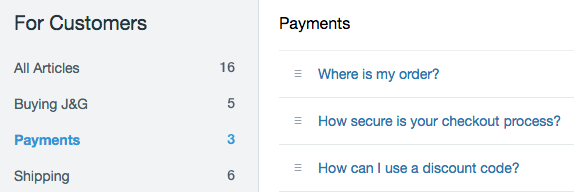
Click on the *Payments* text at the top of the articles table. Select the **Custom** sorting order from the pop-up modal, then save your settings. You can now drag and drop articles in to a specific order. 
**Note:** Did this answer your question? Thanks for the feedback There was a problem submitting your feedback. Please try again later.Yes No No results found
- [Docs](https://hsdemo.frodx.com/en/knowledge/docs#main-content)
- [Working with Docs](https://hsdemo.frodx.com/en/knowledge/docs#working-with-docs)
- [Formatting Content](https://hsdemo.frodx.com/en/knowledge/docs#formatting-content)
- [Managing Docs in Help Scout](https://hsdemo.frodx.com/en/knowledge/docs#managing-docs-in-help-scout)
- [Help Desk](https://hsdemo.frodx.com/en/knowledge/help-desk#main-content)
- [Mobile Apps](https://hsdemo.frodx.com/en/knowledge/help-desk#mobile-apps)
- [Getting Started](https://hsdemo.frodx.com/en/knowledge/help-desk#getting-started)
- [Productivity](https://hsdemo.frodx.com/en/knowledge/help-desk#productivity)
- [Mailbox and User Settings](https://hsdemo.frodx.com/en/knowledge/help-desk#mailbox-and-user-settings)
- [Working with Conversations](https://hsdemo.frodx.com/en/knowledge/help-desk#working-with-conversations)
- [Account Management](https://hsdemo.frodx.com/en/knowledge/help-desk#account-management)
- [Integrations](https://hsdemo.frodx.com/en/knowledge/help-desk#integrations)
- [Copying Email to Help Scout](https://hsdemo.frodx.com/en/knowledge/help-desk#copying-email-to-help-scout)
- [Reporting](https://hsdemo.frodx.com/en/knowledge/help-desk#reporting)
- [Sample Contact Page](https://hsdemo.frodx.com/sample-contact)
- [Sample About Page](https://hsdemo.frodx.com/sample-about)
- [Default HubSpot Blog](https://hsdemo.frodx.com/biglytics-blog)
[.png?width=550&height=171&name=frodx-logo-new%20(1).png "FrodX")](https://en.frodx.com/)
[mailto:email@email.com](mailto:email@email.com)
Copyright © 2026, GateHub Ltd