---
title: Understand Conversation Icons and Colors
description: Pictures are worth a thousand words they say, and Help Scout uses icons and colors to give you a lot of information in a quick glance. Here we'll break down the icons and colors that you'll see in a c
---
[Skip to content](https://hsdemo.frodx.com/en/knowledge/understand-conversation-icons-and-colors#main-content)
English
Show submenu for translations
.png?width=550&height=171&name=frodx-logo-new%20(1).png)
- [Sample Contact Page](https://hsdemo.frodx.com/sample-contact)
- [Sample About Page](https://hsdemo.frodx.com/sample-about)
- [Default HubSpot Blog](https://hsdemo.frodx.com/biglytics-blog)
Open main navigation
Close main navigation
- [Sample Contact Page](https://hsdemo.frodx.com/sample-contact)
- [Sample About Page](https://hsdemo.frodx.com/sample-about)
- [Default HubSpot Blog](https://hsdemo.frodx.com/biglytics-blog)
- English
Show submenu for translations
- Contact us
Contact us
How can we help you?
- There are no suggestions because the search field is empty.
1. [Help Center](https://hsdemo.frodx.com/en/knowledge)
2. [Help Desk](https://hsdemo.frodx.com/en/knowledge/help-desk)
3. [Working with Conversations](https://hsdemo.frodx.com/en/knowledge/help-desk#working-with-conversations)
# Understand Conversation Icons and Colors
Pictures are worth a thousand words they say, and Help Scout uses icons and colors to give you a lot of information in a quick glance. Here we'll break down the icons and colors that you'll see in a conversation designed to make your life easier!
#### In this article
- [Toolbar Icons](https://hsdemo.frodx.com/en/knowledge/understand-conversation-icons-and-colors#toolbar)
- [Status Indicators](https://hsdemo.frodx.com/en/knowledge/understand-conversation-icons-and-colors#status)
- [Conversation Thread Colors](https://hsdemo.frodx.com/en/knowledge/understand-conversation-icons-and-colors#threads)
### Toolbar Icons
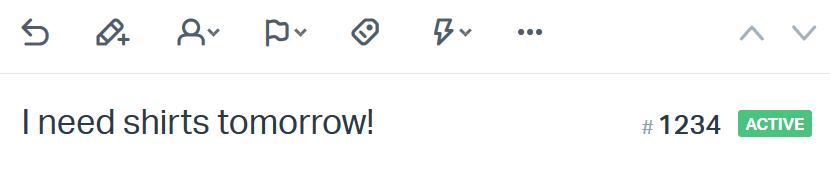
At the top of each conversations you'll find a row of buttons that you'll get to know well. When you're starting out, to figure out what’s what, hover over each icon to see a tooltip. From left to right:
*Reply ⋅ Note ⋅ Assign ⋅ Status ⋅ Tag ⋅ Workflow ⋅ More Actions*
Note: The workflow feature is only available on Standard, Plus, and Pro plans.
Just below the toolbar icons is the subject line. You can edit the conversation subject by clicking anywhere on the text. To the far right, you’ll see the conversation number, followed by the conversation’s current status. The two arrow icons above the status indicator take you to the previous or next conversation.
### Status Indicators
In Help Scout, there are three values for conversation status:
1. **Active** conversations indicate the conversation is waiting for action. New conversations are automatically set as *Active* when they arrive in your mailbox.
2. **Pending** conversations are waiting on something. Set a conversation to *Pending* if you’re waiting to hear back from a customer, or you just need time to gather more information.
3. **Closed** conversations are solved conversations. Set the status to *Closed* when you’re finished working with the customer, and you consider the case to be resolved.
If a customer replies back to a Pending or Closed conversation, the status will automatically be changed to Active. It’s not possible to edit existing status options, or add custom values to the status menu. We suggest [using tags for that](https://5256150.hs-sites.com/knowledge/create-and-manage-tags).
### Conversation Thread Colors
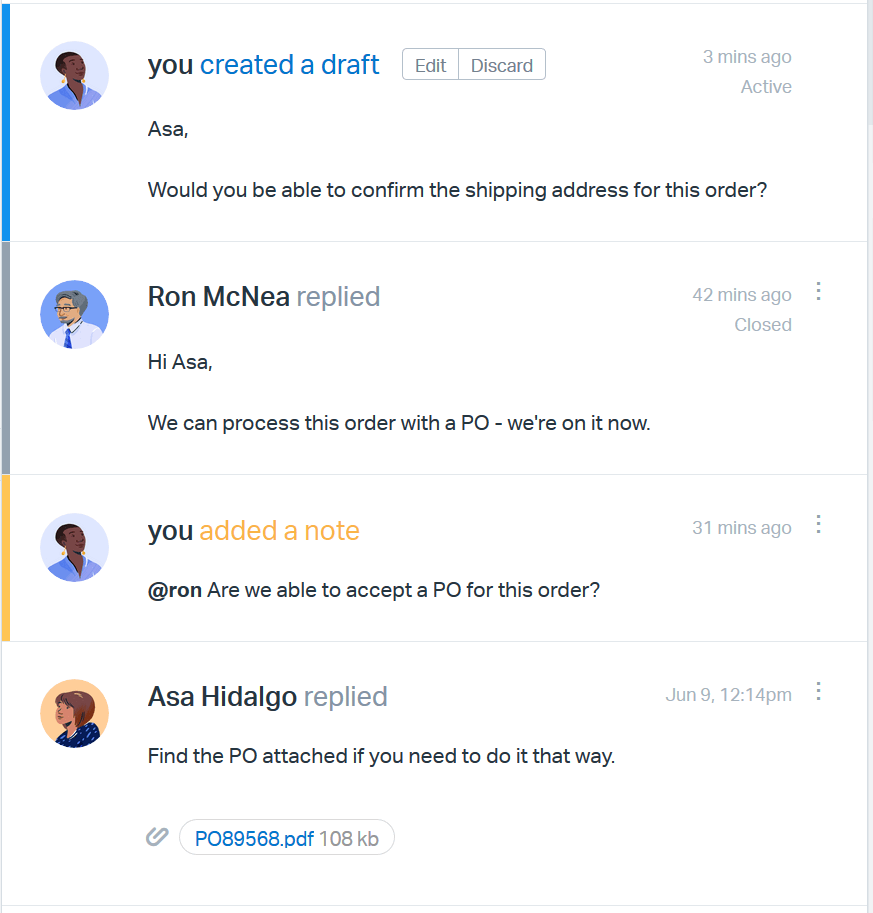
Conversations can be colorful! You’ll notice a couple of different border colors, each representing a different type of thread:
- Customer replies have no border.
- User replies have a grey border.
- Drafts are represented by a blue border.
- Notes are represented by a yellow border.
Did this answer your question? Thanks for the feedback There was a problem submitting your feedback. Please try again later.Yes No No results found
- [Docs](https://hsdemo.frodx.com/en/knowledge/docs#main-content)
- [Working with Docs](https://hsdemo.frodx.com/en/knowledge/docs#working-with-docs)
- [Formatting Content](https://hsdemo.frodx.com/en/knowledge/docs#formatting-content)
- [Managing Docs in Help Scout](https://hsdemo.frodx.com/en/knowledge/docs#managing-docs-in-help-scout)
- [Help Desk](https://hsdemo.frodx.com/en/knowledge/help-desk#main-content)
- [Mobile Apps](https://hsdemo.frodx.com/en/knowledge/help-desk#mobile-apps)
- [Getting Started](https://hsdemo.frodx.com/en/knowledge/help-desk#getting-started)
- [Productivity](https://hsdemo.frodx.com/en/knowledge/help-desk#productivity)
- [Mailbox and User Settings](https://hsdemo.frodx.com/en/knowledge/help-desk#mailbox-and-user-settings)
- [Working with Conversations](https://hsdemo.frodx.com/en/knowledge/help-desk#working-with-conversations)
- [Account Management](https://hsdemo.frodx.com/en/knowledge/help-desk#account-management)
- [Integrations](https://hsdemo.frodx.com/en/knowledge/help-desk#integrations)
- [Copying Email to Help Scout](https://hsdemo.frodx.com/en/knowledge/help-desk#copying-email-to-help-scout)
- [Reporting](https://hsdemo.frodx.com/en/knowledge/help-desk#reporting)
- [Sample Contact Page](https://hsdemo.frodx.com/sample-contact)
- [Sample About Page](https://hsdemo.frodx.com/sample-about)
- [Default HubSpot Blog](https://hsdemo.frodx.com/biglytics-blog)
[.png?width=550&height=171&name=frodx-logo-new%20(1).png "FrodX")](https://en.frodx.com/)
[mailto:email@email.com](mailto:email@email.com)
Copyright © 2026, GateHub Ltd