---
title: Use an Outlook Redirect Rule to Redirect Email to Help Scout
description: This article describes how to create a redirect rule in Outlook to move your email into Help Scout. Note that this is different than a forwarding rule in Outlook. The redirect rule ensures that Help S
---
[Skip to content](https://hsdemo.frodx.com/en/knowledge/use-an-outlook-redirect-rule-to-redirect-email-to-help-scout#main-content)
English
Show submenu for translations
.png?width=550&height=171&name=frodx-logo-new%20(1).png)
- [Sample Contact Page](https://hsdemo.frodx.com/sample-contact)
- [Sample About Page](https://hsdemo.frodx.com/sample-about)
- [Default HubSpot Blog](https://hsdemo.frodx.com/biglytics-blog)
Open main navigation
Close main navigation
- [Sample Contact Page](https://hsdemo.frodx.com/sample-contact)
- [Sample About Page](https://hsdemo.frodx.com/sample-about)
- [Default HubSpot Blog](https://hsdemo.frodx.com/biglytics-blog)
- English
Show submenu for translations
- Contact us
Contact us
How can we help you?
- There are no suggestions because the search field is empty.
1. [Help Center](https://hsdemo.frodx.com/en/knowledge)
2. [Help Desk](https://hsdemo.frodx.com/en/knowledge/help-desk)
3. [Copying Email to Help Scout](https://hsdemo.frodx.com/en/knowledge/help-desk#copying-email-to-help-scout)
# Use an Outlook Redirect Rule to Redirect Email to Help Scout
This article describes how to create a redirect rule in Outlook to move your email into Help Scout. Note that this is different than a *forwarding* rule in Outlook. The *redirect* rule ensures that Help Scout is able to properly parse your email.
If you know your Outlook Web Access (OWA) login information, you may want to consider setting forwarding there instead of relying on Outlook rules. Take a look at [Forward from Microsoft 365 Outlook Web Access (OWA)](https://5256150.hs-sites.com/knowledge/forward-from-microsoft-365-outlook-web-access-owa) for the detailed instructions there. **Note:** You should only use a single method to get your email from Microsoft 365 to Help Scout. If you create a redirect rule *and* have forwarding enabled in OWA or by your Microsoft 365 admin, you will see duplicate emails in your Help Scout mailbox.
First things first: Make sure you have followed the first steps in [Connect Your Custom Address](https://docs.helpscout.com/article/830-get-your-email-into-help-scout#connect) and you have your Help Scout Mailbox Address ready.
#### In this article
- [Microsoft 365 (formerly Office 365)](https://hsdemo.frodx.com/en/knowledge/use-an-outlook-redirect-rule-to-redirect-email-to-help-scout#365)
- [Outlook 2013 or 2016](https://hsdemo.frodx.com/en/knowledge/use-an-outlook-redirect-rule-to-redirect-email-to-help-scout#2013)
### Microsoft 365 (formerly Office 365)
**Manage Rules & Alerts...** 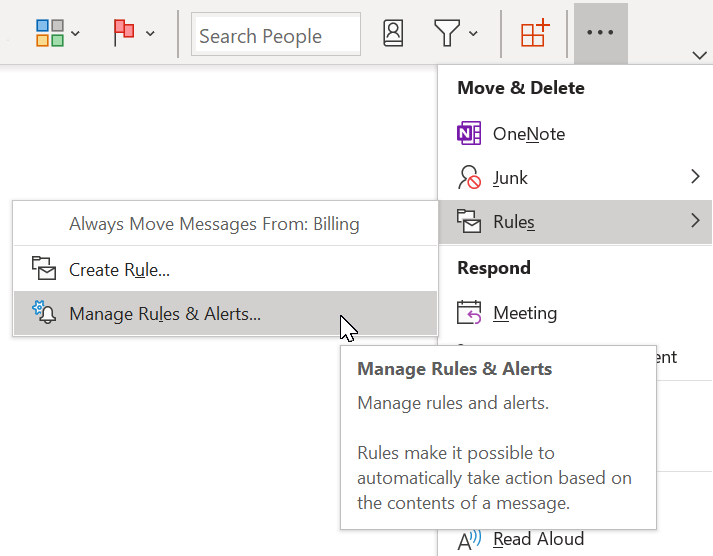 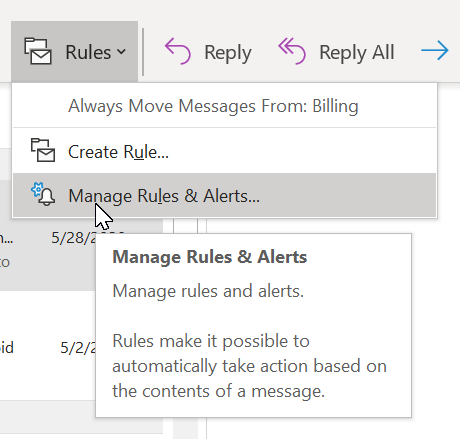 **New Rule...** **Apply rule on messages I receive** 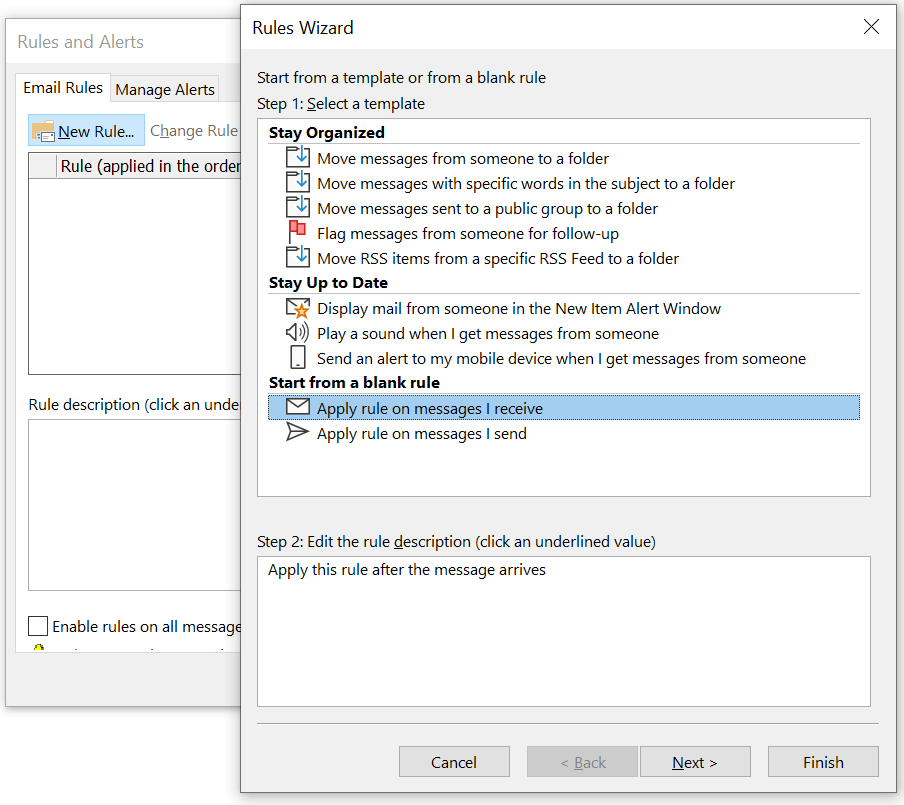 **Next** **Yes** 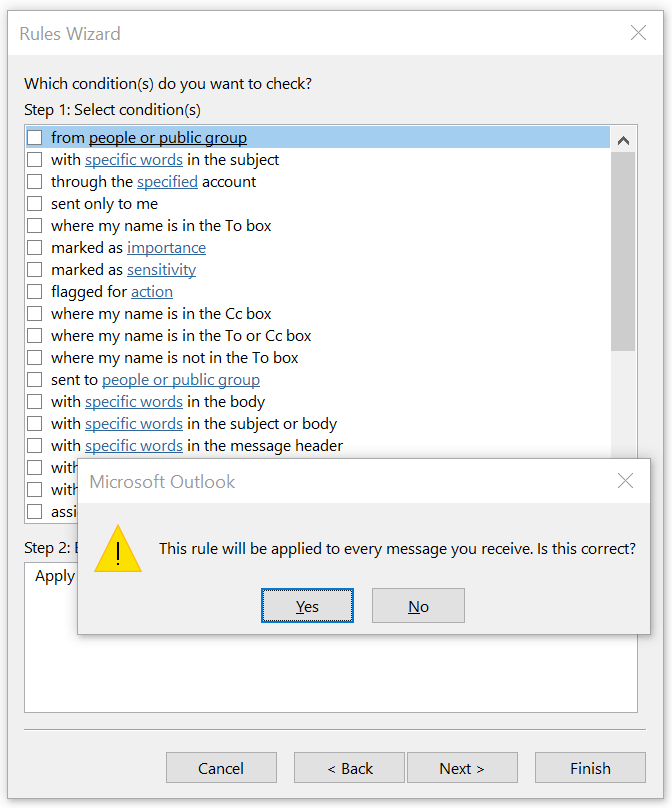
Click the checkbox next to **redirect it to people or a public group** in the top box, then click on the blue linked **people or public group** in the bottom box. This will bring up your address book. In the To field, enter the Help Scout Mailbox Address, click OK to select that address. Click **Finish** on this screen. As the last step, click **OK** on the *Rules and Alerts* window to save your new rule.
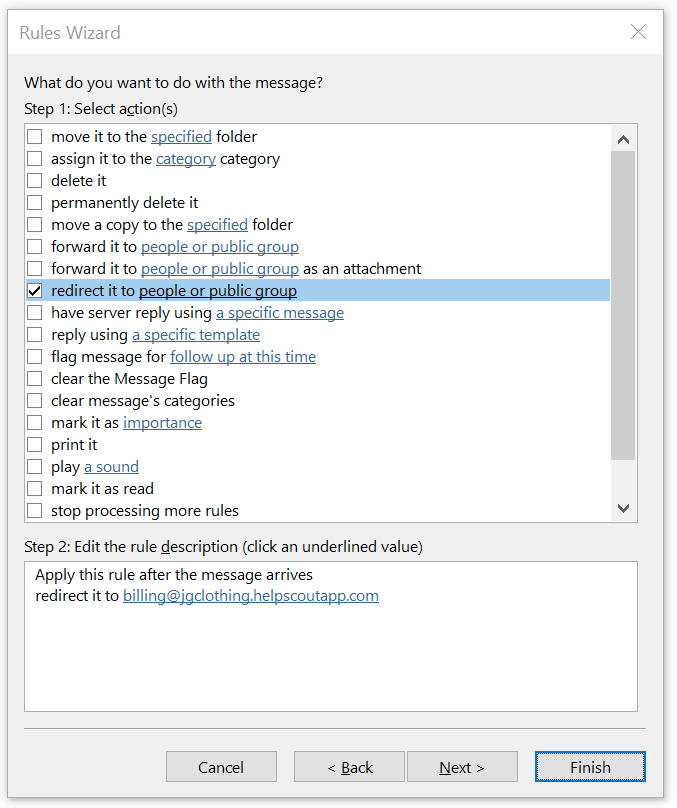
That will do it - head back into Help Scout to see your emails in your mailbox! **Next steps:** Set up [SPF](https://5256150.hs-sites.com/knowledge/use-an-spf-record-to-help-with-email-delivery) and [DKIM](https://5256150.hs-sites.com/knowledge/use-dkim-to-help-with-email-delivery-1) to allow Help Scout servers to send email on your behalf, or set up a [Custom SMTP](https://docs.helpscout.com/article/120-smtp-settings) server to have your email sent from your own provider.
**Note:** You may need to take an additional step if you're receiving bounce messages after setting up the redirect rule. Microsoft 365 spam protection might be set to block automatic forwards and redirects for your organization. Reach out to your Microsoft 365 administrator and point them over to [Enable External Forwarding in Microsoft 365](https://docs.helpscout.com/article/1424-enable-external-forwarding-in-Microsoft-365) for the steps they need to take to allow your email to forward to Help Scout.
### Outlook 2013 or 2016
Click on **Rules** then **Manage Rules & Alerts...** from the Home ribbon.

Click **New Rule...** on the *Rules and Alerts* window, then click **Apply rule on messages I receive** on the first *Rules Wizard* screen. Click **Next** to advance the wizard.
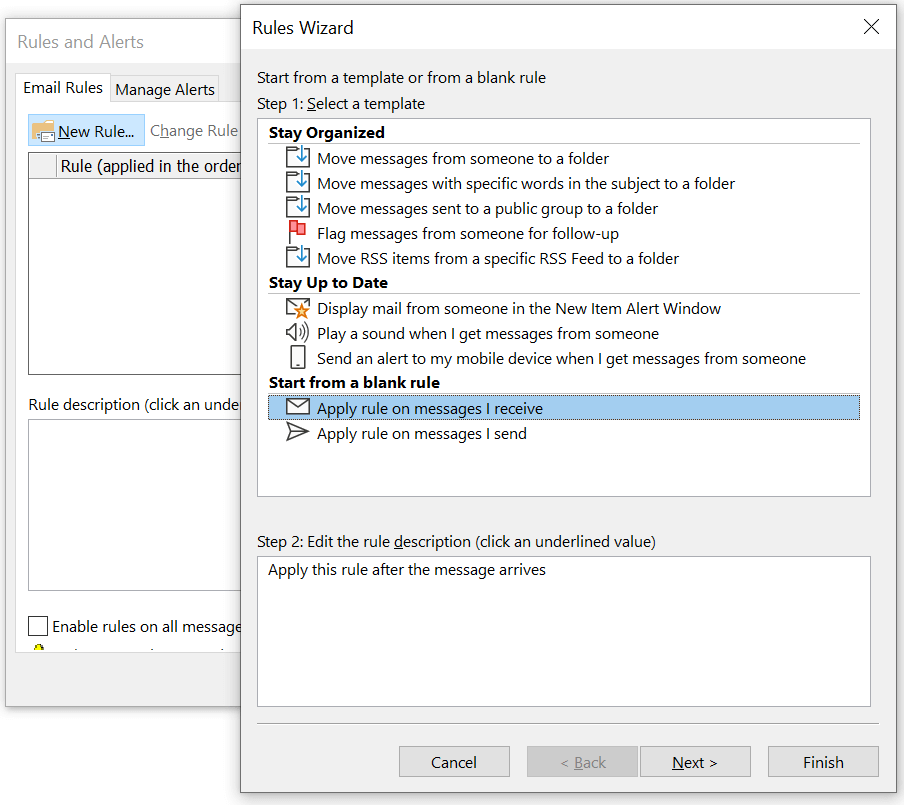
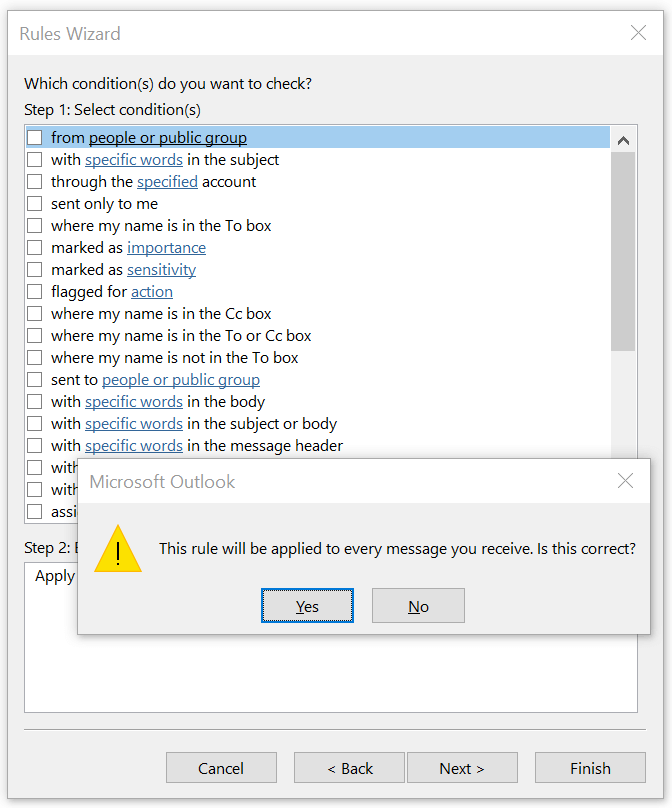
Click **Next** on the *Rules Wizard* without specifying any conditions. You will see a popup warning "This rule will be applied to every message you receive. Is this correct?" - click **Yes** to continue.
 **redirect it to people or a public group** **people or public group** **Finish** **OK** *Rules and Alerts* 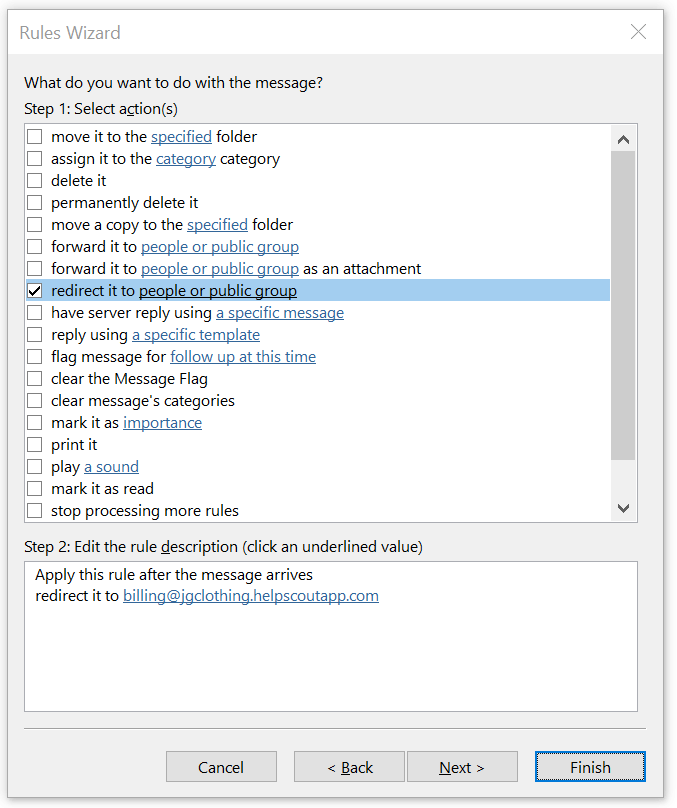
That will do it - head back into Help Scout to see your emails in your mailbox! **Next steps:** Set up [SPF](https://5256150.hs-sites.com/knowledge/use-an-spf-record-to-help-with-email-delivery) and [DKIM](https://5256150.hs-sites.com/knowledge/use-dkim-to-help-with-email-delivery-1) to allow Help Scout servers to send email on your behalf, or set up a [Custom SMTP](https://docs.helpscout.com/article/120-smtp-settings) server to have your email sent from your own provider.
Did this answer your question? Thanks for the feedback There was a problem submitting your feedback. Please try again later.Yes No No results found
- [Docs](https://hsdemo.frodx.com/en/knowledge/docs#main-content)
- [Working with Docs](https://hsdemo.frodx.com/en/knowledge/docs#working-with-docs)
- [Formatting Content](https://hsdemo.frodx.com/en/knowledge/docs#formatting-content)
- [Managing Docs in Help Scout](https://hsdemo.frodx.com/en/knowledge/docs#managing-docs-in-help-scout)
- [Help Desk](https://hsdemo.frodx.com/en/knowledge/help-desk#main-content)
- [Mobile Apps](https://hsdemo.frodx.com/en/knowledge/help-desk#mobile-apps)
- [Getting Started](https://hsdemo.frodx.com/en/knowledge/help-desk#getting-started)
- [Productivity](https://hsdemo.frodx.com/en/knowledge/help-desk#productivity)
- [Mailbox and User Settings](https://hsdemo.frodx.com/en/knowledge/help-desk#mailbox-and-user-settings)
- [Working with Conversations](https://hsdemo.frodx.com/en/knowledge/help-desk#working-with-conversations)
- [Account Management](https://hsdemo.frodx.com/en/knowledge/help-desk#account-management)
- [Integrations](https://hsdemo.frodx.com/en/knowledge/help-desk#integrations)
- [Copying Email to Help Scout](https://hsdemo.frodx.com/en/knowledge/help-desk#copying-email-to-help-scout)
- [Reporting](https://hsdemo.frodx.com/en/knowledge/help-desk#reporting)
- [Sample Contact Page](https://hsdemo.frodx.com/sample-contact)
- [Sample About Page](https://hsdemo.frodx.com/sample-about)
- [Default HubSpot Blog](https://hsdemo.frodx.com/biglytics-blog)
[.png?width=550&height=171&name=frodx-logo-new%20(1).png "FrodX")](https://en.frodx.com/)
[mailto:email@email.com](mailto:email@email.com)
Copyright © 2026, GateHub Ltd