---
title: Add Responsive Video to a Docs Article
description: Video is a great way to help customers in your Docs site. The default design for Docs overall is responsive — it looks nice on a computer or a mobile device — but you may find you'll need to add a bit
---
[Skip to content](https://hsdemo.frodx.com/en/knowledge/add-responsive-video-to-a-docs-article#main-content)
English
Show submenu for translations
.png?width=550&height=171&name=frodx-logo-new%20(1).png)
- [Sample Contact Page](https://hsdemo.frodx.com/sample-contact)
- [Sample About Page](https://hsdemo.frodx.com/sample-about)
- [Default HubSpot Blog](https://hsdemo.frodx.com/biglytics-blog)
Open main navigation
Close main navigation
- [Sample Contact Page](https://hsdemo.frodx.com/sample-contact)
- [Sample About Page](https://hsdemo.frodx.com/sample-about)
- [Default HubSpot Blog](https://hsdemo.frodx.com/biglytics-blog)
- English
Show submenu for translations
- Contact us
Contact us
How can we help you?
- There are no suggestions because the search field is empty.
1. [Help Center](https://hsdemo.frodx.com/en/knowledge)
2. [Docs](https://hsdemo.frodx.com/en/knowledge/docs)
3. [Formatting Content](https://hsdemo.frodx.com/en/knowledge/docs#formatting-content)
# Add Responsive Video to a Docs Article
Video is a great way to help customers in your Docs site. The default design for Docs overall is responsive — it looks nice on a computer or a mobile device — but you may find you'll need to add a bit of CSS to your video embeds or alter your video provider's default embed code to ensure the video will load in a way that looks great on all platforms across all sizes.
In this article we will show you how to add a snippet of CSS to your video embed code to make it responsive, and we'll offer a few provider specific tidbits we've seen.
**Note**: Making your video responsive will allow your video to render nicely in Beacon as well!
#### In this article
- [Add CSS Classes for Responsive Video](https://hsdemo.frodx.com/en/knowledge/add-responsive-video-to-a-docs-article#css)
- [Specific Provider Notes](https://hsdemo.frodx.com/en/knowledge/add-responsive-video-to-a-docs-article#providers)
### Add CSS Classes for Responsive Video
**Insert Video**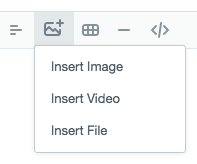
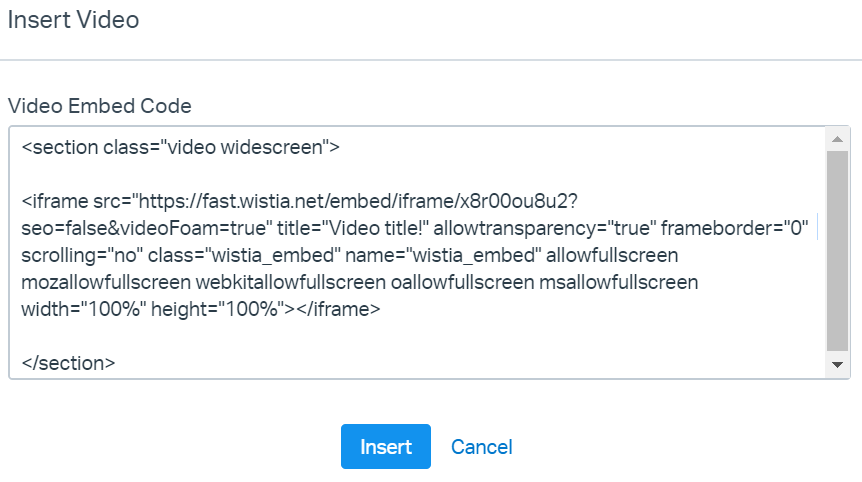
Paste your video embed code you got from your video provider, and add a bit of HTML around it. You'll just wrap it in a section tag, giving it a class of *video*. If it's a widescreen video, add the class *widescreen* as well.
Not sure how to do that? We've got you! Here's the code you want to copy for a widescreen video.
` VIDEO EMBED CODE GOES HERE `
A widescreen video embed then would look something like this:
### Specific Provider Notes
Each video provider offers different built-in options with their default embed codes. You may need to modify the default embed code they provide or use a specific version of their embed code to properly set a responsive video in Docs.
You'll still want to wrap the embed in the CSS snippet as shown above, but if you're still seeing video out of bounds after adding that, these tweaks can get things cleared up for you.
#### Wistia
You want to use either their [Standard inline embed](https://wistia.com/support/embed-and-share/video-on-your-website#inline-embeds) or the [Fallback inline embed](https://wistia.com/support/embed-and-share/video-on-your-website#fallback-iframe-embed) to embed your video.
#### YouTube, Vimeo, and Facebook
YouTube, Vimeo, and Facebook all include width and height specifications in their embed by default, which can keep your video from being responsive. You may see this in another video hosting service as well. Removing those specifications from their embed codes should do the trick for you!
As an example, here's the default embed code for a [YouTube video about Help Scout's Against the Grain series](https://www.youtube.com/watch?v=CHiD1Kz-rJQ):
Make sure you still wrap it in the CSS as shown above, but also remove the width and height designations in the embed to make sure your video is responsive!
If you're using some other video hosting service that we've not listed here — give us a shout if you've found the extra nudge their code needs to play nicely!
Did this answer your question? Thanks for the feedback There was a problem submitting your feedback. Please try again later.Yes No No results found
- [Docs](https://hsdemo.frodx.com/en/knowledge/docs#main-content)
- [Working with Docs](https://hsdemo.frodx.com/en/knowledge/docs#working-with-docs)
- [Formatting Content](https://hsdemo.frodx.com/en/knowledge/docs#formatting-content)
- [Managing Docs in Help Scout](https://hsdemo.frodx.com/en/knowledge/docs#managing-docs-in-help-scout)
- [Help Desk](https://hsdemo.frodx.com/en/knowledge/help-desk#main-content)
- [Mobile Apps](https://hsdemo.frodx.com/en/knowledge/help-desk#mobile-apps)
- [Getting Started](https://hsdemo.frodx.com/en/knowledge/help-desk#getting-started)
- [Productivity](https://hsdemo.frodx.com/en/knowledge/help-desk#productivity)
- [Mailbox and User Settings](https://hsdemo.frodx.com/en/knowledge/help-desk#mailbox-and-user-settings)
- [Working with Conversations](https://hsdemo.frodx.com/en/knowledge/help-desk#working-with-conversations)
- [Account Management](https://hsdemo.frodx.com/en/knowledge/help-desk#account-management)
- [Integrations](https://hsdemo.frodx.com/en/knowledge/help-desk#integrations)
- [Copying Email to Help Scout](https://hsdemo.frodx.com/en/knowledge/help-desk#copying-email-to-help-scout)
- [Reporting](https://hsdemo.frodx.com/en/knowledge/help-desk#reporting)
- [Sample Contact Page](https://hsdemo.frodx.com/sample-contact)
- [Sample About Page](https://hsdemo.frodx.com/sample-about)
- [Default HubSpot Blog](https://hsdemo.frodx.com/biglytics-blog)
[.png?width=550&height=171&name=frodx-logo-new%20(1).png "FrodX")](https://en.frodx.com/)
[mailto:email@email.com](mailto:email@email.com)
Copyright © 2026, GateHub Ltd