---
title: Capsule
description: Capsule is a web-based CRM that helps you track the people and companies you do business with. It's a great tool for tracking conversations (like the ones in Help Scout and elsewhere) and opportunitie
---
[Skip to content](https://hsdemo.frodx.com/en/knowledge/capsule#main-content)
English
Show submenu for translations
.png?width=550&height=171&name=frodx-logo-new%20(1).png)
- [Sample Contact Page](https://hsdemo.frodx.com/sample-contact)
- [Sample About Page](https://hsdemo.frodx.com/sample-about)
- [Default HubSpot Blog](https://hsdemo.frodx.com/biglytics-blog)
Open main navigation
Close main navigation
- [Sample Contact Page](https://hsdemo.frodx.com/sample-contact)
- [Sample About Page](https://hsdemo.frodx.com/sample-about)
- [Default HubSpot Blog](https://hsdemo.frodx.com/biglytics-blog)
- English
Show submenu for translations
- Contact us
Contact us
How can we help you?
- There are no suggestions because the search field is empty.
1. [Help Center](https://hsdemo.frodx.com/en/knowledge)
2. [Help Desk](https://hsdemo.frodx.com/en/knowledge/help-desk)
3. [Integrations](https://hsdemo.frodx.com/en/knowledge/help-desk#integrations)
# Capsule
[Capsule](https://capsulecrm.com/) is a web-based CRM that helps you track the people and companies you do business with. It's a great tool for tracking conversations (like the ones in Help Scout and elsewhere) and opportunities in the pipeline. One great thing about using Capsule alongside Help Scout is being able to sync profile information.
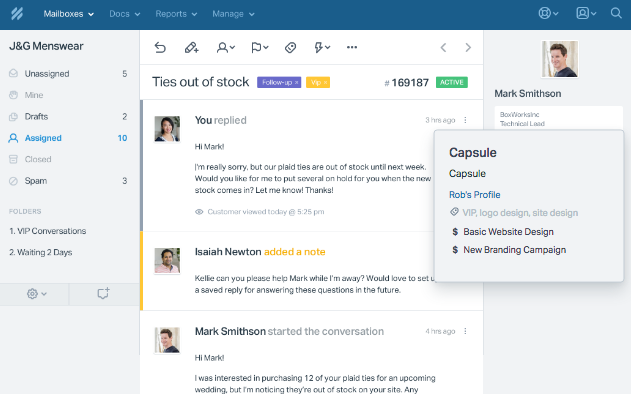
By installing the app, customer profile data from Capsule will auto-sync with the customer's profile in Help Scout. This way you always have the latest customer contact information. If the customer doesn't exist in Capsule, you can add them with a single click. If they do exist, Help Scout pulls in a profile link, and tags any active opportunities for the customer. Check out the snapshot below of how it will appear below in Help Scout:
### Activation instructions
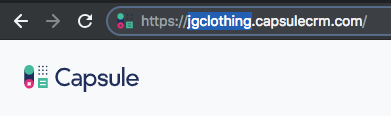
[Log in](https://app.capsulecrm.com/siteaddress/goto) to your Capsule account and take note of your Capsule site address. Your site address is the text screen before capsulecrm.com in your browser address bar. In the example below, our shop address is *jgclothing*.
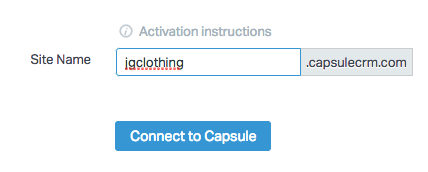
In Help Scout, head over to **Manage → Apps → Capsule** to drop in your site address. Then, click the blue *Connect to Capsule* button.
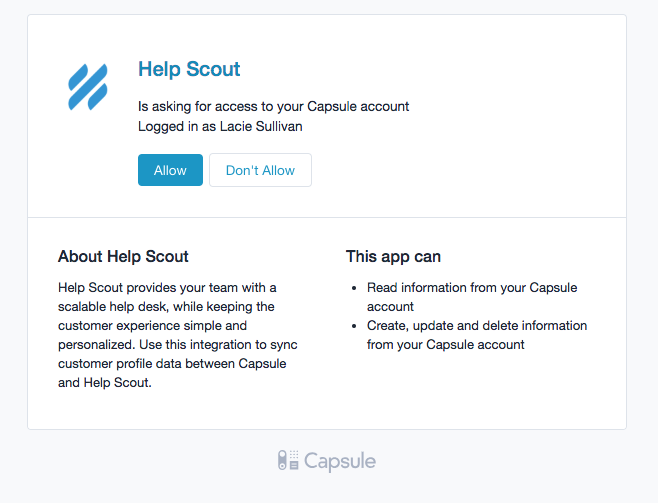
If prompted, log back in to your Capsule account and then click the blue *Allow* button.
 *Sync ProfileShow Custom Fields Save* 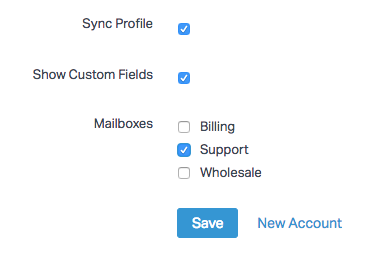 *New Account*Did this answer your question? Thanks for the feedback There was a problem submitting your feedback. Please try again later.Yes No No results found
- [Docs](https://hsdemo.frodx.com/en/knowledge/docs#main-content)
- [Working with Docs](https://hsdemo.frodx.com/en/knowledge/docs#working-with-docs)
- [Formatting Content](https://hsdemo.frodx.com/en/knowledge/docs#formatting-content)
- [Managing Docs in Help Scout](https://hsdemo.frodx.com/en/knowledge/docs#managing-docs-in-help-scout)
- [Help Desk](https://hsdemo.frodx.com/en/knowledge/help-desk#main-content)
- [Mobile Apps](https://hsdemo.frodx.com/en/knowledge/help-desk#mobile-apps)
- [Getting Started](https://hsdemo.frodx.com/en/knowledge/help-desk#getting-started)
- [Productivity](https://hsdemo.frodx.com/en/knowledge/help-desk#productivity)
- [Mailbox and User Settings](https://hsdemo.frodx.com/en/knowledge/help-desk#mailbox-and-user-settings)
- [Working with Conversations](https://hsdemo.frodx.com/en/knowledge/help-desk#working-with-conversations)
- [Account Management](https://hsdemo.frodx.com/en/knowledge/help-desk#account-management)
- [Integrations](https://hsdemo.frodx.com/en/knowledge/help-desk#integrations)
- [Copying Email to Help Scout](https://hsdemo.frodx.com/en/knowledge/help-desk#copying-email-to-help-scout)
- [Reporting](https://hsdemo.frodx.com/en/knowledge/help-desk#reporting)
- [Sample Contact Page](https://hsdemo.frodx.com/sample-contact)
- [Sample About Page](https://hsdemo.frodx.com/sample-about)
- [Default HubSpot Blog](https://hsdemo.frodx.com/biglytics-blog)
[.png?width=550&height=171&name=frodx-logo-new%20(1).png "FrodX")](https://en.frodx.com/)
[mailto:email@email.com](mailto:email@email.com)
Copyright © 2026, GateHub Ltd