---
title: Constant Contact
description: Constant Contact is a tool for businesses to manage their email newsletter and customer marketing. Their suite of products not only includes email marketing, but also event registration, surveys and p
---
[Skip to content](https://hsdemo.frodx.com/en/knowledge/constant-contact#main-content)
English
Show submenu for translations
.png?width=550&height=171&name=frodx-logo-new%20(1).png)
- [Sample Contact Page](https://hsdemo.frodx.com/sample-contact)
- [Sample About Page](https://hsdemo.frodx.com/sample-about)
- [Default HubSpot Blog](https://hsdemo.frodx.com/biglytics-blog)
Open main navigation
Close main navigation
- [Sample Contact Page](https://hsdemo.frodx.com/sample-contact)
- [Sample About Page](https://hsdemo.frodx.com/sample-about)
- [Default HubSpot Blog](https://hsdemo.frodx.com/biglytics-blog)
- English
Show submenu for translations
- Contact us
Contact us
How can we help you?
- There are no suggestions because the search field is empty.
1. [Help Center](https://hsdemo.frodx.com/en/knowledge)
2. [Help Desk](https://hsdemo.frodx.com/en/knowledge/help-desk)
3. [Integrations](https://hsdemo.frodx.com/en/knowledge/help-desk#integrations)
# Constant Contact
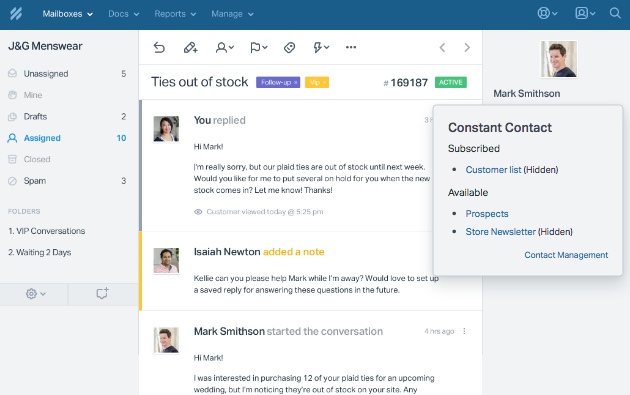
[Constant Contact](https://www.constantcontact.com/) is a tool for businesses to manage their email newsletter and customer marketing. Their suite of products not only includes email marketing, but also event registration, surveys and promotions. The Help Scout app instantly connects your customer to their Constant Contact profile. You can see the lists they are subscribed to and have one-click access to the Contact Management screen in Constant Contact. Here's a snapshot of what it looks like in Help Scout:
### Activation instructions
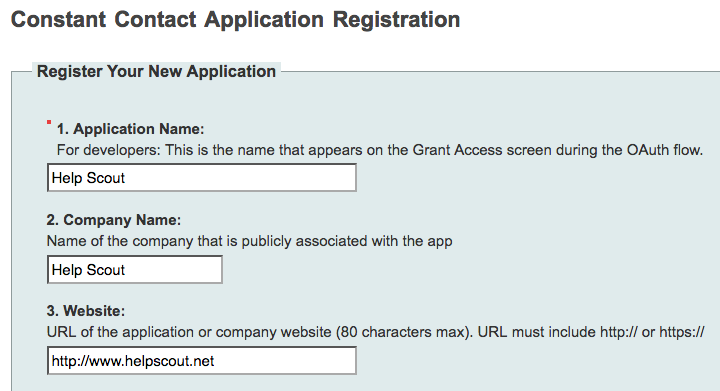
[Register your application](https://constantcontact.mashery.com/apps/register) (Help Scout) with Constant Contact. Fill out the form will the following values:
- **Application Name:** Help Scout
- **Company Name:** Help Scout
- **Redirect URI for OAuth calls**: [http://www.helpscout.net](http://www.helpscout.net)
 *Register Application* 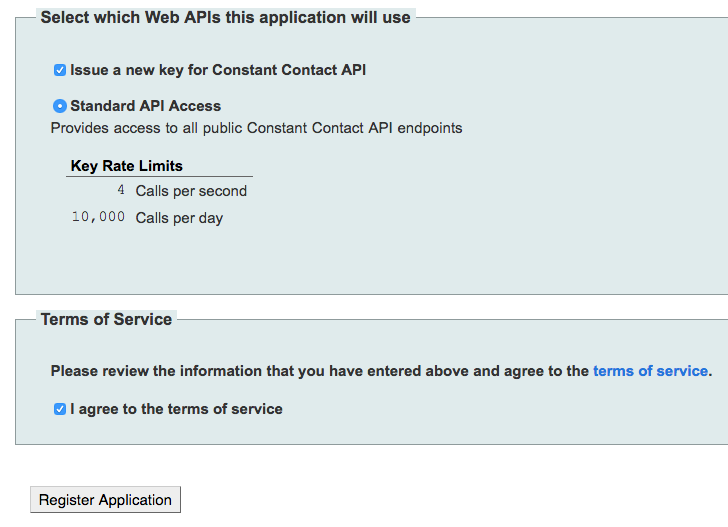 **Key** *Get Access Token*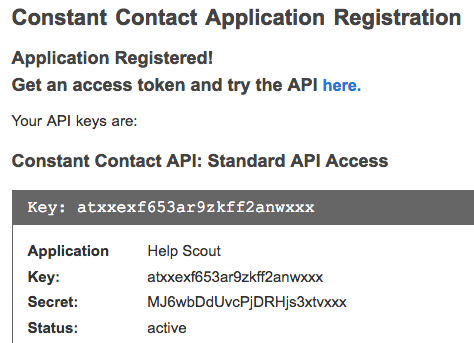
After clicking the *Get Access Token* button, you'll be redirected to a Constant Contact login/registration page. You can either sign in to your existing account, or if you don't have an account, you can create one from that page. After you're logged in, click on the *Generate Access Token* link. 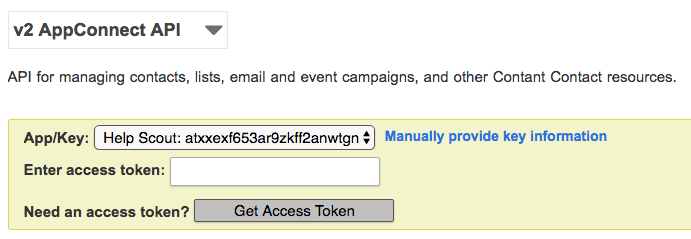
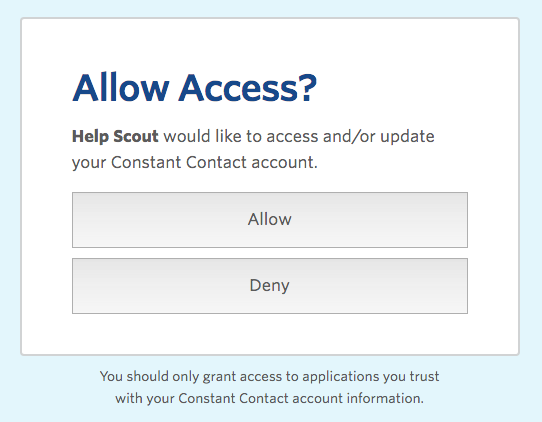
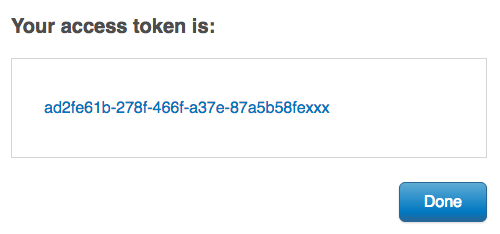
On the next page, you'll be prompted to grant access to Help Scout. Click the *Allow* button! You'll be redirected once more to a page containing your new access token. Copy your token and head over to Help Scout.
From Help Scout, [install the Constant Contact](https://secure.helpscout.net/apps/constant-contact/) app to wrap up. Paste your API key (referenced in the first step) and your access token in to the corresponding fields. Select which mailboxes you'd like to connect, then hit the *Save* button. 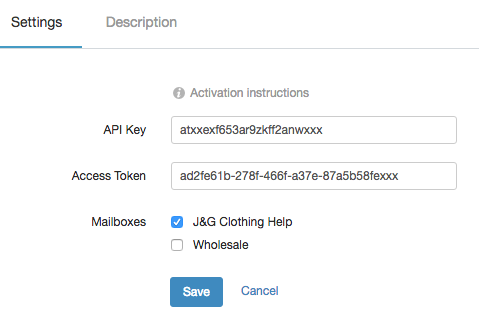
Did this answer your question? Thanks for the feedback There was a problem submitting your feedback. Please try again later.Yes No No results found
- [Docs](https://hsdemo.frodx.com/en/knowledge/docs#main-content)
- [Working with Docs](https://hsdemo.frodx.com/en/knowledge/docs#working-with-docs)
- [Formatting Content](https://hsdemo.frodx.com/en/knowledge/docs#formatting-content)
- [Managing Docs in Help Scout](https://hsdemo.frodx.com/en/knowledge/docs#managing-docs-in-help-scout)
- [Help Desk](https://hsdemo.frodx.com/en/knowledge/help-desk#main-content)
- [Mobile Apps](https://hsdemo.frodx.com/en/knowledge/help-desk#mobile-apps)
- [Getting Started](https://hsdemo.frodx.com/en/knowledge/help-desk#getting-started)
- [Productivity](https://hsdemo.frodx.com/en/knowledge/help-desk#productivity)
- [Mailbox and User Settings](https://hsdemo.frodx.com/en/knowledge/help-desk#mailbox-and-user-settings)
- [Working with Conversations](https://hsdemo.frodx.com/en/knowledge/help-desk#working-with-conversations)
- [Account Management](https://hsdemo.frodx.com/en/knowledge/help-desk#account-management)
- [Integrations](https://hsdemo.frodx.com/en/knowledge/help-desk#integrations)
- [Copying Email to Help Scout](https://hsdemo.frodx.com/en/knowledge/help-desk#copying-email-to-help-scout)
- [Reporting](https://hsdemo.frodx.com/en/knowledge/help-desk#reporting)
- [Sample Contact Page](https://hsdemo.frodx.com/sample-contact)
- [Sample About Page](https://hsdemo.frodx.com/sample-about)
- [Default HubSpot Blog](https://hsdemo.frodx.com/biglytics-blog)
[.png?width=550&height=171&name=frodx-logo-new%20(1).png "FrodX")](https://en.frodx.com/)
[mailto:email@email.com](mailto:email@email.com)
Copyright © 2026, GateHub Ltd