---
title: Trello Power-Up
description: The Help Scout Power-Up shows up-to-date information about conversations attached to a card. Linking relevant conversations to Trello cards is a great way to keep track of feature requests, bug repor
---
[Skip to content](https://hsdemo.frodx.com/en/knowledge/trello-power-up#main-content)
English
Show submenu for translations
.png?width=550&height=171&name=frodx-logo-new%20(1).png)
- [Sample Contact Page](https://hsdemo.frodx.com/sample-contact)
- [Sample About Page](https://hsdemo.frodx.com/sample-about)
- [Default HubSpot Blog](https://hsdemo.frodx.com/biglytics-blog)
Open main navigation
Close main navigation
- [Sample Contact Page](https://hsdemo.frodx.com/sample-contact)
- [Sample About Page](https://hsdemo.frodx.com/sample-about)
- [Default HubSpot Blog](https://hsdemo.frodx.com/biglytics-blog)
- English
Show submenu for translations
- Contact us
Contact us
How can we help you?
- There are no suggestions because the search field is empty.
1. [Help Center](https://hsdemo.frodx.com/en/knowledge)
2. [Help Desk](https://hsdemo.frodx.com/en/knowledge/help-desk)
3. [Integrations](https://hsdemo.frodx.com/en/knowledge/help-desk#integrations)
# Trello Power-Up
The [Help Scout](http://www.helpscout.net/) Power-Up shows up-to-date information about conversations attached to a card. Linking relevant conversations to Trello cards is a great way to keep track of feature requests, bug reports, or other discussions that might be related to cards you're working on.
### Activation Instructions
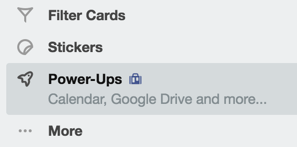
Log in to Trello, open the board you want to use the power-up with, then open the board menu on the right-hand side of the page. Click on the **Power-Ups** option.
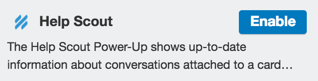
Scroll down and locate the Help Scout power-up. Click on the blue **Enable** button.
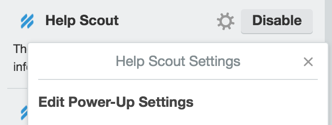
Click the cog icon, then click **Edit Power-Up Settings**.
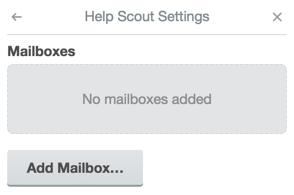
You'll need to link Help Scout mailboxes to the Trello board you're working in. Click the **Add Mailbox** button.
Click the **Link Your Help Scout Account** button to authorize Trello.

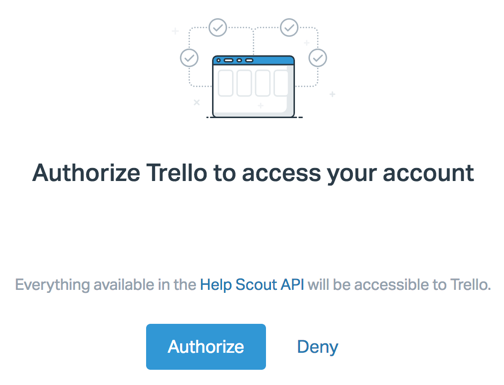
A new window will pop-up, asking you to confirm API access. Click the **Authorize** button.
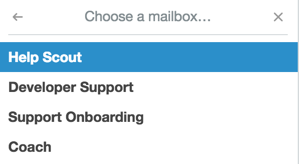
Head back to the integration settings menu to select a mailbox. Once you've linked a mailbox, set up is finished.
### Power-Up Options
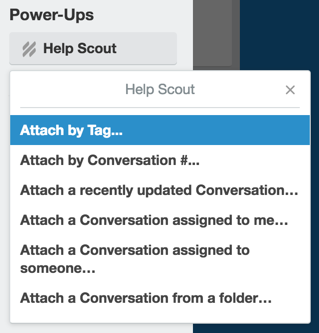
You can attach conversations by tag, conversation number, or via the other assignee routes available in the drop down menu. Open a Trello card, then click on the **Help Scout** button under the Power-Ups section to get started.
Did this answer your question? Thanks for the feedback There was a problem submitting your feedback. Please try again later.Yes No No results found
- [Docs](https://hsdemo.frodx.com/en/knowledge/docs#main-content)
- [Working with Docs](https://hsdemo.frodx.com/en/knowledge/docs#working-with-docs)
- [Formatting Content](https://hsdemo.frodx.com/en/knowledge/docs#formatting-content)
- [Managing Docs in Help Scout](https://hsdemo.frodx.com/en/knowledge/docs#managing-docs-in-help-scout)
- [Help Desk](https://hsdemo.frodx.com/en/knowledge/help-desk#main-content)
- [Mobile Apps](https://hsdemo.frodx.com/en/knowledge/help-desk#mobile-apps)
- [Getting Started](https://hsdemo.frodx.com/en/knowledge/help-desk#getting-started)
- [Productivity](https://hsdemo.frodx.com/en/knowledge/help-desk#productivity)
- [Mailbox and User Settings](https://hsdemo.frodx.com/en/knowledge/help-desk#mailbox-and-user-settings)
- [Working with Conversations](https://hsdemo.frodx.com/en/knowledge/help-desk#working-with-conversations)
- [Account Management](https://hsdemo.frodx.com/en/knowledge/help-desk#account-management)
- [Integrations](https://hsdemo.frodx.com/en/knowledge/help-desk#integrations)
- [Copying Email to Help Scout](https://hsdemo.frodx.com/en/knowledge/help-desk#copying-email-to-help-scout)
- [Reporting](https://hsdemo.frodx.com/en/knowledge/help-desk#reporting)
- [Sample Contact Page](https://hsdemo.frodx.com/sample-contact)
- [Sample About Page](https://hsdemo.frodx.com/sample-about)
- [Default HubSpot Blog](https://hsdemo.frodx.com/biglytics-blog)
[.png?width=550&height=171&name=frodx-logo-new%20(1).png "FrodX")](https://en.frodx.com/)
[mailto:email@email.com](mailto:email@email.com)
Copyright © 2026, GateHub Ltd