.png?width=550&height=171&name=frodx-logo-new%20(1).png)
Help Scout variables are placeholders for generated customer, User, mailbox, and conversation data. Variables are defined using specific text between curly brackets and % signs. Each type of variable has its own set of properties and locations in Help Scout where it can be used.
In this article
Variable Usage
When editing saved replies, workflow emails, the mailbox signature, or your auto-reply, you'll find a dropdown list of valid variables in the top-right corner of the editor. To insert a variable, just open the menu and pick one from the list.
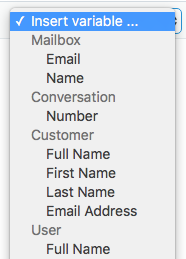
For example, say that you want to automatically insert the customer's first name in a saved reply. Using the {%customer.firstName%} variable will automatically populate the customer's first name when the reply is sent; that way, you don't have to type it out manually when the editor is open. Remember to place all variables between a curly bracket and a % sign.
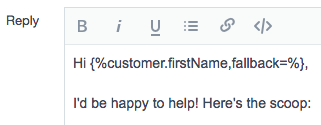
Variable Fallback Attribute
Use the fallback attribute with variables that might not find a match in every use case. For example, some customer profiles do not contain a first and/or last name, only an email address. The text you want to automatically populate when the variable text isn't available will go into your after fallback=. A variable with a fallback looks like this: {%customer.firstName,fallback=there%}
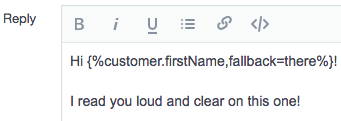
In our example above, if the customer has a first name populated on their profile, let's say "John" in this case, the variable output would read: Hi John! If no first name was present, the variable output would read: Hi there!
Common Use Cases
Here are a few common scenarios where variables are super handy:
- Automatically adding the responding User name and job title to the mailbox signature.
- Using the customer's first or full name in the auto-reply greeting.
- Reference a specific conversation number in a follow-up workflow.
- Add the mailbox email address to the signature alongside other options to get help.
Variable List and Uses
Certain variables can only be used in certain areas of Help Scout. Follow the tables below to see where specific variables can be used.
Tables can't be imported directly. Please insert an image of your table which can be found here.
UserTables can't be imported directly. Please insert an image of your table which can be found here.
CustomerTables can't be imported directly. Please insert an image of your table which can be found here.
ConversationTables can't be imported directly. Please insert an image of your table which can be found here.
MailboxTables can't be imported directly. Please insert an image of your table which can be found here.
RatingsNote: The Custom From Name in Mailbox settings can accept the following variables: mailbox.name, user.fullName, user.firstName, and/or user.lastName. The field does not contain a dropdown to select the variable, but you can manually enter them there.
Did this answer your question? Thanks for the feedback There was a problem submitting your feedback. Please try again later.Yes No No results found